

- APEDA registration is now a 100% online process — every step from application to certificate download happens on the DGFT digital platform, with no physical office visit needed.
- You must have a valid Import Export Code (IEC) and link it to your DGFT login using e-Sign or a Digital Signature Certificate before you can apply.
- The online application is filed under Services > e-RCMC on the DGFT portal, where you select APEDA as your registering authority and your scheduled product category.
- Total cost for online registration is ₹5,900 (inclusive of GST), paid directly through the portal's integrated payment gateway, and the certificate is valid for 5 years.
How Do You Apply for APEDA Registration Online?
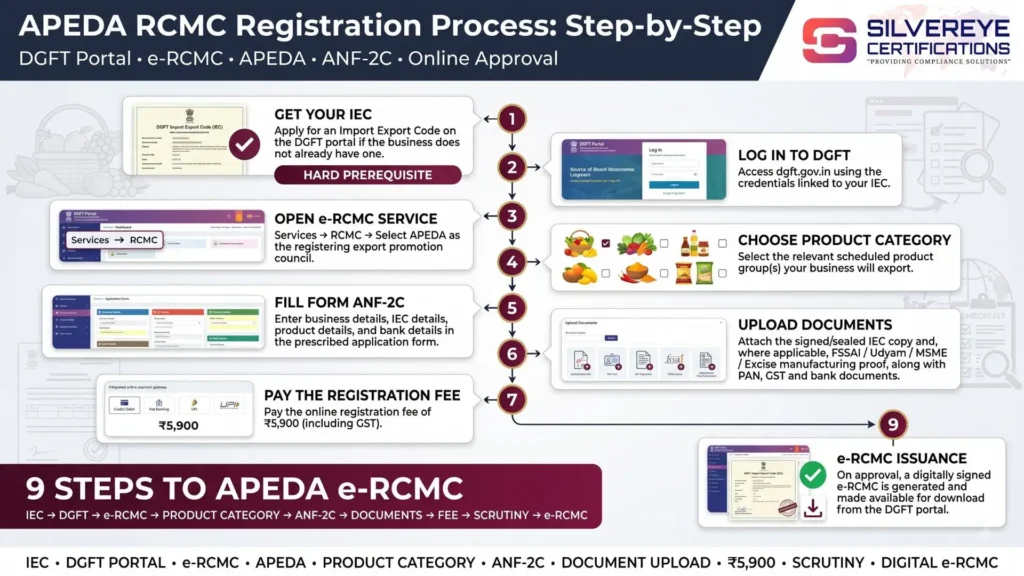
You apply for APEDA registration online through the DGFT portal, not through a separate APEDA website. After logging in and linking your Import Export Code (IEC) using e-Sign or a Digital Signature Certificate, go to Services > e-RCMC > Apply for e-RCMC, choose APEDA as the registering authority, select your scheduled product category, upload your documents, and pay the ₹5,900 registration fee online.

This single-window system has been the exclusive route for APEDA registration since July 2023 and remains the standard, fully digital process through 2026 — there is no offline or in-person filing option anymore.
If you're applying for the first time and want to avoid a rejected or stalled application, Silvereye Certifications can walk you through the entire online filing process end-to-end.
Is APEDA Registration Completely Online Now?
Yes. In compliance with DGFT Trade Notice 35/2021-22 dated 24 February 2022, APEDA moved its Registration-Cum-Membership Certificate (RCMC) issuance onto the DGFT Common Digital Platform with effect from 17 July 2023. Before this, exporters dealt with a separate APEDA-specific registration workflow.
Today, APEDA registration, renewal, and amendment are all filed as "e-RCMC" through the same portal exporters already use for their IEC — making it a true single-window digital experience rather than two disconnected systems.
Who Can Register for APEDA Online?
Any Indian business exporting a product listed under APEDA's First Schedule can complete registration online, including:
- Sole proprietors and individual exporters
- Partnership firms and LLPs
- Private and public limited companies
- Merchant exporters and trading houses
- Manufacturer-exporters and food processors
- Farmer producer organizations (FPOs)
- New-age D2C and home-based export brands
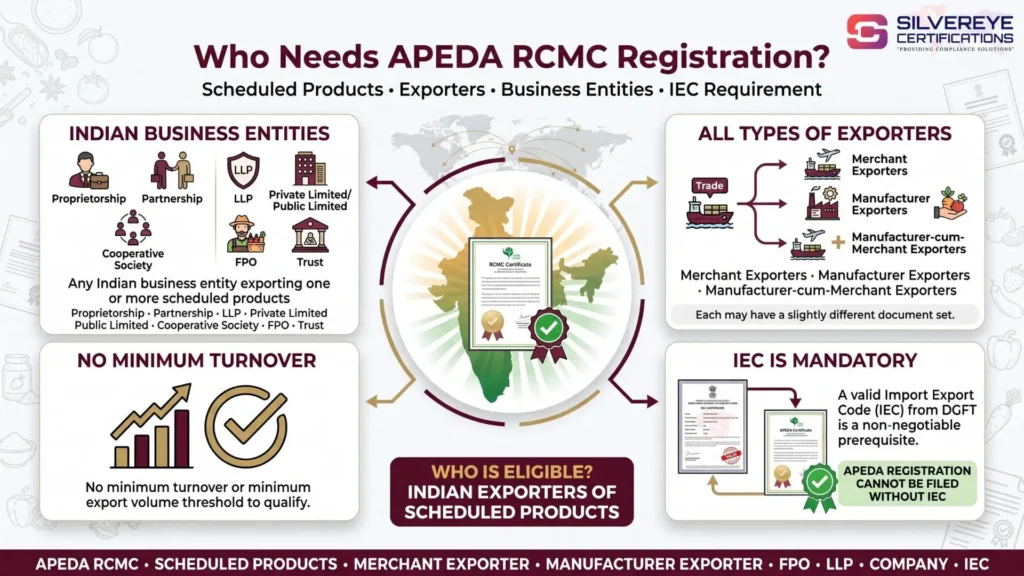
There's no separate offline category or manual exception — the online system is now the only channel available, regardless of business size.
Before You Start: What You Need Ready
1. A Valid Import Export Code (IEC)
You cannot begin an APEDA e-RCMC application without an active IEC from DGFT. If you don't have one, apply for it first on the same portal — it usually takes a few working days.
2. IEC Linked to Your DGFT Login via e-Sign or DSC
Your IEC needs to be electronically linked to your DGFT account using either Aadhaar-based e-Sign or a registered Digital Signature Certificate (DSC). This is what allows the system to digitally authenticate and sign your application — it replaces the old requirement of physically signing and stamping paper forms.
3. Scanned Documents Ready for Upload
Keep digital copies of your PAN, GST certificate, bank certificate or cancelled cheque, latest two months' bank statement, incorporation/partnership proof, and FSSAI license (for food product exporters) ready in the accepted file format before you start — this keeps the online session from timing out midway.
Step-by-Step: How to Apply for APEDA Registration Online
- Go to the DGFT portal and click Login in the top-right corner.
- Enter your username, password and CAPTCHA code to access your exporter dashboard.
- If your IEC isn't linked yet, link it using e-Sign or your Digital Signature Certificate (DSC) from the dashboard — this step is mandatory before proceeding.
- Navigate to Services > e-RCMC > Apply for e-RCMC.
- Choose Start Fresh Application, or select Proceed with Existing Application if you already have a saved draft.
- Your firm's details will auto-populate from your IEC profile (as per ANF-1). Review these carefully for accuracy.
- Confirm the profile-update declaration when prompted, then click Save & Next.
- Under RCMC Details, select APEDA as your registering authority and pick the correct scheduled product category for what you actually export.
- Enter your export product details along with the relevant ITC(HS) codes.
- Add the authorised representative or contact person who will be responsible for the application.
- Move to the Attachments section and upload every required document in the specified format.
- Proceed to payment and pay the ₹5,900 registration fee through the portal's integrated gateway.
- Review the complete application summary, then digitally sign it using e-Sign or DSC to submit.
- Note your application reference number to track status until APEDA approves and issues the RCMC.
Save your application as a draft at any point if you need to gather a missing document — the portal lets you resume an incomplete e-RCMC filing instead of starting over.
Online Payment Methods for APEDA Registration
Once your application is complete, payment is processed directly within the DGFT portal. Accepted modes include:
• Credit card
• Debit card
• Net banking
• Demand draft in favour of "APEDA," payable at your city (for cases where online payment isn't used)
The total online registration fee is ₹5,900 — a base fee of ₹5,000 plus 18% GST (₹900). The same fee structure applies when you renew your RCMC online after five years.
How to Track Your APEDA Online Application Status
After submission, you can track your e-RCMC application status in real time by logging into the DGFT portal and entering your IEC along with the application number. The dashboard will show whether your application is under review, whether APEDA has raised a deficiency memo requiring correction, or whether it has been approved.
This real-time visibility is one of the clearest upgrades the online system brought over the earlier manual process, where applicants had far less insight into where their file stood.
Downloading and Verifying Your RCMC Certificate Online
Once APEDA approves your application, you'll receive login details at your registered email, and the RCMC certificate becomes available for download directly from your DGFT/APEDA dashboard — typically under a "View RCMC Certificate" option.
There's no physical certificate mailed to you; the digital copy issued through the portal is the valid, official version you should use for customs, banking, and buyer documentation.
Renewing Your APEDA RCMC Online
Your RCMC is valid for five financial years. Renewal follows almost the same online workflow as fresh registration:
- Log in to the DGFT portal and confirm your IEC is still linked.
- Go to Services > e-RCMC > Apply for Renewal of RCMC.
- Select your existing RCMC number and click Renew.
- Review your auto-populated firm details and update anything that's changed.
- Re-confirm your product categories, HS codes, and authorised representative details.
- Pay the ₹5,900 renewal fee online and digitally sign the renewal application.
Start your renewal at least 60 days before your RCMC's expiry date. A lapsed certificate can interrupt eligibility for Foreign Trade Policy benefits until it's reinstated, and the online system does not auto-renew on your behalf.
Amending Your APEDA RCMC Online
If any registered detail changes — branch address, bank account, product category, or authorized signatory — you can file an amendment directly through the same DGFT dashboard once your RCMC is active.
Unlike fresh registration and renewal, amendment carries no government fee, and it's processed as a straightforward online update rather than a fresh application.
APEDA Online Registration Fees and Validity at a Glance
| Particular | Details |
|---|---|
| Online Registration Fee | ₹5,900 (₹5,000 base fee + 18% GST of ₹900) |
| Online Renewal Fee | ₹5,900, same as fresh registration |
| Amendment Fee | Nil — free once RCMC is issued |
| Certificate Validity | 5 financial years from date of issue |
| Application Channel | DGFT portal only (Services > e-RCMC) |
| Payment Modes | Credit card, debit card, net banking, or demand draft |
Why the Online e-RCMC System Is an Upgrade for Exporters
• No physical office visits or courier of paper documents required at any stage
• Single login covers IEC and RCMC together, cutting duplicate data entry
• Real-time application tracking replaces the earlier guesswork on pending status
• Faster turnaround when documents are accurate and uploaded correctly the first time
• Digital certificate download means instant access once approved, with no waiting on postal delivery
• Amendments can be filed the moment something changes, instead of waiting for a renewal cycle
What's New for APEDA Registration Online in 2026?
The biggest practical shift for 2026 is that the DGFT e-RCMC system — introduced in July 2023 — has now fully matured into the only way to register, renew or amend an APEDA RCMC. APEDA's own registration and procedure circulars have been republished through April and June 2026, reconfirming the same online-only workflow, document list, and fee structure, with no parallel offline route left running. For exporters, this means:
• e-Sign or DSC-based IEC linking is now a firm prerequisite, not an optional shortcut, before any e-RCMC application can be started
• The application, document upload, payment, tracking, and certificate download all sit inside one continuous DGFT session rather than separate systems
• Renewal and amendment use the identical digital workflow as fresh registration, keeping the learning curve low for exporters who already filed once
• APEDA continues to expand its outreach and organic-market promotion work (including recent efforts branding organic produce from regions like Ladakh) alongside this online registration system, reflecting an active, ongoing agency rather than a static registry
The base government fee of ₹5,900 has not changed as part of this update. Because government portals can revise minor procedural steps without wide notice, always confirm the live workflow and fee on the DGFT e-RCMC page immediately before filing.
Common Problems Exporters Face While Applying Online
• IEC not linked via e-Sign/DSC, which blocks the e-RCMC application from even starting
• Session timeout while gathering documents mid-application — always keep files ready beforehand
• Name or address mismatches between IEC, PAN, GST and bank records, triggering a deficiency memo
• Selecting the wrong product category, which misaligns the RCMC with what you actually export
• Payment failures not reflecting immediately — wait and check application status before repaying
• Missing the FSSAI license upload for processed food product categories
How Long Does the Online Process Take?
When your IEC is already linked and your documents are accurate on the first attempt, APEDA typically processes e-RCMC applications within a few working days to about two weeks. Any deficiency memo adds time, since you'll need to log back in, correct the flagged issue, and resubmit — which is why getting the online form right the first time matters more than speed of filing.
Make Your APEDA Online Registration Smooth From the Start
The move to a fully online, DGFT-integrated e-RCMC system has genuinely simplified APEDA registration — but "online" doesn't mean "error-proof." Most delays still come down to an unlinked IEC, mismatched documents, or the wrong product category being selected on the form. Getting these right before you even log in saves you from deficiency memos and repeated resubmissions.
If you'd rather have someone experienced handle the online filing, document verification, and status tracking on your behalf, Silvereye Certifications supports exporters through the complete APEDA registration online journey — from IEC linking and document preparation to e-RCMC submission, renewal, and amendment. Whether you're registering for the first time or renewing an existing certificate, Silvereye Certifications can help you get it right on the first attempt.
Frequently Asked questions
Where do I apply for APEDA registration online?
You apply on the DGFT portal, under Services > e-RCMC. There is no separate standalone APEDA website for new online applications — everything routes through DGFT.
Do I need a Digital Signature Certificate for APEDA registration online?
You need either a DSC or Aadhaar-based e-Sign to link your IEC to your DGFT login and to digitally sign your e-RCMC application. Without this linking step, you cannot proceed.
Can I complete the entire APEDA registration process without visiting any office?
Yes. Application, document upload, fee payment, status tracking, and certificate download are all handled online through the DGFT portal — no physical visit is required.
What is the online registration fee for APEDA?
The fee is ₹5,900, made up of a ₹5,000 base fee plus 18% GST (₹900), payable through the portal's online payment gateway.
How do I know if my APEDA online application has been approved?
Log in to the DGFT portal and check your application status using your IEC and application number. You'll also receive login details and updates at your registered email once approved.
Can I save an incomplete APEDA application and finish it later?
Yes. The portal allows you to save your application as a draft and resume it later using the Proceed with Existing Application option, so you don't have to start over if you're missing a document.
Is the RCMC certificate available for download, or is it posted physically?
It's available for download directly from your DGFT/APEDA dashboard once approved. No physical certificate is mailed — the digital version from the portal is the valid one to use.
Can I renew my APEDA RCMC entirely online?
Yes. Renewal is filed through the same DGFT e-RCMC platform, using the same ₹5,900 fee structure, roughly 60 days before your current 5-year certificate expires.
Is there a fee for making changes to my RCMC after it's issued?
No. Amendments to details like address, bank account, or product category can be filed online free of charge once your RCMC is active.
What's the most common reason online applications get delayed?
Mismatched details across PAN, GST, IEC and bank documents, along with an unlinked IEC (no e-Sign/DSC), are the two most frequent causes of deficiency memos and delays.
Do I need an IEC before I can register for APEDA online?
Yes. A valid, active Import Export Code from DGFT is mandatory before you can even open the e-RCMC application form.
Can a first-time exporter with no export history register online?
Yes. New exporters can register online the same way as established ones — there's no export turnover or history requirement to be eligible for APEDA registration.