
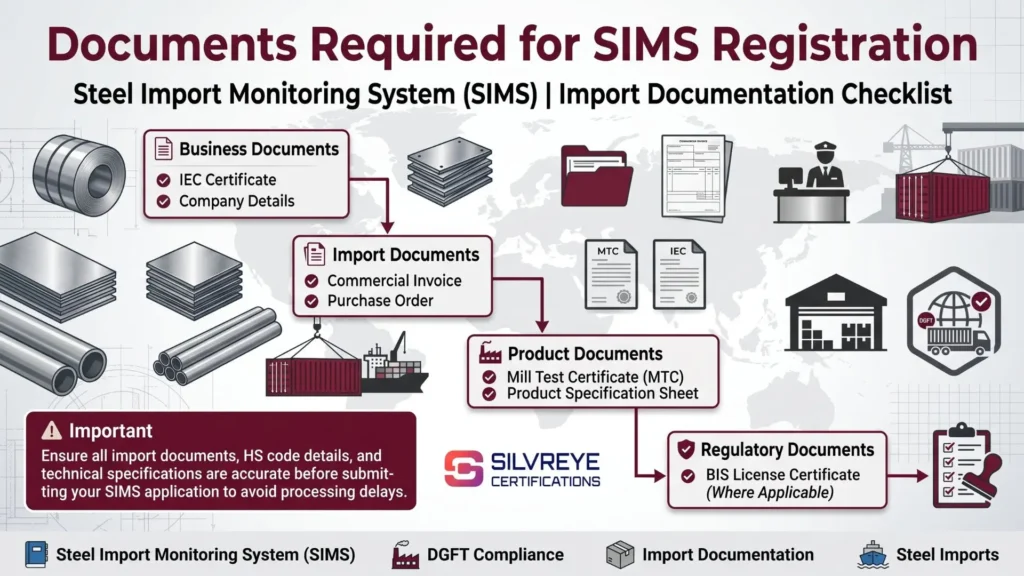
- Three categories of supporting documents: Organise your records into business KYC documents (IEC, GST, PAN and incorporation details), shipment documents (invoice, packing list, Bill of Lading and Mill Test Certificate) and product compliance records (BIS license, Certificate of Origin and PSIC for specified seconds or defective steel imports, where applicable).
- Document consistency is essential: SIMS allows only one seller and one manufacturer per application. Ensure that business names, addresses, product descriptions, steel grades and shipment details match the relevant supporting records. Incorrect or inconsistent information can lead to clarification requirements or problems during verification.
- Digital signature requirement: A registered Digital Signature Certificate (DSC) is listed as a prerequisite for the SIMS application process. Complete DSC registration through the prescribed DGFT portal option before submitting your application. Do not assume Aadhaar-based OTP is an alternative unless the current portal instructions explicitly permit it.
- Accurate information matters more than the number of fields: SIMS 2.0 provides a structured online application process, but importers must still enter accurate and verifiable information. Keep supporting records available to check the importer, seller, manufacturer, HS code, technical specifications, quantity and CIF value before final submission.
Introduction
The documents required for SIMS registration can be organized into three main groups: business KYC records (IEC, GST certificate, PAN and incorporation proof), shipment and product records (commercial invoice, packing list, Bill of Lading and Mill Test Certificate), and compliance documents (BIS license and IS Code details where applicable, Certificate of Origin, and PSIC for specified seconds or defective steel imports).
A registered Digital Signature Certificate (DSC) is also a prerequisite for SIMS 2.0 registration. Do not assume that Aadhaar-based OTP authentication can be used as an alternative unless the current portal instructions expressly permit it.

Before submitting the application, cross-check the importer, seller, manufacturer, product description, HS code, grade, quantity and shipment details against the supporting records. Consistent and accurate information helps reduce discrepancies and verification issues. Since a submitted SIMS application cannot be amended or cancelled, review all details carefully before final submission.
Why the Right Documents Matter for SIMS Registration
SIMS registration is a data-driven process. The Ministry of Steel uses the information submitted by importers to monitor steel imports into India. Each detail entered in the application must be supported by accurate business, shipment and product information.
For example, your IEC identifies the importer, the commercial invoice provides transaction details, and the Mill Test Certificate (MTC) supports the declared steel grade and technical specifications. A valid BIS license or other applicable compliance document may also be needed when the imported product is covered by a Quality Control Order (QCO).
Accuracy is particularly important because a submitted SIMS application cannot be amended or cancelled. If you enter incorrect information, you may need to make a fresh registration rather than edit the submitted application. Keep the relevant records ready and cross-check the importer, seller, manufacturer, product description, HS code, quantity and shipment details before submission.
Complete Documents Required for SIMS Registration
The following is a practical checklist. It distinguishes the basic SIMS requirements from supporting documents that may be useful or required under other applicable import and product-compliance rules.
| Category | Documents and Details to Keep Ready |
|---|---|
| Basic registration requirements | Valid Importer Exporter Code (IEC) and a registered Digital Signature Certificate (DSC) |
| Business and KYC records | GST registration certificate, PAN details, Certificate of Incorporation, partnership deed or other applicable business constitution documents |
| Shipment and transaction records | Commercial invoice, packing list, Bill of Lading or Airway Bill, and expected shipment or arrival details |
| Product and technical information | Accurate product description, applicable 8-digit ITC (HS) code, grade, dimensions, quantity and Mill Test Certificate (MTC) |
| Seller and manufacturer details | Name and address of the overseas seller and manufacturer, along with contact details and website information where available |
| Quality and compliance records | BIS licence and relevant IS code details, where applicable under a QCO |
| Special-case documents | Pre-Shipment Inspection Certificate (PSIC) or other documents where required under the applicable import policy or product-specific conditions |
| Additional supporting records | Certificate of Origin, end-use declaration or agent authorisation, where required for the particular transaction or related customs process |
Important: The Ministry of Steel's SIMS 2.0 FAQ identifies supporting information such as the invoice, Bill of Lading, Mill Test Certificate, Consignment ID, BIS license and IS Code, where applicable. GST, PAN, incorporation documents, packing lists and other records may help verify business or shipment information, but should not automatically be treated as mandatory SIMS portal uploads in every case.
Document-by-Document Breakdown: What Each One Is and Why You Need It
1. Importer Exporter Code (IEC)
The Importer Exporter Code (IEC) is a 10-character code issued by the Directorate General of Foreign Trade (DGFT). It is a basic requirement for importers applying for SIMS registration.
Your IEC identifies the importing entity and is used during the prescribed importer registration process on the SIMS 2.0 portal. Make sure the IEC is valid and that the importer details associated with it are accurate before starting the application.
2. GST Registration Certificate
Keep your GST registration details available to cross-check the business name and address used in your import and tax records. Consistency between your GST details, IEC and commercial documents can help avoid unnecessary verification issues.
GST registration should not be confused with the basic SIMS registration prerequisite: the valid IEC.
3. Company PAN Card and Incorporation Proof
Keep your PAN details and business constitution documents ready, such as a Certificate of Incorporation, partnership deed or other applicable registration proof.
These records can help establish the legal identity and constitution of the importing business. However, do not assume that every applicant must upload all these documents as separate SIMS attachments. Follow the fields and document requirements displayed on the current portal.
4. Digital Signature Certificate (DSC)
A registered Digital Signature Certificate (DSC) is listed as a prerequisite for SIMS 2.0 registration. Ensure that the DSC is valid, accessible and registered through the prescribed portal process before beginning the application.
Do not assume that Aadhaar-based OTP authentication can replace the DSC unless the current SIMS portal instructions expressly provide that option.
5. Commercial Invoice
The commercial invoice records the transaction between the buyer and seller. Keep it ready to verify details such as:
- Product description and specifications
- Quantity and unit of measurement
- Unit price and total invoice value
- Seller and buyer details
- Other relevant transaction information
The product and shipment information entered in SIMS should be consistent with the supporting transaction records. A proforma invoice may help during preliminary preparation, but use the final transaction and shipment documents as they become available and follow the portal's requirements.
6. Packing List
The packing list provides a breakdown of the goods being shipped, including package-wise quantities, weights and other packing details.
It is useful for checking whether the declared product quantity and shipment information match the documents provided by the supplier. Keep it available for shipment verification and customs documentation, even where it is not specifically required as a SIMS upload.
7. Bill of Lading or Airway Bill
A Bill of Lading (for sea shipments) or Airway Bill (for air shipments) provides transport details for the consignment. These may include the carrier, port or airport details, shipment date and other transportation information.
The Ministry of Steel's SIMS FAQ identifies the Bill of Lading as supporting information. Keep the available transport document and expected arrival details ready so that the shipment information entered in the application is accurate.
8. Mill Test Certificate (MTC)
The Mill Test Certificate (MTC) is issued by the steel manufacturer and provides technical information about the material, such as its chemical composition and mechanical properties.
It helps support the declared steel grade and product specifications. This is particularly relevant for products where composition, grade or technical characteristics affect classification and applicable quality requirements.
Check that the MTC relates to the actual material being imported and that its grade and specifications are consistent with the invoice and product description.
9. Product Specification Sheet
A product specification sheet or technical datasheet provides additional information about the imported steel, such as:
- Grade and material type
- Thickness, width and length
- Coating or surface finish
- Applicable technical standards
- Other product-specific characteristics
This information can help you verify the correct 8-digit ITC (HS) code and ensure that the product description is not too broad or inconsistent with the technical records.
10. Seller and Manufacturer Details
Keep the overseas seller's and manufacturer's details ready, including their names, addresses and other contact information requested by the portal.
Check that these details match the commercial invoice and other transaction records. If the seller and manufacturer are different entities, enter their details in the appropriate fields rather than treating them as the same party.
11. BIS License and IS Code Details (Where Applicable)
If the imported steel product is covered by an applicable BIS Quality Control Order (QCO), check the relevant compliance requirements before importing it.
Keep the applicable BIS license details and Indian Standard (IS) code ready where required. QCO coverage and exemptions can vary by product and may change through government notifications. Therefore, verify the latest position for the exact product, grade and applicable notification instead of assuming that every steel import requires a BIS license.
SIMS registration and BIS compliance are separate requirements. A SIMS registration number does not replace a BIS licence or an applicable QCO exemption.
12. Certificate of Origin
A Certificate of Origin (CoO) identifies the country in which the goods were produced or manufactured under the applicable origin rules.
It may be relevant for customs assessment, preferential tariff claims, trade-policy checks or country-specific import measures. Keep it ready where required for your shipment, but do not treat it as a universal SIMS document requirement.
13. End-Use Declaration
An end-use declaration explains the intended use of the imported steel, such as manufacturing, processing or another specified purpose.
It may be required under a particular exemption, import-policy condition or other applicable procedure. Check the relevant notification or authority's instructions before preparing it; it is not a standard mandatory document for every regular SIMS application.
14. Pre-Shipment Inspection Certificate (PSIC) — Where Applicable
A Pre-Shipment Inspection Certificate (PSIC) may be required for specified imports of seconds, defective or other non-prime steel products, depending on the applicable ITC (HS) policy conditions.
Before importing such material, verify the relevant policy entry and any conditions relating to inspection, valuation, ports or other restrictions. Do not assume that every second-grade or non-prime steel shipment follows the same requirements.
15. Authorization Letter — If an Agent Is Assisting
If a customs broker, consultant or other authorised representative is assisting with the application or related customs formalities, keep the appropriate authorisation available where required by the relevant portal or authority.
The importer remains responsible for the accuracy of the information submitted under its IEC. Assistance from an agent does not transfer the importer's responsibility for the application.
Documents Checklist by SIMS Registration Scenario
The documents and information required can vary depending on the type of registration and the product being imported. Use this table as a practical reference before applying.
| Scenario | Documents and Details to Keep Ready |
|---|---|
| Regular SIMS registration | Valid IEC, registered DSC, product and shipment details, commercial invoice, Bill of Lading and MTC, along with other supporting information required by the portal |
| SARAL SIMS | Valid IEC, registered DSC and declared annual quantity or applicable export-purpose details. Keep shipment records such as invoices and MTCs available for actual imports and related customs requirements |
| Products covered by an active BIS QCO | Applicable BIS licence details and IS Code, or valid exemption documentation where permitted |
| Seconds, defective or non-prime steel | PSIC and supporting documents where required under the applicable import policy, including compliance with relevant valuation and port conditions |
| Application assisted by a customs broker or agent | Appropriate authorisation from the importer, where required by the relevant portal or authority |
Note: SARAL SIMS is a separate registration route for eligible small consignments and specified export-purpose imports under Advance Authorisation, SEZ or EOU arrangements. Do not treat it as an annual version of regular SIMS for every importer. Check the current SARAL eligibility and quantity conditions before applying.
Common Document Mistakes to Avoid
- Mismatched seller or manufacturer details: Differences in names, addresses or other party information across the invoice, supporting records and SIMS application can lead to verification queries. Check the details before submission.
- Outdated IEC or business information: If your business details have changed, verify that the information associated with your IEC and other relevant records is current.
- Missing or incorrect Mill Test Certificate: The MTC supports the declared steel grade and technical specifications. Keep the certificate for the actual material being imported and check that its details match the product description.
- Not checking BIS and QCO applicability: BIS requirements can vary by steel category and applicable government notifications. Verify the current QCO status for the exact product and grade before importing.
- Incomplete seller or manufacturer information: Enter the details requested by the portal accurately. Keep the names and addresses of both parties consistent with the transaction records.
- Incorrect document uploads: Follow the file-format and size requirements displayed on the SIMS portal. Check that uploaded documents are readable and relate to the correct product and shipment.
How to Organize Your Documents Before You Start
- Create a reusable business KYC folder: Keep your IEC, GST certificate, PAN details and incorporation or business constitution documents together for easy reference.
- Request the MTC early: Ask the supplier or manufacturer for the Mill Test Certificate when the order is confirmed. This gives you time to check the grade and technical specifications before filing.
- Cross-check shipment details: Compare the commercial invoice, packing list and Bill of Lading wherever available. Verify the seller, manufacturer, product description, quantity and shipment information.
- Keep your DSC valid: Check that your registered Digital Signature Certificate is active and accessible before starting the application.
- Save your submitted records: Keep copies of the application details, supporting documents, payment confirmation and generated SIMS registration number. Since a submitted application cannot be amended or cancelled, these records will help if a fresh application is required.
SIMS Registration Fees
| Fee Component | Current Fee |
|---|---|
| Registration fee | ₹500 |
| Processing fee | ₹250 |
| Total payable per registration number | ₹750 |
The current regular SIMS fee is ₹750 per unique registration number, comprising a ₹500 registration fee and a ₹250 processing fee. The older fee structure of Re. 1 per ₹1,000 of CIF value, subject to a minimum of ₹500 and maximum of ₹1 lakh, should not be presented as the current fee.
The applicable fee for SARAL SIMS is also ₹750 per registration number. Check the portal for the amount payable when submitting your application.
SIMS Validity and Advance Registration Timeline
- Validity: A regular SIMS registration number is valid for 75 days from the date of issue.
- Renewal: Regular SIMS registration does not have a conventional renewal process. If the registration expires before it is used, check the applicable requirements and obtain a fresh registration where necessary.
- Amendment and cancellation: A submitted SIMS application cannot be amended or cancelled. Verify the details carefully before final submission.
- Advance registration window: Under the Ministry of Steel's notice effective 20 February 2026, the filing window depends on the import category and country of origin. For most countries, registration must be completed between 60 days and 3 days before the expected arrival. For Nepal, Bhutan and Sri Lanka, and certain specified categories, the final deadline is 2 days before expected arrival.
Check the applicable category-specific deadline before filing rather than relying on a single advance-registration window for every shipment.
Who Needs to Prepare These Documents?
- Direct importers: Importers intending to bring goods classified under the applicable HS codes in Chapters 72, 73 and 86 of ITC (HS), 2022 must complete SIMS registration, subject to applicable exemptions and special procedures.
- Customs brokers and agents: A customs broker or authorized representative may assist with the application, but the importer remains responsible for the registration and accuracy of the information submitted under its IEC.
- SEZ and EOU units: Imports or transfers from an SEZ or EOU to the Domestic Tariff Area (DTA) are subject to the applicable SIMS procedure and advance-registration conditions. Check whether regular SIMS or the relevant SARAL route applies to the transaction.
What Happens If SIMS Documents Are Missing or Incorrect?
Incorrect or incomplete information can create problems during registration and subsequent import clearance. Depending on the nature of the discrepancy, possible consequences include:
- Application difficulties: Incorrect details or missing supporting information may lead to verification queries or prevent successful completion of the registration process.
- Fresh registration: Since a submitted application cannot be amended or cancelled, an error may require a new application with corrected information.
- Customs clearance delays: Differences between the SIMS registration, Bill of Entry and shipment documents may lead to additional checks or delays.
- Additional costs: If customs clearance is delayed, the importer may incur demurrage, storage or other shipment-related charges, depending on the circumstances and applicable terms.
- Import-policy consequences: Failure to comply with applicable SIMS or other import-policy requirements may result in action under the relevant provisions. Any penalty or consequence depends on the specific violation and applicable law.
To reduce these risks, verify the HS code, product description, quantity, seller, manufacturer and expected arrival details before submitting the application.
Why Choose Silvereye Certifications for SIMS Registration?
Completing SIMS registration requires accurate product classification, consistent shipment details and compliance with the Ministry of Steel's applicable requirements. Silvereye Certifications helps importers understand the process and prepare their applications with greater clarity.
Here's how we can assist:
- SIMS Registration Guidance: Get step-by-step guidance on the regular SIMS and SARAL SIMS registration processes, based on your import requirements.
- Document Verification Support: Get assistance in reviewing IEC details, invoices, Mill Test Certificates, Bill of Lading and other relevant supporting documents.
- HS Code and Product Information Guidance: Receive support in checking product descriptions, steel grades and applicable HS code details before filing.
- BIS and QCO Compliance Guidance: Understand whether your imported steel product is covered by an applicable Quality Control Order and what BIS-related requirements may apply.
- Application Preparation Support: Get assistance in organising the required information and preparing your application for submission through the official SIMS portal.
- Transparent Professional Support: Understand the applicable registration requirements, government fees and professional service charges before proceeding.
Silvereye Certifications is a compliance consultancy that provides documentation, guidance and application support. SIMS registrations are processed through the official government portal under the Ministry of Steel; Silvereye Certifications does not issue government registration numbers or guarantee approval.
Conclusion
SIMS registration is an important requirement for importers bringing covered steel products into India. Choosing the correct registration route, verifying the applicable HS code, preparing accurate documents and completing the application within the prescribed advance-registration window can help avoid unnecessary compliance issues.
Before importing, check whether regular SIMS or SARAL SIMS applies to your shipment, confirm the latest registration fee and validity conditions, and review any additional BIS, QCO or import-policy requirements relevant to your product.
If you need assistance with document preparation, product-related compliance checks or the SIMS application process, Silvereye Certifications can guide you through the requirements and help you prepare for registration.
Frequently Asked Questions
What is the most important document for SIMS registration?
Your Importer Exporter Code (IEC) is the most critical document — it's both your legal import authorization and your login credential for the SIMS portal. Without it, you cannot start an application.
Do I need a Mill Test Certificate for every SIMS registration?
While not always explicitly mandatory for every product, a Mill Test Certificate is strongly recommended and often requested, since it supports your declared HS code, grade, and technical specifications — especially for stainless, alloy, or coated steel.
Is a Digital Signature Certificate mandatory for SIMS registration?
In most cases, yes. SIMS 2.0 requires digital authentication to sign and submit the application, either through a Digital Signature Certificate (DSC) or Aadhaar-based OTP linked to your IEC.
Do I always need a BIS certificate for SIMS registration?
Only if your specific steel product currently falls under an active BIS Quality Control Order. BIS/QCO applicability varies by product and can change, so always verify the current requirement for your exact product before assuming it applies or doesn't.
Can I use the same documents for multiple SIMS registrations?
Your business KYC documents (IEC, GST certificate, PAN, incorporation proof) can be reused across applications, but shipment-specific documents like the invoice, packing list, and Mill Test Certificate must match each individual consignment.
What documents does SARAL SIMS require compared to regular SIMS?
SARAL SIMS mainly requires your IEC, digital authentication, and a declared annual import quantity for the registration itself. Shipment-level documents like the invoice and Mill Test Certificate are still needed for each actual consignment, but not for the annual SARAL SIMS registration step.
What happens if my seller and manufacturer details don't match across documents?
Mismatches between your invoice, packing list, and SIMS entry are a common cause of application rejection or customs queries later, since SIMS allows only one seller and one manufacturer per application and expects consistent data across all documents.
Do I need a certificate of origin for SIMS registration?
It's required or strongly recommended for many shipments, and it's become more important given active anti-dumping investigations on certain steel categories tied to specific countries of origin.
What extra document do I need for importing seconds or defective steel?
A Pre-Shipment Inspection Certificate (PSIC) confirming the non-prime or defective status of the material is required in addition to the standard SIMS document set, along with compliance with applicable value and port restrictions.
Can I submit documents in any file format on the SIMS portal?
No. The portal specifies accepted file formats and size limits for uploads. Always check the current upload requirements on the SIMS portal before attempting to submit, since an incorrect format can cause the upload to fail.
What if I don't have a proper Mill Test Certificate from my supplier?
Request one from your supplier or mill as early as possible in the order process. Without it, supporting your declared grade and specifications during registration or at customs becomes significantly harder.
Do I need an authorization letter if my customs broker files SIMS on my behalf?
Yes. If someone other than you is filing the application, a signed authorization letter confirming they're acting on your company's behalf is typically required alongside the standard document set.