
- Who needs it: SIMS registration is generally compulsory for importers bringing goods classified under HS Chapters 72, 73 and 86 into India, subject to applicable exemptions and special procedures.
- Government fee: The current regular SIMS registration fee is ₹750 per unique registration number, comprising a ₹500 registration fee and ₹250 processing fee. Payment is made online.
- Validity: A regular SIMS registration number is valid for 75 days from the date of issue. It cannot be renewed, amended or cancelled after submission. A unique registration number is required for each imported item; do not assume one number covers an entire customs entry.
- What to prepare: Keep your valid IEC, registered Digital Signature Certificate (DSC), eight-digit HS code, product specifications, supplier and manufacturer details, quantity, CIF value and expected arrival date ready before submitting the application.
Introduction
Steel Import Monitoring System registration is an advance import declaration that Indian importers must complete for goods covered under HS Chapters 72, 73 and 86, subject to applicable exemptions and special procedures. Importers need a valid Importer Exporter Code (IEC) and a registered Digital Signature Certificate (DSC) to apply through the official portal. The application requires shipment details such as the HS code, product specifications, supplier information, quantity, CIF value and expected arrival date.
The current regular SIMS registration fee is ₹750 per unique registration number, comprising a ₹500 registration fee and ₹250 processing fee. The number is generally generated after successful submission and payment and remains valid for 75 days. It cannot be amended, cancelled or renewed after submission. A unique registration number is required for each imported item, rather than one number for every customs entry.

Regular SIMS applications must be filed between 60 days before the expected arrival date and the applicable cut-off, generally the third day before arrival, with certain categories subject to a second-day cut-off. Eligible small importers and businesses importing steel for specified export purposes may use SARAL SIMS, subject to its eligibility, quantity limits and return-filing conditions.
What Is Steel Import Monitoring System Registration?
The Steel Import Monitoring System (SIMS) is an advance import-monitoring mechanism introduced by the Government of India to collect information about steel imports before the goods arrive in the country. Under SIMS, importers submit details such as the product description, HS code, country of origin, supplier, quantity and CIF value through the online portal.
After successful submission and payment, the importer receives a SIMS registration number, which must be quoted in the applicable Bill of Entry.
Under India's import policy, covered steel products are generally classified as "Free, subject to compulsory registration under SIMS." DGFT introduced the system through Notification No. 17/2015-2020 dated 5 September 2019. Notification No. 33/2015-2020 dated 28 September 2020 extended the registration requirement to all HS codes under Chapters 72, 73 and 86 of ITC (HS).
The Ministry of Steel administers the SIMS portal, now known as SIMS 2.0. Importers can access it at sims.steel.gov.in.
SIMS registration is an advance import declaration, not an import license or product quality certificate. It does not replace customs clearance, BIS certification or other applicable import requirements.
Who Must Complete Steel Import Monitoring System Registration?
Importers bringing goods covered under HS Chapters 72, 73 and 86 into India generally need SIMS registration, subject to applicable exemptions and special procedures.
The importer holding the IEC is responsible for the application. A customs broker or consultant may assist with the filing, but this does not replace the importer's responsibility.
| Applicant or role | Position | Practical note |
|---|---|---|
| Importer holding a valid IEC | Required to apply for covered imports | The application is filed using the importer's IEC |
| Actual user or manufacturing unit | Must ensure registration for its covered imports | Applies when a factory imports steel for its own production |
| Importing agent, trader or broker | May assist with the application | The importer remains the applicant; an intermediary does not replace the IEC holder |
| Advance Authorisation holder | May qualify for SARAL SIMS for eligible export-purpose imports | Subject to the applicable SARAL conditions and route requirements |
Which Goods Are Covered Under SIMS?
SIMS registration applies to goods classified under all HS codes in Chapters 72, 73 and 86 of ITC (HS), 2022, subject to applicable exemptions and special procedures.
| HS Chapter | Broad description | Examples |
|---|---|---|
| 72 | Iron and steel | Hot-rolled and cold-rolled steel products, bars, rods and other iron or steel forms |
| 73 | Articles of iron or steel | Tubes, pipes, fittings and other fabricated steel articles |
| 86 | Railway or tramway locomotives, rolling stock and related equipment | Railway vehicles, track fixtures and associated equipment |
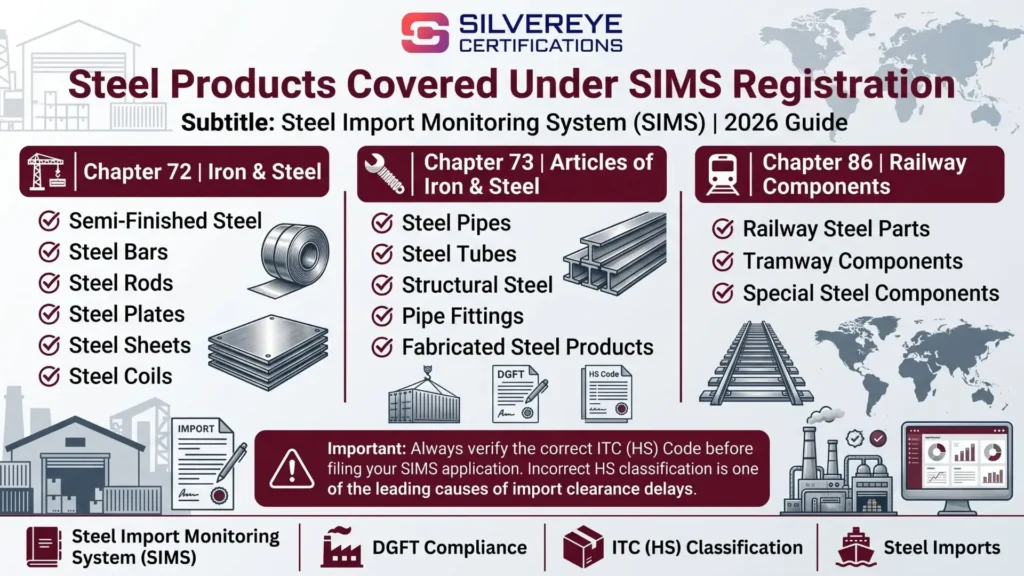
Do not rely on an older fixed count of tariff lines when checking whether a product is covered. Verify the correct eight-digit ITC (HS) code using the current SIMS portal and applicable import policy. The product's classification, rather than its general commercial name, determines whether SIMS applies.
Benefits of Steel Import Monitoring System Registration for Importers
SIMS is a compulsory compliance requirement for covered imports, but completing the application accurately and within the prescribed timeline can also help importers manage their shipments more efficiently.
| Benefit | Why it matters |
|---|---|
| Registration number for the Bill of Entry | Provides the required SIMS reference for the applicable customs declaration |
| Online application process | Importers can submit the required information and pay the fee through the portal |
| Registration number generated after successful submission | Avoids a separate manual approval process for routine registration |
| Multiple registrations through one login | Importers can generate separate unique registration numbers for different imported items |
| Advance import information | Encourages importers to organise product, supplier and shipment details before arrival |
| Better compliance planning | Helps importers track registration validity and applicable filing deadlines |
The current regular SIMS fee is ₹750 per unique registration number, comprising a ₹500 registration fee and a ₹250 processing fee. A registration number does not guarantee customs clearance or exemption from other applicable requirements.
Eligibility and Requirements for Steel Import Registration
Before applying for SIMS registration, check that you have the necessary importer credentials and shipment information.
You should have:
- A valid Importer Exporter Code (IEC): Your IEC must be active and linked to your DGFT portal account.
- A registered Digital Signature Certificate (DSC): Register your DSC through the relevant option under My Dashboards on the DGFT portal.
- The correct eight-digit HS code: Confirm that the product falls under a covered HS code in Chapter 72, 73 or 86.
- Product and technical specifications: Keep the steel grade, product description, applicable IS code and other technical details ready.
- Supplier and manufacturer information: Check the exporter and manufacturer details against your purchase and shipping documents.
- Quantity and CIF value: Use accurate figures from the purchase order or proforma invoice.
- Complete IEC business details: Check that your branch, district and state information is correctly recorded, as some details are populated from the IEC.
Preparing these details before starting the application can help reduce data-entry errors and avoid delays during the filing process.
Documents and Details Required for Steel Import Registration
SIMS registration is completed online using importer and shipment information. Although the application is primarily a data-entry process, keep the relevant business and shipment documents available so you can enter accurate details.
| Requirement | What to keep ready |
|---|---|
| IEC and DSC | Active Importer Exporter Code and registered Digital Signature Certificate |
| Seller and manufacturer details | Accurate details of the exporter and manufacturer; the application allows one seller and one manufacturer |
| Country of origin | Country where the imported goods originate |
| Port of exportation | Port from which the goods are shipped out of the supplying country |
| HS code | Correct eight-digit ITC (HS) code selected from the portal's drop-down |
| Product description | Steel grade, dimensions, product type and technical specifications |
| IS code and QCO details | Applicable Indian Standard and QCO information, where relevant. If the required IS code is unavailable, follow the portal FAQ instructions for selecting the appropriate alternative and providing details under the sub-category field |
| Quantity and CIF value | Figures matching the purchase order, proforma invoice and other shipment records |
| Expected arrival date | Expected date of arrival in India, used to determine the permitted filing window |
| Domestic availability | Information on whether similar steel is manufactured or available in India |
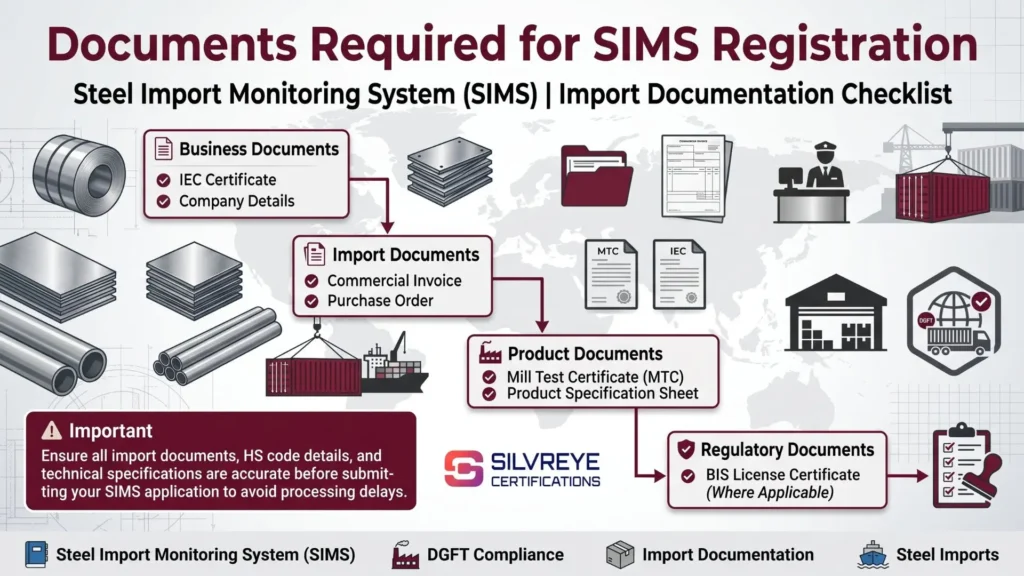
Keep your purchase order, proforma invoice, commercial invoice, Bill of Lading and mill test certificate (MTC) available as applicable. The Ministry's SIMS FAQ also identifies supporting information such as the consignment ID, BIS license and IS code, wherever relevant.
The portal asks about the domestic availability of similar steel. Prepare an accurate response based on the product and available information rather than guessing.
Steel Import Monitoring System Registration Process: Step by Step
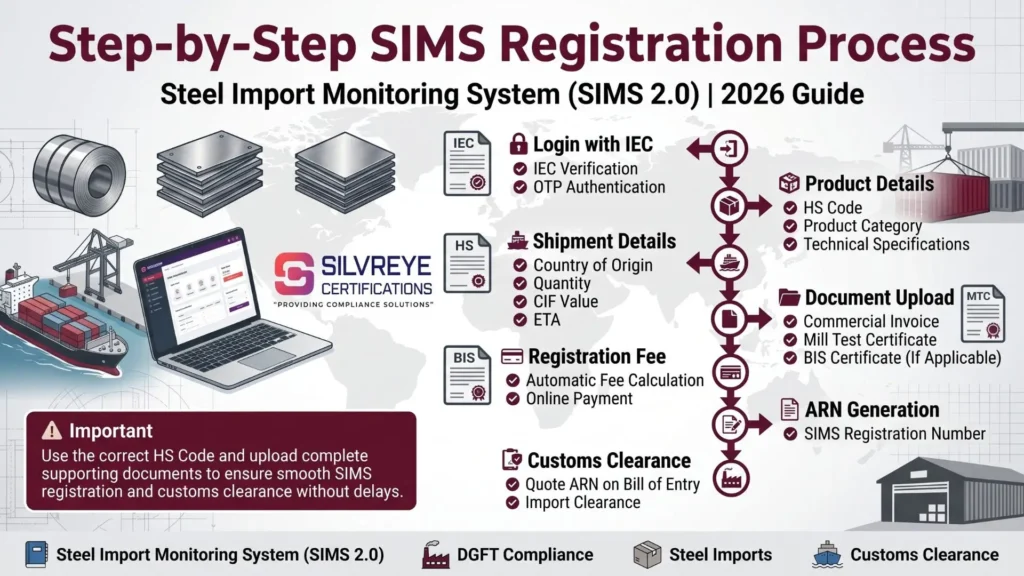
Follow these steps to complete regular SIMS registration process through the DGFT portal:
- Check your IEC: Confirm that your Importer Exporter Code is active and that the business details, including branch information, are correct.
- Log in to the DGFT portal: Access your account and ensure your IEC is linked to it.
- Register your DSC: Go to My Dashboards → View and Register Digital Signatures Token and complete the digital signature registration.
- Open the SIMS application: Navigate to Services → Import Management System → Steel Import Monitoring System → Explore → Apply for New Authorization.
- Enter importer and shipment details: Fill in the importer, seller, manufacturer, country of origin and port of exportation details. Add the imported item with its HS code, technical specifications, quantity and CIF value.
- Save a draft if required: If you need to verify any information, save the application as a draft. Draft applications can be edited; submitted applications cannot be amended or cancelled.
- Pay the applicable fee and submit: Pay the current fee of ₹750 per unique SIMS registration number through the online payment facility and complete the final submission process. Check that the application status confirms successful submission.
- Retrieve your registration number: After successful submission and payment, the number is generated through the portal. You can also check the registered email and mobile notifications and retrieve the registration letter through the submitted applications section of your DGFT account.
- Quote the number in the Bill of Entry: Share the applicable SIMS registration number with your customs house agent so it can be entered in the relevant customs declaration.
Important: A payment receipt alone is not confirmation that the application has been successfully submitted. Check the application status and registration letter before treating the process as complete.
When to File SIMS Registration: 2026 Advance Filing Rules
The Ministry of Steel revised the advance registration windows through its notice dated 19 February 2026, effective from 20 February 2026. Regular SIMS applications can generally be filed from 60 days before the expected arrival date. The latest permitted filing date depends on the import category.
| Import category | Earliest filing | Latest filing |
|---|---|---|
| Most imports from countries other than Nepal, Bhutan and Sri Lanka | 60 days before expected arrival | 3 days before expected arrival |
| Imports from Nepal, Bhutan and Sri Lanka | 60 days before expected arrival | 2 days before expected arrival |
| Specific ferrous scrap imports under heading 7204 | 60 days before expected arrival | 2 days before expected arrival |
| SEZ/EOU to DTA imports | 60 days before expected arrival | 2 days before expected arrival |
These are advance filing deadlines, not guaranteed processing times. Always check the latest Ministry of Steel notice and the SIMS portal before applying, particularly if your shipment falls under a special category.
Practical tip: Avoid waiting until the final permitted filing date. Applying one or two weeks before the cut-off gives you time to check shipment information and resolve data-entry issues.
SIMS Registration Fees: Government Charges and Other Costs
The current regular SIMS registration fee is ₹750 per unique registration number, comprising a ₹500 registration fee and a ₹250 processing fee, as specified in the Ministry of Steel's current SIMS 2.0 FAQ.
Older articles may quote the earlier fee structure of ₹1 per thousand of CIF value, subject to a minimum of ₹500 and a maximum of ₹1 lakh. Do not use that older calculation as the current regular SIMS fee.
| Cost element | What to expect |
|---|---|
| SIMS registration fee | ₹750 per unique registration number |
| DSC cost | Depends on the provider and validity period; applicable if you do not already have a suitable DSC |
| Professional assistance | Optional; charges vary by service provider |
| Additional registration | A separate fee applies when another unique SIMS registration number is required |
The government fee is paid online during the application. DSC and professional service charges, if any, are separate from the SIMS registration fee.
SIMS Registration Validity, Renewal and Expiry
A regular SIMS registration number remains valid for 75 days from the date of issue. It cannot be renewed or extended. If the shipment does not arrive within the registration's validity period, the importer may need to submit a fresh application and pay the applicable fee.
The following example explains how the advance filing window and validity period work.
Example: Expected vessel arrival – 15 March 2027
| Milestone | Date |
|---|---|
| Earliest permitted filing date (60 days before arrival) | 14 January 2027 |
| Latest filing date for most imports (3 days before arrival) | 12 March 2027 |
| Approximate expiry if registration is issued on 14 January | 30 March 2027 |
| Revised vessel arrival date in case of delay | 2 April 2027 |
If the registration expires before the goods arrive, a fresh registration may be required. Always refer to the validity date printed on the registration letter.
Can a submitted SIMS application be changed or cancelled?
No. According to the Ministry of Steel's SIMS FAQ, a submitted application cannot be amended or cancelled. Only saved drafts can be edited. Therefore, verify the HS code, product description, quantity, CIF value, supplier details and expected arrival date before final submission.
How many registration numbers are required?
The current Ministry of Steel FAQ requires a separate unique SIMS registration number for each imported item. Multiple registration numbers can be generated through the same portal login. Do not assume that one regular SIMS number can be reused for different imported items or shipments. SARAL SIMS follows a separate procedure for eligible imports.
Common Steel Import Registration Mistakes to Avoid
Even though SIMS registration is completed online, small errors can create compliance problems or affect shipment planning. Importers should avoid these common mistakes:
- Guessing the HS code: Verify the correct eight-digit ITC (HS) code against the product description and technical specifications before selecting it in the portal.
- Stopping after payment: Payment alone does not complete the application. Follow the final submission steps and confirm that the SIMS registration number has been generated.
- Filing outside the permitted window: Regular SIMS applications must be submitted within the prescribed advance period. The earliest and latest filing dates depend on the import category and country of origin.
- Ignoring the 75-day validity: A regular SIMS registration number is valid for 75 days. If shipment delays cause it to expire, a fresh registration may be required.
- Reusing a registration number incorrectly: A unique registration number is required for each imported item under regular SIMS. SARAL SIMS has a separate facility for eligible imports and allows multiple Bills of Entry against the applicable registration, subject to its conditions.
- Leaving IEC details incomplete: Branch, district and state information may be populated from the IEC. Correct missing or outdated details through the DGFT portal before applying.
- Providing vague product descriptions: Include the correct steel grade, dimensions, technical specifications and applicable IS code wherever relevant.
- Confusing SIMS with quality compliance: SIMS registration is an import-monitoring requirement, not a BIS certificate or QCO exemption. Check the applicable product standards and quality-control requirements separately.
What's Changed in Steel Import Monitoring System Registration: 2019–2026
SIMS has undergone several changes since its introduction, including wider product coverage, revised registration procedures and the introduction of SARAL SIMS.
| Date | Important development |
|---|---|
| 5 September 2019 | DGFT introduced SIMS through Notification No. 17/2015-2020 for specified steel product categories. |
| 28 September 2020 | Notification No. 33/2015-2020 extended compulsory registration to all HS codes under Chapters 72, 73 and 86. |
| 28 August 2023 | DGFT revised the SIMS fee to a flat ₹500 per registration number under Notification No. 28/2023-2020. The current Ministry of Steel FAQ specifies a total fee of ₹750, including the processing fee. |
| 20 June 2025 | An earlier revision introduced an advance registration window of 60 to 7 days before expected arrival. This was subsequently superseded. |
| 20 November 2025 | The Ministry of Steel announced SARAL SIMS for eligible small consignments and export-purpose imports. The revised procedure also removed the need for a separate clarification or NOC for steel grades not covered by a QCO. |
| 20 February 2026 | Revised advance registration windows took effect under the Ministry of Steel notice dated 19 February 2026. |
| 8 June 2026 | The Ministry issued a notice concerning the filing of SARAL SIMS returns after the prescribed due date. |
| 25 August 2026 | The Ministry extended the FY 2025–26 SARAL SIMS return deadline to 31 August 2026, subject to a late filing fee. |
| 28 October 2026 | An industry open-house discussion reportedly covered SIMS, SARAL SIMS and QCO exemption issues. An open-house discussion should not be treated as a regulatory amendment unless followed by an official notification or notice. |
Why Choose Silvereye Certifications for Steel Import Monitoring System Registration?
Completing SIMS registration requires accurate product classification, correct shipment information and timely submission through the government portal. Silvereye Certifications helps steel importers understand the registration requirements and manage the application process with professional assistance.
Here is how we can support your business:
- SIMS registration guidance: Get assistance in understanding the applicable registration process, eligibility conditions and filing deadlines.
- HS code and product details review: Receive guidance on checking product descriptions, eight-digit HS codes and technical specifications before submission.
- Document and information verification: Get support in reviewing IEC details, supplier information, quantity, CIF value and other application particulars.
- Online application assistance: Receive step-by-step support with portal navigation, application entry, payment and final submission.
- SARAL SIMS guidance: Understand whether your small consignments or eligible export-purpose imports qualify for the SARAL SIMS route.
- Related compliance support: Get guidance on applicable BIS certification, Quality Control Orders (QCOs) and other product-specific import requirements.
- Transparent professional charges: Understand the scope of services and applicable professional fees before proceeding.
Silvereye Certifications provides consultancy, documentation and application support. The Ministry of Steel and the relevant government authorities remain responsible for issuing registration numbers and granting applicable approvals or exemptions.
Conclusion
Steel Import Monitoring System registration is an important pre-import compliance requirement for businesses importing covered products under HS Chapters 72, 73 and 86. Importers should verify the correct HS code, prepare accurate shipment details, maintain a valid IEC and registered DSC, and submit the application within the prescribed advance filing window.
The regular SIMS registration number is valid for 75 days, and the current fee is ₹750 per unique registration number. Eligible small importers and businesses making specified export-purpose imports may use SARAL SIMS, subject to its conditions and return-filing requirements.
Before placing or shipping an import order, check the latest Ministry of Steel notices and applicable BIS or QCO requirements. If you need assistance with regular SIMS or SARAL SIMS, Silvereye Certifications can guide you through the registration process and help you organise the required compliance information.
Frequently Asked Questions
What is Steel Import Monitoring System registration?
Monitoring System registration is a compulsory advance declaration of your steel import, filed online before the goods reach India.
Is Steel Import Monitoring System registration mandatory for every steel import?
Steel import registration applies to imports under HS Chapters 72, 73 and 86, subject to any exemptions the government notifies.
Who can apply for SIMS registration?
Importers, actual users, importing agents, traders or brokers, and Advance Authorization users, per the portal FAQ.
How much does steel import registration cost in 2026?
The government fee for SIMS registration is a flat ₹500 per application. Any consultant or DSC cost is extra.
How long is steel import registration valid?
SIMS registration is valid for seventy-five days from generation.
Can I renew Steel Import Monitoring System registration?
No. If the shipment arrives late, file a new application and pay again.
How early can I file steel import registration?
You can file SIMS registration up to 60 days before expected arrival. The latest cut-off is 2 or 3 days before, depending on the category.
What information do I need for SIMS registration?
IEC, DSC, seller and manufacturer, origin, port of exportation, HS code, specifications, quantity, CIF value and arrival date.
Can I edit my SIMS registration after submitting?
No. Only drafts are editable. A submitted application can't be amended or cancelled.
Do I need one steel import registration per shipment?
Yes, one SIMS registration per customs entry, though one application can cover multiple products with matching importer, exporter, manufacturer, origin and port.
Is SARAL SIMS registration better for small businesses?
It can be, if your consignments are up to 10 MT each within the 1,000 MT annual cap, or you import for export. Otherwise regular registration applies.
Does steel import registration replace BIS or QCO compliance?
No, SIMS registration does not replace them. They are separate requirements.