
- Mandatory registration: SIMS (Steel Import Monitoring System) registration is compulsory before importing the specified steel products covered under ITC (HS) Chapters 72, 73 and 86. The requirement does not automatically apply to every product under these chapters; check the applicable 8-digit HS tariff line.
- Fixed government fee: Regular SIMS registration carries a flat government fee of ₹500 per application. The registration number is generated through the online system after successful application processing.
- Validity: A regular SIMS registration number remains valid for 75 days and is required for the relevant customs entry. A separate application is generally required for each customs entry.
- Application prerequisites: Importers need an active Importer Exporter Code (IEC), a DGFT account and a registered Digital Signature Certificate (DSC) to apply through the SIMS portal.
- Advance registration window: Under the Ministry of Steel notice effective from 20 February 2026, applications must generally be submitted between 60 days and 2 or 3 days before the expected arrival of the consignment, depending on the country of origin and applicable category.
- SARAL SIMS facility: Eligible small importers may use SARAL SIMS. For FY 2026–27, the small-import facility covers consignments of up to 10 MT, subject to an annual import cap of 1,000 MT. Its fee and validity conditions differ from regular SIMS.
Introduction
SIMS registration online is an advance import declaration that importers must complete for specified steel and steel products covered under ITC (HS) Chapters 72, 73 and 86, as notified by the Ministry of Steel. Importers must submit the required shipment information through the DGFT portal before the consignment arrives in India.
To apply, log in to the DGFT portal using your Importer Exporter Code (IEC) and registered Digital Signature Certificate (DSC). Enter the required import and shipment details, pay the applicable ₹500 government fee for regular SIMS registration and complete the application using Final Submit.

After successful submission, the system generates a SIMS registration number. The regular SIMS number is valid for 75 days, cannot be renewed and is intended for the relevant customs entry. Importers must quote the applicable registration number in the Bill of Entry for customs clearance.
Small importers who meet the prescribed eligibility conditions may be able to use the SARAL SIMS facility, which follows separate fee, validity and quantity requirements.
What Is SIMS Registration Online?
SIMS stands for Steel Import Monitoring System. It is an online system through which importers submit advance information about steel and iron products they plan to import into India. The information includes product details, HS code, quantity, country of origin, supplier and shipment-related particulars.
The Ministry of Steel uses this information to monitor steel import trends, understand market conditions and support policy decisions.
Is SIMS Registration an Import License?
No. SIMS registration is an advance import monitoring requirement, not a separate import license or permission to import restricted goods.
Under the Foreign Trade Policy, imports covered by SIMS are generally classified as Free, subject to compulsory registration under SIMS. This means importers must complete the prescribed registration requirement even though the goods are not otherwise restricted under the relevant import policy.
The requirement was introduced through DGFT Notification No. 17/2015-2020 dated 5 September 2019, initially covering specified tariff lines. Later, DGFT Notification No. 33/2015-2020 dated 28 September 2020 extended compulsory SIMS registration to all HS codes under Chapters 72, 73 and 86 of ITC (HS).
Which Government Authorities Manage SIMS?
SIMS is administered by the Ministry of Steel, with the Directorate General of Foreign Trade (DGFT) involved in the import policy framework.
Importers can access the registration facility through the official SIMS 2.0 portal:
- Regular SIMS portal: https://sims.steel.gov.in/
- SARAL SIMS portal: https://sims.steel.gov.in/SARAL
The Ministry of Steel portal provides registration facilities, FAQs, notices and user guidance.
Who Needs SIMS Registration?
Any importer intending to import goods classified under the applicable HS codes in Chapters 72, 73 or 86 of ITC (HS), 2022 must obtain SIMS registration, subject to applicable exemptions and special procedures.
The requirement can apply to manufacturers importing raw materials, traders importing finished steel products and businesses importing steel components for their operations.
According to the Ministry of Steel's FAQ, an importer holding a valid Importer Exporter Code (IEC) can apply for regular SIMS registration.
| Applicant or importer category | SIMS registration requirement |
|---|---|
| Manufacturer importing steel | Required for covered products |
| Trader or merchant importer | Required for covered products |
| Actual user importing steel for its own business | Required for covered products |
| Importer using a customs or professional agent | The importer remains responsible for registration; an agent may assist with the process |
| Advance Authorisation, SEZ or EOU importer | SIMS requirements apply, with SARAL SIMS available for eligible export-purpose imports |
Important: A customs broker or consultant does not replace the importer as the applicant. The registration is associated with the importer's IEC.
Which Products Are Covered Under SIMS?
SIMS covers products classified under the following ITC (HS) chapters:
| HS Chapter | Products broadly covered | Examples |
|---|---|---|
| 72 | Iron and steel | Flat products, bars, rods, wire, coils and steel scrap |
| 73 | Articles of iron or steel | Pipes, tubes, fittings, fasteners and fabricated steel articles |
| 86 | Railway or tramway locomotives, rolling stock and related equipment | Railway coaches, locomotives, track fixtures and parts |
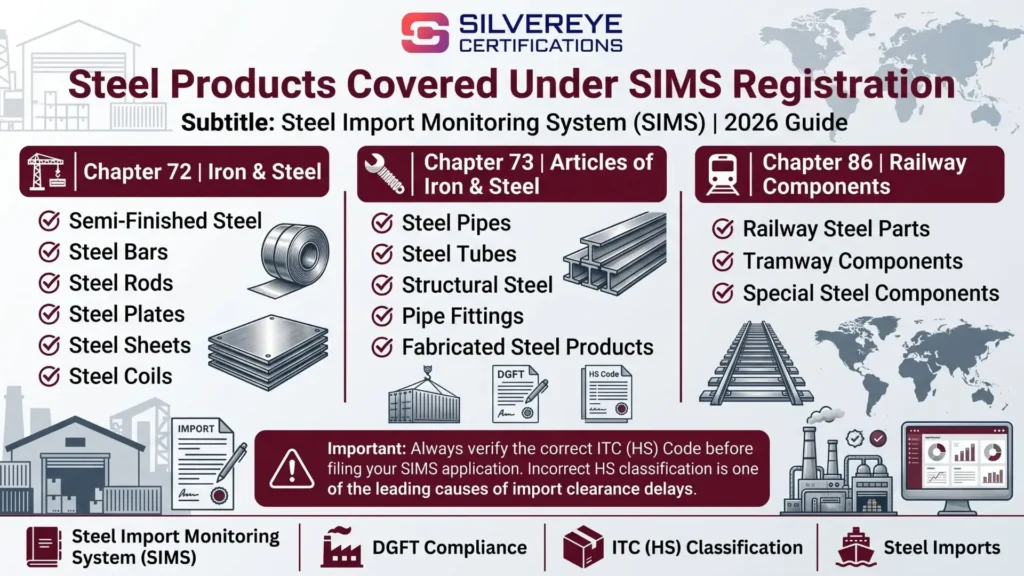
The Ministry of Steel's current FAQ confirms that compulsory SIMS registration applies to all HS codes under these three chapters.
How do you check whether your product requires SIMS?
Identify the correct 8-digit ITC (HS) code for the product and verify its classification before applying. Do not rely only on a broad product description because the correct tariff classification determines the applicable import requirements.
The SIMS portal also requires product-specific technical information. If you are unsure about the HS code or technical specifications, obtain confirmation from the manufacturer or a qualified classification professional before submitting the application.
Benefits of SIMS Registration Online for Steel Importers
SIMS registration is a compulsory compliance requirement for covered steel imports. Completing it correctly and within the prescribed period helps importers prepare for customs clearance and maintain proper import records.
| Benefit | What it means for importers |
|---|---|
| Advance import declaration | Allows importers to submit product and shipment information before the goods arrive in India |
| Automatic registration number | The SIMS number is generated after successful application submission and payment |
| Online application | Importers can submit applications through the SIMS 2.0 portal without routine physical submission |
| Multiple-item application facility | Importers can generate multiple unique registration numbers through one login when an invoice contains more than one imported item |
| Customs documentation support | The SIMS registration number and expiry date can be entered in the Bill of Entry for customs clearance |
| Predictable application fee | The current portal FAQ specifies ₹750 for each unique regular SIMS registration number |
| Import compliance | Timely registration helps meet the compulsory SIMS requirement and avoid issues arising from missing registration |
Note: SIMS registration does not guarantee customs clearance. Importers must also comply with applicable customs procedures, product standards, BIS requirements, quality control orders and other import regulations.
SARAL SIMS facility: Eligible importers can use the simplified SARAL SIMS route for qualifying small consignments or specified export-purpose imports. The eligibility, annual quantity limits, fees and reporting requirements differ from regular SIMS.
Requirements and Documents for SIMS Registration
SIMS registration is completed online, and most of the information required relates to the importer and the proposed steel consignment. However, importers should keep the relevant commercial and technical documents ready before starting the application.
Account-level requirements
| Requirement | Why it matters |
|---|---|
| Valid Importer Exporter Code (IEC) | A valid IEC is required to register and apply on the SIMS portal. |
| SIMS portal account | First-time users must register as an importer using their IEC and create login credentials. |
| Updated IEC details | Branch details are linked to the IEC. If the district or state information is missing, the importer may need to update the IEC details. |
| Accurate business information | The importer’s details should match the records linked to the IEC. |
Shipment details and supporting documents
| Information or document | What to check |
|---|---|
| Importer details | These are linked to the IEC used for registration. |
| Seller and manufacturer details | Keep the correct exporter and manufacturer information ready. |
| Country of origin | Enter the country in accordance with the applicable rules of origin. |
| Port of exportation | Identify the port from which the goods are being shipped. |
| 8-digit ITC (HS) code | Verify the correct classification before submitting the application. |
| Product description and technical specifications | Use the product’s actual grade, type and technical details rather than a broad description. |
| Indian Standard (IS) code and BIS licence details | Keep these ready wherever applicable, particularly for products covered by a Quality Control Order (QCO). |
| Quantity and CIF value | Refer to the purchase order, invoice or other relevant commercial documents. |
| Expected date of arrival | This determines the permitted advance-registration window. |
| Invoice, Bill of Lading and Mill Test Certificate (MTC) | Keep the relevant shipment and material documents available as supporting references. |
| Consignment ID | Keep the applicable consignment reference ready. |
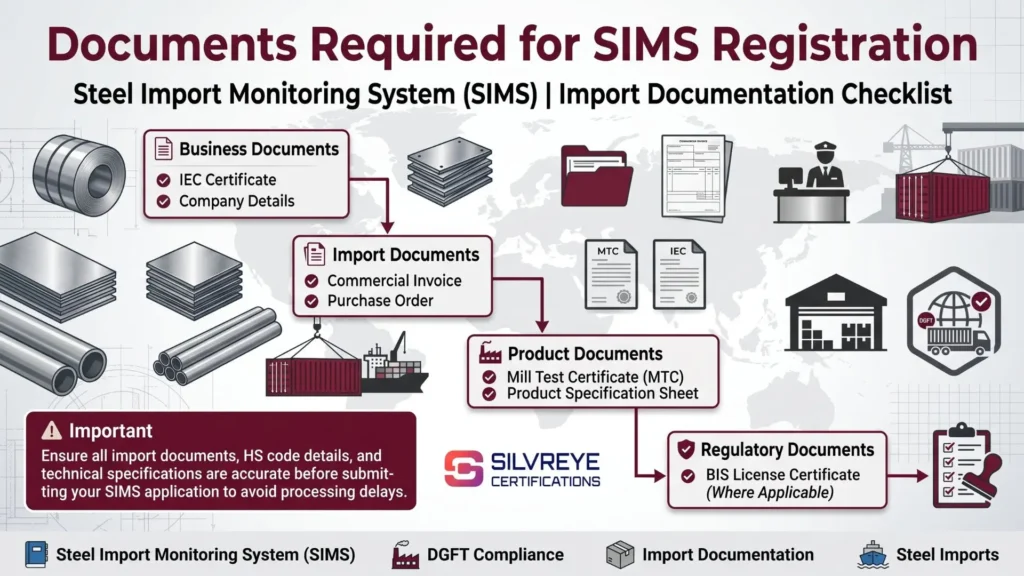
The Ministry of Steel’s SIMS FAQ identifies documents and information such as the Invoice, Bill of Lading, Mill Test Certificate, Consignment ID, BIS license and IS code, wherever applicable, as relevant to the application. The exact information required depends on the imported product and the portal fields.
Practical tip: Keep the purchase order, proforma invoice, supplier’s technical sheet and available shipment documents together. This makes it easier to verify the HS code, product description, quantity, value and expected arrival date before submission.
SIMS registration and BIS/QCO compliance
SIMS registration is separate from BIS certification and Quality Control Order (QCO) compliance. A SIMS registration number does not exempt an importer from the applicable product-quality requirements.
If the imported steel product is covered by a QCO, the importer must check the relevant Indian Standard and applicable BIS requirements. Where an exemption is available, the importer should follow the Ministry of Steel’s prescribed exemption procedure. Do not assume that a product is exempt simply because its grade or description is not readily visible in the portal’s list. Check the latest Ministry of Steel notices and portal instructions before filing.
How to Complete SIMS Registration Online: Step-by-Step Process
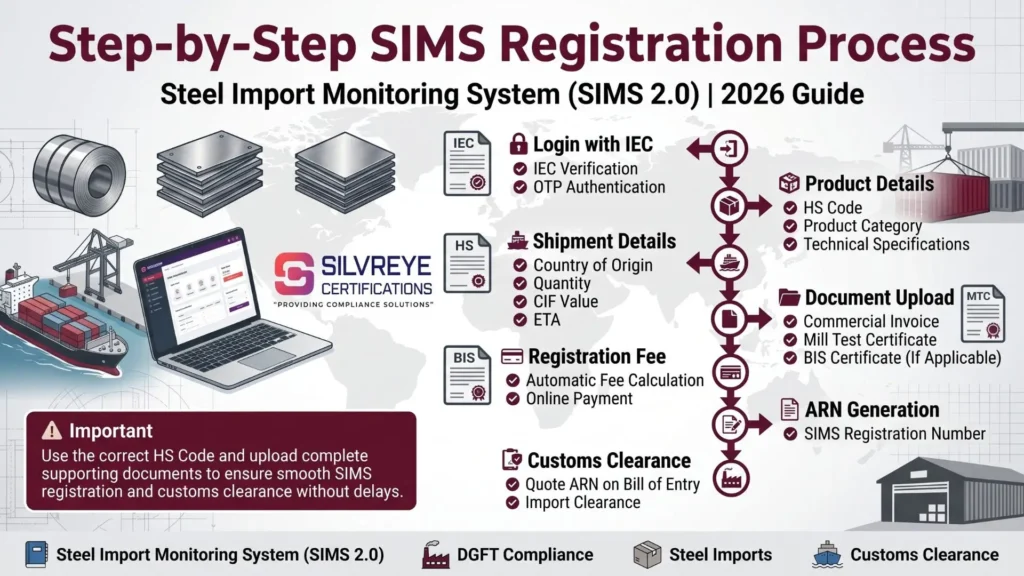
Importers can apply through the official SIMS 2.0 portal. The basic process is as follows:
- Check your IEC: Confirm that your Importer Exporter Code is valid and that the relevant business details are updated.
- Open the SIMS portal: Visit sims.steel.gov.in. First-time users should select Register as Importer and complete registration using their IEC.
- Log in to your account: Use the registered login credentials to access the SIMS application facility.
- Start a new application: Select the option to apply for a new SIMS registration and follow the instructions displayed on the portal.
- Enter importer and shipment details: Provide the required information, including seller, manufacturer, country of origin, port of exportation and expected arrival date.
- Add the imported item: Enter the applicable HS code, product description, technical specifications, quantity, CIF value and other required product details. A separate unique SIMS registration is required for each imported item.
- Review the application: Check the HS code, product details, quantity, value and other information carefully. You may save an incomplete application as a draft and review it before submission.
- Pay the applicable fee and submit: Pay the prescribed fee online and complete the final submission as instructed by the portal.
- Download the SIMS registration details: After successful completion and payment, the SIMS registration number is generated immediately, according to the Ministry of Steel FAQ. Save the registration details and application summary for your records.
- Share the number with your customs broker: Ensure that the applicable SIMS registration number is quoted in the Bill of Entry for the relevant imported item.
Important: A submitted application cannot be amended or cancelled through the SIMS portal. Only a draft can be edited before submission. Review all information carefully before completing the final submission.
When to File SIMS Registration: Advance Registration Window
SIMS registration must be completed within the advance-registration period prescribed by the Ministry of Steel. The permitted period depends on the country of origin and the category of import.
The Ministry of Steel notice dated 19 February 2026, effective from 20 February 2026, superseded its earlier notices and prescribed the following periods:
| Import category | Earliest permitted filing | Latest permitted filing |
|---|---|---|
| Imports from Nepal, Bhutan and Sri Lanka | 60 days before expected arrival | 2 days before expected arrival |
| Imports from all other countries | 60 days before expected arrival | 3 days before expected arrival |
| Specific HS codes under heading 7204 | 60 days before expected arrival | 2 days before expected arrival |
| Imports from SEZ/EOU to DTA | 60 days before expected arrival | 2 days before expected arrival |
The relevant date is the expected date of arrival of the import consignment. Importers should check the latest Ministry of Steel notice and the SIMS portal before applying, particularly if the shipment schedule changes.
Practical advice: Avoid waiting until the last permitted day. Applying in advance gives you time to review the information and address any portal or payment issues within the allowed filing window.
SIMS Registration Online Fee
The current Ministry of Steel SIMS 2.0 FAQ specifies a fee of ₹750 for each unique SIMS registration number.
| Fee component | Amount |
|---|---|
| Registration fee | ₹500 |
| Processing fee | ₹250 |
| Total per unique registration number | ₹750 |
If an invoice contains multiple imported items, the importer can generate multiple unique SIMS registration numbers in a single portal login. The fee is charged for each number. For example, generating four unique registration numbers requires a total payment of ₹3,000.
Older references may quote the earlier fee structure of ₹1 per thousand of CIF value, subject to a minimum of ₹500 and a maximum of ₹1 lakh, or the subsequent flat ₹500 fee. For current applications, refer to the ₹750 fee stated in the Ministry of Steel's SIMS 2.0 FAQ.
The fee is paid online through the portal. Any separate professional or consultancy charges, if applicable, are not part of this government-prescribed SIMS fee.
SIMS Registration Validity, Renewal and Changes
A regular SIMS registration number remains valid for 75 days from the date of issue. It is not a permanent registration, and the validity period should be considered when planning the expected arrival of the consignment.
| Particular | Details |
|---|---|
| Validity | 75 days from the date of issue |
| Renewal | No routine renewal or extension is provided for the regular registration number |
| Expired registration | A fresh application may be required if the number is no longer valid for the intended import |
| Draft application | Can be edited before submission |
| Submitted application | Cannot be amended or cancelled, as stated in the Ministry of Steel FAQ |
What if the shipment is delayed?
If the expected arrival date changes, check whether the existing SIMS registration number remains valid and whether the import still falls within the applicable requirements. If the number expires before the import is completed, the importer should check the portal's current instructions for obtaining a fresh registration.
Do not assume that the 75-day validity automatically changes when a vessel schedule is revised.
Can one SIMS registration number cover multiple products or customs entries?
The Ministry of Steel FAQ states that a unique SIMS registration number is required for each imported item. However, an importer can generate multiple unique registration numbers in one portal login when an invoice contains more than one item.
Therefore, do not assume that one SIMS number covers every product listed on an invoice or every customs entry. Match the registration number with the relevant imported item and ensure that the applicable details are correctly quoted in the Bill of Entry.
SARAL SIMS Registration: A Simpler Route for Small Importers
The Ministry of Steel introduced SARAL SIMS in November 2025 to simplify registration for small steel consignments and imports made under the Advance Authorization, SEZ and EOU routes for export purposes. It operates through a separate portal.
| Feature | Details |
|---|---|
| Who can use it | Importers bringing in consignments of up to 10 MT each, subject to an annual limit of 1,000 MT, and eligible importers making imports under Advance Authorisation, SEZ or EOU routes for export purposes |
| Registration process | The importer declares the total intended import quantity while generating the SARAL SIMS registration |
| Multiple imports | The registration can be quoted in multiple Bills of Entry, subject to the available registered quantity and applicable conditions |
| Validity and import period | Registration is valid for the financial year, with a one-month grace period. Imports against it can be made up to 30 April of the following financial year |
| Return filing | The importer must report actual imports by 30 April of the following financial year. A Nil return is required if no imports were made |
| Next year's registration | The return for the preceding financial year must be filed before generating a new SARAL SIMS registration |
| Application fee | ₹750 per SARAL SIMS registration number |
| Helpdesk | 011-65263079 and 011-65263080 |
Important conditions: For small imports, each consignment must not exceed 10 MT, and the annual threshold is 1,000 MT. If actual imports exceed the applicable annual limit, subsequent imports must be registered under regular SIMS. An importer who switches to regular SIMS after using SARAL SIMS cannot use SARAL SIMS for the remaining period of that financial year.
For export-purpose imports, there is no consignment-size threshold under the SARAL facility. However, it is restricted to imports under the specified Advance Authorization, SEZ or EOU routes for export purposes. Imports intended for domestic clearance require regular SIMS registration.
The Ministry issued a notice on 8 June 2026 concerning late filing of SARAL SIMS returns. A subsequent notice dated 25 August 2026 extended the FY 2025–26 return deadline to 31 August 2026, subject to a late filing fee of ₹10,000. This was a specific extension for that financial year, not a general relaxation of future return deadlines.
SIMS Registration vs IEC vs BIS Certification vs Bill of Entry
These terms relate to different stages of importing steel into India. SIMS registration does not replace IEC, BIS compliance or customs documentation.
| Item | What it is | Issued or handled by | Replaces SIMS? |
|---|---|---|---|
| SIMS registration | Advance import information declaration for covered steel products | Ministry of Steel's SIMS portal | Not applicable |
| Importer Exporter Code (IEC) | Business identification number for import and export activities | DGFT | No. A valid IEC is required to apply for SIMS |
| BIS certification / QCO compliance | Product quality and conformity requirement for products covered by applicable Quality Control Orders | Bureau of Indian Standards and the relevant government authorities | No. It is a separate compliance requirement |
| Bill of Entry | Customs declaration filed for imported goods | Filed with Indian Customs | No. The applicable SIMS number must be quoted in the Bill of Entry |
Importers should check the applicable Quality Control Order (QCO) and BIS requirements for their specific steel grade and product. SIMS registration is an import-monitoring requirement; it is not a quality approval or exemption from product standards.
SIMS Registration Updates: Key Changes from 2019 to 2026
The SIMS framework has changed since its introduction. The following timeline highlights important regulatory and portal updates.
| Date | Important development |
|---|---|
| 5 September 2019 | DGFT introduced SIMS through Notification No. 17/2015-2020 for specified steel product categories |
| 28 September 2020 | DGFT Notification No. 33/2015-2020 extended compulsory registration to all HS codes under Chapters 72, 73 and 86 |
| 28 August 2023 | DGFT Notification No. 28/2023-2020 revised the SIMS registration fee structure |
| 25 July 2024 | The Ministry of Steel launched the revamped SIMS 2.0 portal |
| 20 November 2025 | The Ministry announced SARAL SIMS for eligible small imports and export-purpose imports |
| 20 February 2026 | Revised advance registration windows came into effect under the Ministry of Steel notice dated 19 February 2026 |
| 8 June 2026 | The Ministry issued a notice concerning late filing of SARAL SIMS returns |
| 25 August 2026 | The Ministry extended the FY 2025–26 SARAL SIMS return deadline to 31 August 2026, with a late filing fee |
Common SIMS Registration Mistakes That Can Cause Problems
Even though the SIMS application is completed online, incorrect information or missed procedural steps can affect the registration process. Importers should watch out for these common mistakes:
- Selecting the wrong HS code: Check the applicable eight-digit ITC (HS) code against the product details and import documents. Consult a customs broker if the classification is unclear.
- Not completing Final Submit: Payment alone does not complete the application. Follow the portal's submission steps and confirm that the application has been successfully submitted and the registration number generated.
- Applying outside the permitted advance window: Regular SIMS applications must be filed within the applicable period before the expected arrival date. The cut-off depends on the country of origin and the category of import.
- Ignoring the 75-day validity: A regular SIMS registration number remains valid for 75 days. If shipment delays cause it to expire, a fresh registration may be required.
- Using one regular SIMS number for multiple imported items: The Ministry's FAQ requires a unique SIMS registration number for each imported item. Multiple unique numbers can be generated through one portal login. SARAL SIMS follows a separate procedure for eligible imports.
- Leaving branch or address details incomplete: Some business details are populated from the IEC. If the district, state or branch information is missing, check and correct the IEC details through DGFT.
- Providing vague product specifications: Enter accurate details of the steel grade, product description, applicable IS code and other technical information. Keep the supplier's technical documents available while completing the application.
- Confusing SIMS with BIS or QCO compliance: SIMS is an advance import-monitoring declaration. It does not replace mandatory BIS certification, QCO compliance or an applicable exemption.
Why Choose Silvereye Certifications for SIMS Registration Online?
SIMS registration involves accurate product classification, technical information and compliance with the Ministry of Steel's filing requirements. Silvereye Certifications provides practical assistance to steel importers throughout the application process.
Here is how we can help:
- SIMS application guidance: Understand the applicable registration route and the information required for regular SIMS or SARAL SIMS.
- HS code and product detail assistance: Get support in reviewing product descriptions, technical specifications and import details before submission.
- Document and information checks: Review IEC details, supplier information, quantity, CIF value and other application particulars to help reduce avoidable errors.
- Online application support: Receive step-by-step assistance with portal navigation, application entry, payment and submission.
- Import compliance guidance: Understand how SIMS registration relates to BIS certification, Quality Control Orders (QCOs) and other applicable import requirements.
- Transparent professional support: Get clarity on the scope of assistance and applicable professional charges before proceeding.
Silvereye Certifications is a compliance consultancy, not a government issuing authority. The SIMS registration number is generated through the official government portal after successful completion of the applicable process.
Conclusion
SIMS registration is an important advance import-monitoring requirement for steel products covered under the applicable ITC (HS) codes. Importers should identify the correct HS code, prepare accurate shipment and technical details, and submit the application within the prescribed advance registration window.
Small importers and eligible export-linked businesses may also consider SARAL SIMS, provided they meet its eligibility conditions and follow the annual quantity and return-filing requirements.
Before importing, verify the latest Ministry of Steel notices, registration fees, validity rules and product-specific BIS or QCO requirements. If you need assistance with the application or want to understand which SIMS route applies to your imports, Silvereye Certifications can guide you through the registration process and related compliance requirements.
Frequently Asked Questions
Is SIMS registration mandatory for steel imports?
Yes, SIMS registration is mandatory. Imports under Chapters 72, 73 and 86 of ITC(HS) are "free subject to compulsory registration under SIMS", so you must register before the goods arrive.
How do I do SIMS registration online?
Log in to the DGFT portal with your IEC, register your DSC, open Services → Import Management System → Steel Import Monitoring System, and select Apply for New Authorization. Fill in the shipment details, pay ₹500 and click Final Submit.
What is the SIMS registration fee in 2026?
A flat ₹500 per SIMS registration application, in force since DGFT Notification 28/2023 of 28 August 2023. The earlier percentage-based formula no longer applies.
How long is SIMS registration valid?
SIMS registration is valid for seventy-five days from the date the number is generated. After that, the number can't be used.
Can I renew or extend a SIMS registration?
No. If your consignment arrives after the number expires, file a fresh SIMS registration application and pay the fee again.
How early should I apply for SIMS registration?
You can file SIMS registration from the 60th day before expected arrival. The latest date is 2 or 3 days before arrival, depending on the import category under the 19 February 2026 notice. Filing a week or two ahead is safer.
What documents are required for SIMS registration?
For SIMS registration there's no bulk upload of paperwork. You need a valid IEC, a registered DSC and shipment details: exporter, manufacturer, country of origin, port of exportation, HS code, technical specifications, quantity and CIF value.
Do I need a Digital Signature Certificate for SIMS registration?
The portal FAQ lists registering a DSC on the DGFT dashboard as a prerequisite for applying, so arrange one before you start.
Can I edit or cancel my SIMS registration after submission?
No. Only drafts can be edited. Once you click Final Submit, the application can't be modified or cancelled, so review it carefully.
Do I need a separate SIMS registration for every shipment?
Yes, one SIMS registration is needed for each customs entry. One application can include several products if the importer, exporter, manufacturer, country of origin and port of exportation are the same.
Who can file SIMS registration on my behalf?
The portal FAQ lists importers, actual users, importing agents, traders or brokers, and Advance Authorization users as eligible to register and file.
I paid the fee but didn't receive my SIMS registration number. What should I do?
First check your drafts. If you forgot to click Final Submit, the application is still there. Otherwise, look under My Dashboard → Submitted Applications, or contact the Ministry of Steel helpdesk.
What is SARAL SIMS and who qualifies?
SARAL SIMS registration is a simplified route for consignments of up to 10 MT (annual cap of 1,000 MT) and for export-linked imports under Advance Authorization, SEZ or EOU. You declare a yearly quantity and get one number for multiple consignments.
What happens if I import steel without SIMS registration?
Skipping SIMS registration means the import wouldn't meet the policy condition, and customs clearance can stall because the number is expected in the Bill of Entry. Penal action is also possible. Speak to a customs broker or trade advisor about your specific case.