

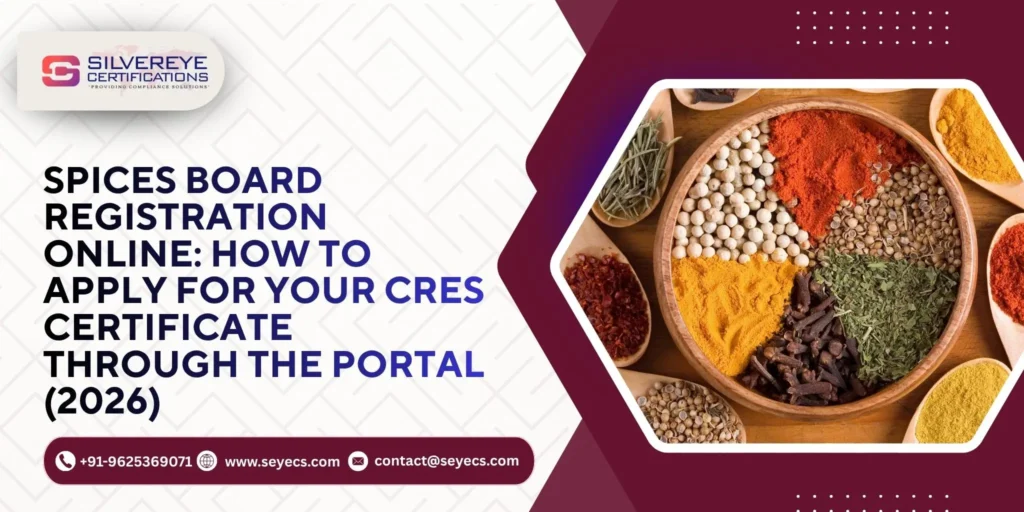
- Spices Board Registration is a fully online process — no physical visit to any Spices Board office is needed to apply.
- The application is filed through Form-1 on the official Spices Board portal, with documents uploaded digitally.
- Registration fees are paid online through the portal's payment gateway, and application status is trackable from your dashboard.
- Your CRES certificate is issued and downloadable digitally once your application clears verification.
Introduction
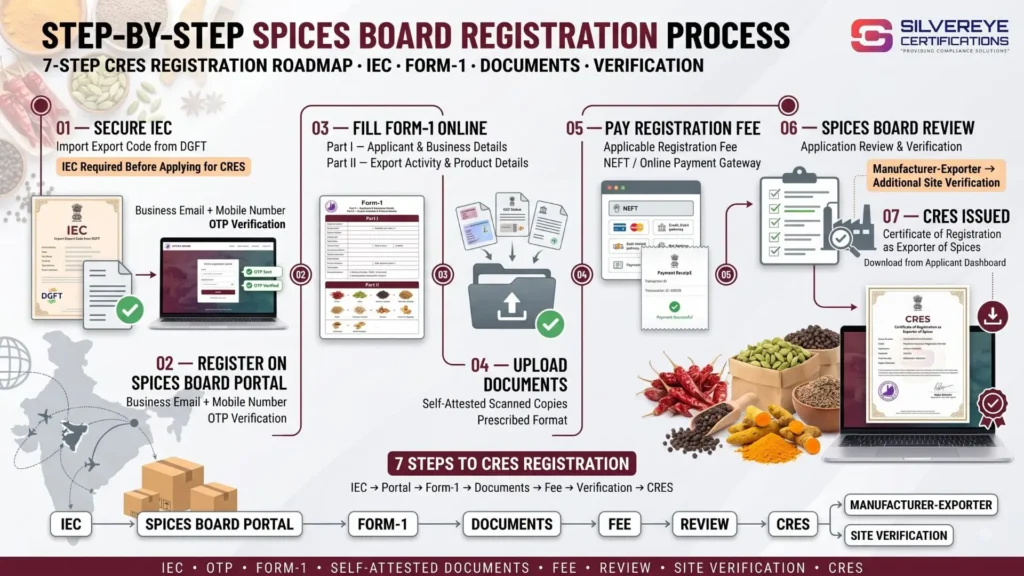
Spices Board Registration online refers to applying for the Certificate of Registration as Exporter of Spices (CRES) entirely through the Spices Board of India's digital portal, without visiting any regional office in person. After securing an IEC from DGFT, an applicant creates a portal login, fills Form-1 with business and export details, uploads self-attested documents, and pays the government fee online.
The Spices Board verifies the application digitally, adding a physical site visit only for manufacturer exporters where required. Once approved, the CRES certificate is generated and made available for download directly from the applicant's online dashboard.
How to Complete Spices Board Registration Online?
Spice exporters used to associate government registrations with physical office visits, paper forms, and waiting in queues. That's not how Spices Board Registration works anymore. The entire application — from your very first login to downloading the final CRES certificate — happens on the Spices Board's digital portal. This matters practically: an exporter based in Kerala, Rajasthan, or Andhra Pradesh can apply, track status, and receive their certificate without ever visiting Kochi, where the Spices Board is headquartered, or any of its regional offices.
That said, 'online' doesn't mean 'casual.' The portal still expects the same level of accuracy as any regulatory filing — correct IEC details, legible document scans, and a properly completed Form-1. The convenience is in the delivery, not in any relaxed standard for what gets accepted.
What You Need Ready Before You Start the Online Application
- A valid Import Export Code (IEC) from DGFT — this has to exist before the online Form-1 will let you proceed.
- A working email ID and mobile number for portal registration and OTP verification.
- Scanned, self-attested copies of your PAN, GST certificate, business constitution proof, bank certificate, address proof, and photograph.
- For manufacturer exporters: digital copies of your factory licence, Udyam/MSME certificate, and FSSAI licence.
- A payment method ready for the online government fee — net banking, UPI, or NEFT, depending on what the portal supports at the time.
Getting Started on the Spices Board Online Portal
Creating Your Portal Account
Registration on the portal starts with a simple sign-up — business email, mobile number, and password. Both contact details go through OTP verification, so make sure you have access to that email inbox and phone during setup, not just at the time you first register.
Understanding the Applicant Dashboard
Once logged in, your dashboard becomes the control centre for the entire online registration journey — this is where you fill Form-1, upload documents, make payment, track verification status, and eventually download your CRES certificate. Bookmark it; you'll return to this same dashboard for renewal years later.
Spices Board Registration Online: Step-by-Step
- Log in to your portal account and open Form-1 from your dashboard.
- Complete Part I with your business identity details — entity type, PAN, GST, IEC, and registered address.
- Complete Part II with your export activity details — the scheduled spices you plan to export and your exporter category.
- Upload each required document individually in the format and size specified by the portal.
- Review the auto-generated application summary before submitting — this is your last chance to catch a typo.
- Proceed to the online payment gateway and pay the applicable government fee for your exporter category.
- Submit the application and note your application reference number for tracking.
- Monitor your dashboard for verification updates, and respond promptly if the Spices Board raises a document query.
- Download your CRES certificate from the dashboard once the application is approved.
What Are the Online Fees for Spices Board Registration?
Payment happens mid-application, after your documents are uploaded and before final submission. The portal typically supports standard digital payment modes such as net banking, UPI, or NEFT — the exact options available can vary, so check what's shown at the time you apply.
| Exporter Category | Indicative Government Fee | GST | Payment Mode |
|---|---|---|---|
| Merchant Exporter | Around ₹5,000 | Charged Extra | Net Banking, UPI, or NEFT |
| Manufacturer Exporter | Around ₹10,000–₹15,000 | Charged Extra | Net Banking, UPI, or NEFT |
Note: Fees are indicative and may be revised periodically. Always confirm the current registration fee on the Spices Board portal at the time of application.
Always download or screenshot your online payment receipt — it's useful if you ever need to follow up on a delayed application.
How Can You Track Your Spices Board Registration Online?
- Your applicant dashboard shows real-time status — submitted, under scrutiny, query raised, or approved.
- If a document is unclear or a detail doesn't match, the portal will typically flag it as a query rather than an outright rejection, giving you a chance to correct and resubmit.
- Manufacturer exporters awaiting a site visit will usually see that step reflected as a distinct stage in their status timeline.
- Once approved, the status updates to reflect certificate issuance, and the download option becomes active on your dashboard.
Common Online Application Issues and How to Avoid Them
| Issue | Likely Cause | How to Avoid It |
|---|---|---|
| OTP not received | Registered mobile/email inactive or network delay | Use an active number and email you check regularly |
| Document upload failing | File exceeds size limit or wrong format | Compress scans and match the portal's accepted file types |
| Application stuck at 'query raised' | Mismatched details across documents | Cross-check names, addresses, and numbers before submission |
| Payment not reflecting | Gateway timeout or delayed bank confirmation | Wait a few hours, then check dashboard before repaying |
| Certificate not downloadable after approval | Browser or session issue | Refresh the dashboard or try a different browser |
Who Can Apply for Spices Board Registration Online?
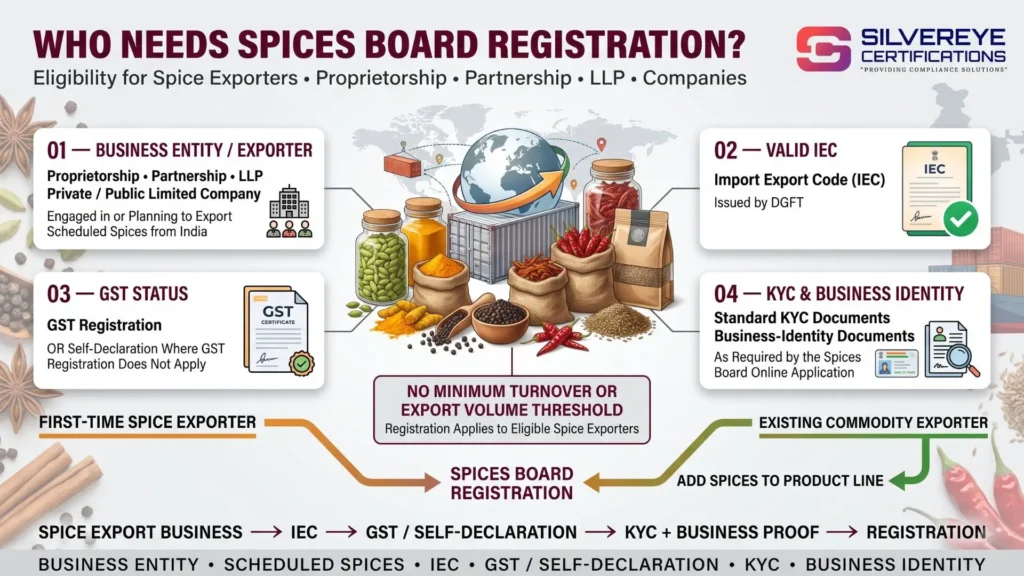
The online process is open to the same applicants as offline registration ever was — there's simply no offline route left to use. You can apply if you are:
- A proprietorship, partnership, LLP, or company exporting any of the 52 scheduled spices or their processed forms.
- In possession of a valid IEC from DGFT, or actively obtaining one.
- Able to provide GST records or a valid self-declaration where GST doesn't apply.
- Prepared with facility documents if registering as a manufacturer exporter.
Validity and Renewing Your CRES Online
Once issued, your CRES certificate is valid for 3 years. Renewal, just like the original registration, is handled entirely online — you log back into the same portal account, file Form-1 as a renewal referencing your existing CRES number, upload any updated documents, and pay the renewal fee. Starting this online renewal 2–3 months before expiry keeps your export activity uninterrupted.
Benefits of Registering Through the Online Portal
- No travel or in-person visits required, regardless of where in India your business is based.
- Full visibility into your application status at every stage, instead of waiting on phone calls or office visits.
- Digital document storage — your CRES and supporting records stay accessible from your dashboard for future reference.
- Faster turnaround overall compared to a manual, paper-based system, since scrutiny and communication both happen digitally.
How Silvereye Certifications Helps With Your Online Application
Even a fully online process has friction points — an upload that keeps failing, a query you're not sure how to respond to, or simply not knowing which document goes where in Form-1. Silvereye Certifications manages the entire Spices Board Registration online journey for exporters: setting up the portal account correctly, preparing and uploading documents in the right format, filing Form-1 accurately, handling the online payment step, and following through on any queries raised during verification. It's the difference between figuring the portal out yourself and having someone who already knows its quirks handle it for you.
Conclusion
Spices Board Registration online has genuinely simplified what used to be an office-visit-heavy process — everything from your first login to your final CRES download now happens on one portal. The trade-off is that you're on your own to get every field, upload, and payment step right, and a small mismatch can still slow things down even in a digital system.
If you'd rather not learn the portal's quirks through trial and error, Silvereye Certifications can handle your Spices Board Registration online journey from start to finish, helping you complete the application accurately and move through the process with fewer delays.
Frequently Asked Questions
Is Spices Board Registration completely online, or do I need to visit an office?
It's completely online — application, document upload, payment, and certificate download all happen through the Spices Board portal.
What's the first thing I need before applying online?
A valid Import Export Code (IEC) from DGFT; the online Form-1 requires this before you can proceed.
Can I pay the registration fee online?
Yes, the portal supports standard online payment modes such as net banking, UPI, or NEFT for the government fee.
How do I track my online application status?
Your applicant dashboard on the portal shows real-time status updates, from submission through to certificate issuance.
What if my document upload keeps failing online?
It's usually a file size or format mismatch — compress the scan and check it matches the portal's accepted format before retrying.
Will I receive my CRES certificate online too?
Yes, once approved, the CRES certificate is generated digitally and made available for download directly from your dashboard.
Is a site visit still required if the whole process is online?
Manufacturer exporters may still need a physical site verification even though the application itself is filed online; merchant exporters generally don't.
Can I renew my Spices Board Registration online as well?
Yes, renewal follows the same online process — logging into your existing account and filing a renewal Form-1 before your CRES expires.
What happens if I don't receive the OTP while registering online?
Check that your registered mobile number and email are active and check spam folders; a network delay is the most common cause and usually resolves on retry.
Is online registration available for both merchant and manufacturer exporters?
Yes, both categories apply through the same online portal, though manufacturer exporters submit a few additional facility-related documents.
Can someone else complete the online application for me?
Yes, many exporters have a compliance partner like Silvereye Certifications manage the entire online filing on their behalf.