

- IPDMS 2.0 is NPPA’s online portal for managing drug and medical device pricing data, available at nppaipdms.gov.in.
- Medical device companies must register separately on IPDMS 2.0, even if they already have an IPDMS 1.0 login for medicines.
- The process starts with company registration. After that, companies can add their manufacturing plants and medical device models before submitting the applicable pricing forms or information.
- No separate registration fee or expiry date is shown on the portal for basic registration. However, companies should ensure that their company, product, MRP and pricing information remains accurate and up to date.
Introduction
NPPA IPDMS 2.0 registration for medical device companies is the online process of creating a company account on nppaipdms.gov.in, selecting “Medical Device” as the product type, and then adding your plants and device models so you can submit the pricing forms and information required by NPPA under the DPCO.
For registration, you generally need details such as your CIN or LLPIN, GSTIN, PAN, office address, two contact persons, and supporting documents. Once the registration is completed, the login credentials are provided through email and mobile.

The portal currently shows no separate registration fee or expiry date for basic registration. However, companies must ensure that their company, plant, product, MRP and pricing information remains accurate and up to date.
Medical device companies need to register afresh on IPDMS 2.0, even if they already have an older IPDMS 1.0 account for medicines.
What is NPPA IPDMS 2.0 and why does registration matter?
IPDMS stands for Integrated Pharmaceutical Database Management System. The National Pharmaceutical Pricing Authority (NPPA) uses this online platform to collect and manage pricing and product information from companies. IPDMS 2.0 is the newer version of the system and covers information related to pharmaceutical products and medical devices.
For a medical device company, NPPA IPDMS 2.0 registration creates a company account through which the company can provide information about its business, plants, products and pricing. NPPA can use this information for price monitoring and regulatory compliance under the applicable provisions of the Drugs (Prices Control) Order, 2013 (DPCO).
IPDMS 2.0 is therefore an important part of a company's pricing-compliance process. However, registration on the portal does not mean that NPPA has approved your medical device for sale.
What is IPDMS 2.0 registration?
IPDMS 2.0 registration is not a medical device licence or product approval. Manufacturing and import permissions for medical devices are handled under the applicable Medical Devices Rules, 2017 through the CDSCO regulatory framework.
Similarly, IPDMS registration should not be confused with compliance with specific NPPA pricing requirements, such as applicable ceiling prices or the Paragraph 20 limit for non-scheduled medical devices. Those requirements depend on the product and the applicable pricing orders.
Who must complete IPDMS 2.0 registration?
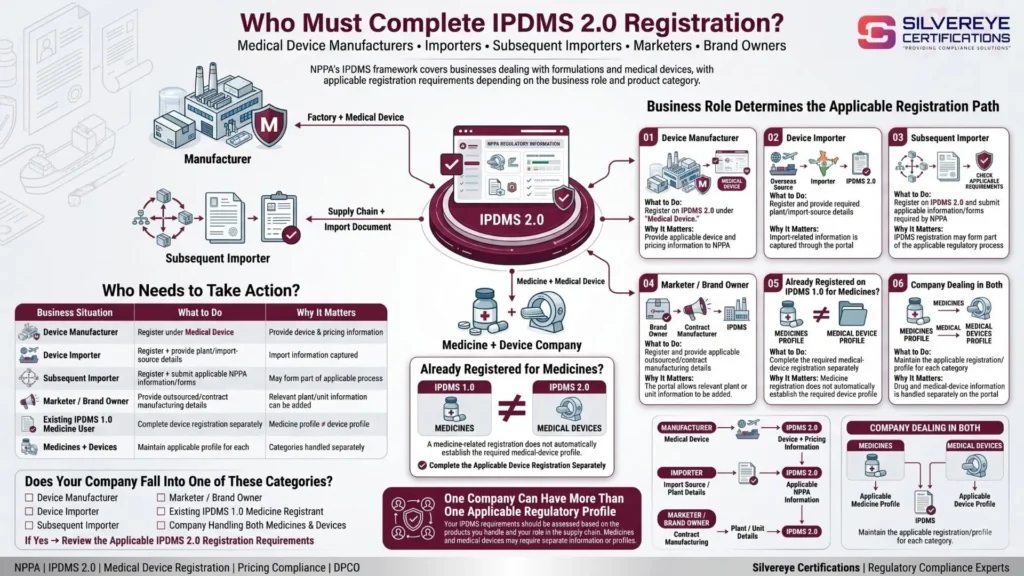
NPPA requires companies dealing with formulations and medical devices to register on IPDMS 2.0. For medical device businesses, the registration requirement can apply to different types of companies.
| Your situation | What to do | Why it matters |
|---|---|---|
| Device manufacturer | Register on IPDMS 2.0 under “Medical Device” | The company needs to provide its device and pricing information to NPPA |
| Device importer | Register and provide the required plant/import-source details | Import-related information is captured through the portal |
| Subsequent importer | Register on IPDMS 2.0 and submit the applicable information/forms required by NPPA | IPDMS registration may be required as part of the applicable regulatory process |
| Marketer or brand owner | Register and provide applicable outsourced/contract manufacturing details | The portal allows relevant plant or unit information to be added |
| Company already registered on IPDMS 1.0 for medicines | Complete the required medical device registration separately | Registration for medicines does not automatically establish the required device profile |
| Company dealing in both medicines and devices | Maintain the applicable registration/profile for each category | Drug and medical device information is handled separately on the portal |
If you receive a specific NPPA notice, follow the deadline and instructions mentioned in that notice. Some notices may require companies to complete registration or submit information within a specified period.
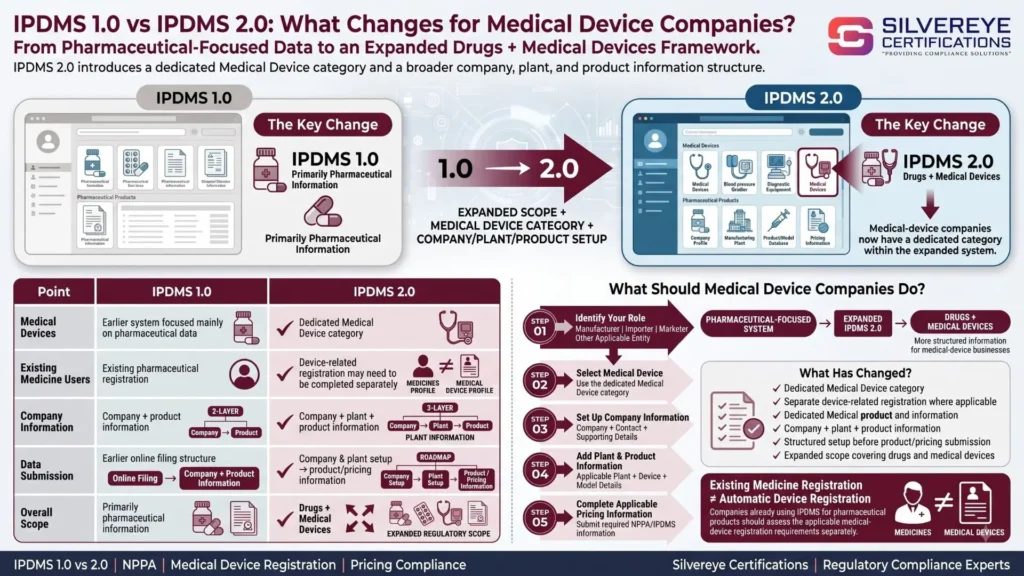
IPDMS 1.0 vs IPDMS 2.0: What changes for medical device companies?
| Point | IPDMS 1.0 | IPDMS 2.0 |
|---|---|---|
| Medical devices | Earlier system focused mainly on pharmaceutical data | Includes a dedicated Medical Device category |
| Existing medicine users | Existing registration for pharmaceutical products | Device-related registration may need to be completed separately |
| Company information | Company and product information | Company, plant and product information |
| Data submission | Earlier online filing structure | Company and plant setup followed by applicable product/pricing information |
| Overall scope | Primarily pharmaceutical information | Covers drugs and medical devices |
What are the benefits of completing IPDMS 2.0 registration early?
- Easier response to NPPA notices: If NPPA asks your company to register or submit information within a specific deadline, having the account and basic data ready can make the process easier.
- Organised product information: Keeping your company, plant and device details properly organised can reduce errors during later submissions.
- Faster pricing filings: Having your device models, MRP and related information prepared can make future pricing-related submissions more efficient.
- Better record management: Maintaining consistent company and product information helps you keep your pricing and compliance records organised.
- Reduced compliance risk: Timely registration and accurate information can help avoid unnecessary queries or delays from NPPA.
What are the eligibility requirements for IPDMS 2.0 registration?
There is no separate examination or qualification test for IPDMS 2.0 registration. Companies falling within the applicable NPPA registration requirements can create an account through the portal.
The registration process generally requires:
- Corporate entities: CIN or LLPIN, GSTIN and PAN.
- Non-corporate entities: GSTIN and PAN.
- Valid email ID and mobile number for communication and login credentials.
- Head or corporate office address.
- Details of the primary and alternative contact persons.
- Supporting documents as required during registration.
The person completing the registration should also have proper authorisation to act on behalf of the company.
What should you keep ready before IPDMS 2.0 registration?
Although the initial registration form is relatively straightforward, preparing your information in advance can make the process smoother.
| Level | What to prepare | Where it is used |
|---|---|---|
| Company | Legal name, CIN/LLPIN, GSTIN, PAN, incorporation details, office address, phone and email | Company registration |
| People | Primary and alternative contact person details, including email and mobile | Registration and communication |
| Documents | Supporting documents required by the portal; keep incorporation, GST, PAN and authorisation documents ready | Document upload |
| Plants | Manufacturing units, contract/outsourced units, loan-license units and applicable import-source details | Plant registration |
| Products | Device names, model numbers and relevant product/pricing information | Product and pricing submissions |
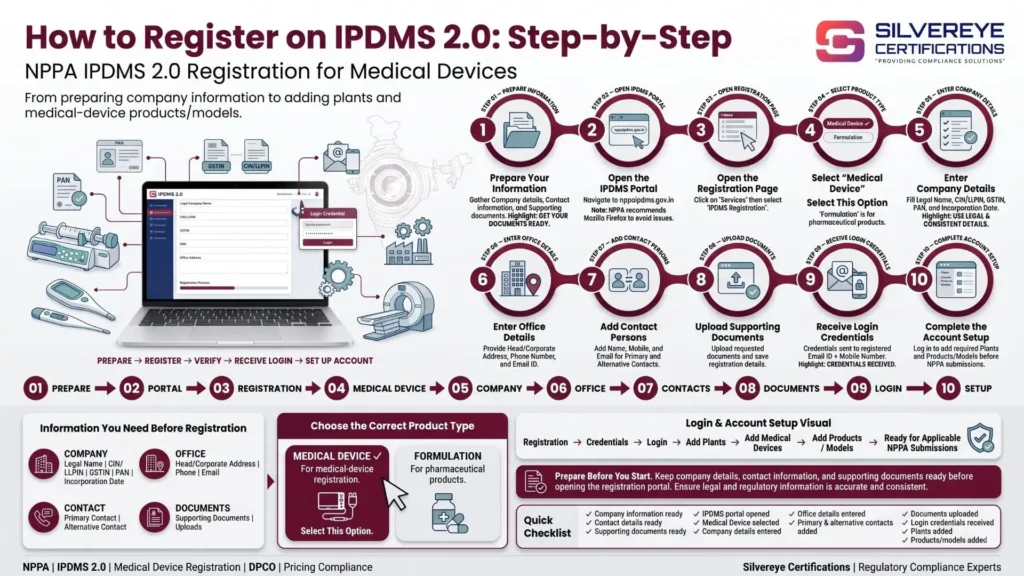
How to Register on IPDMS 2.0: Step-by-Step
Follow these steps to complete NPPA IPDMS 2.0 registration for medical devices:
- Prepare your information: Keep your company details, contact details and supporting documents ready.
- Open the IPDMS portal: Visit nppaipdms.gov.in. NPPA's user guide recommends Mozilla Firefox, so using it may help avoid browser-related issues.
- Open the registration page: Go to Services → IPDMS Registration.
- Select the product type: Choose “Medical Device.” The “Formulation” option is for pharmaceutical products.
- Enter company details: Provide the legal company name, CIN/LLPIN, GSTIN, PAN and incorporation date, as applicable.
- Enter the office details: Add the head/corporate office address, phone number and email ID.
- Add contact persons: Enter the details of the primary contact person and alternative contact person.
- Upload supporting documents: Upload the documents requested on the portal and save the registration details.
- Receive login credentials: The login details are provided through the registered email ID and mobile number, as applicable.
- Complete the account setup: Log in and add the required plants and medical device products/models before submitting the applicable forms or information required by NPPA.
What to Do After IPDMS 2.0 Registration?
Company registration only creates your IPDMS account. You may also need to complete your plant and product information before submitting applicable forms.
NPPA's guidance indicates that company details, plant details and product details need to be verified or updated before proceeding with form submission.
How to Add Plants on IPDMS 2.0
A plant on IPDMS is not limited to your own manufacturing factory. Depending on the applicable setup, it can include manufacturing, outsourcing, contract or loan-licence units. For importers, each country of import may be entered as a plant as directed by the portal.
| Plant Type | Use It For |
|---|---|
| Manufacturing | Your own manufacturing facility |
| Import | Applicable country from which you import medical devices |
| Purchase/Outsource Contractual | Contractual or outsourced manufacturing arrangements |
| Outsource Loan Licence | Units operating under a loan-licence arrangement |
To add a plant, go to the relevant Company Detail section, select Add Plant, enter the required information and save it.
How to Add Medical Devices or Models
After setting up the plant information, add the applicable medical device products and model numbers.
If the required device is available in the portal's product list, select it from the relevant option. If it is not available, use the “Others” option where provided and enter the required details manually.
For device companies, it is better to maintain clear model-wise product information rather than combining multiple models into one generic entry when separate model details are required.
Important: If you cannot access or submit a particular form, first check whether the required company, plant and product information has been completed and verified.
Which IPDMS Forms Apply to Medical Device Companies?
NPPA's general IPDMS guide describes the following forms:
| Form | Purpose Described by NPPA |
|---|---|
| Form I | Application for a new drug |
| Form II | Submission of a revised price for scheduled formulations |
| Form III | Quarterly return of production or sale for scheduled formulations and APIs |
| Form IV | Application for discontinuation of scheduled formulations |
| Form V | Submission of the price list for scheduled and non-scheduled formulations |
These descriptions are primarily written for formulations. Therefore, medical device companies should not assume that every IPDMS form automatically applies to every device.
For medical devices, the safest approach is to follow the specific form, notification or NPPA communication applicable to your product. For example, certain device-specific pricing directions have required companies to submit Form V through IPDMS.
If your NPPA notification or letter specifies a particular form or filing method, follow that direction.
What Are the IPDMS 2.0 Registration Fees, Validity and Renewal Requirements?
| Item | Government Fee | Validity | Renewal / Update |
|---|---|---|---|
| Medical Device company registration | No separate fee shown on the registration page reviewed | No expiry date stated | No separate renewal certificate identified; keep information updated |
| Login credentials | No fee shown | No fixed validity period published | Contact the relevant support/helpdesk if access problems occur |
| Plant and product entries | No fee shown | Remain part of the account until updated | Update when relevant business or product details change |
| Applicable form filings | No fee shown | Depends on the applicable requirement or direction | Submit updated information when required |
| Consultant professional fee | Not fixed by law | Depends on the engagement | Optional; may be charged per filing or under a retainer |
Based on the information reviewed, IPDMS 2.0 registration does not work like a licence that requires periodic renewal. However, companies should keep their company, plant, product, MRP and pricing information accurate and current.
If a third party claims that a mandatory registration fee or fixed renewal fee applies, ask for the relevant NPPA notification or official portal instruction supporting that claim.
How Long Does IPDMS 2.0 Registration Take?
NPPA does not appear to publish a fixed end-to-end processing timeline for IPDMS 2.0 registration. The actual time can depend on how complete your information is and how many plants and products need to be added.
| Stage | Indicative Time | What Affects It? |
|---|---|---|
| Collecting information and documents | 1–3 working days* | Availability and accuracy of records |
| Completing the registration form | About 1 working day* | Accuracy of company and contact details |
| Receiving login credentials | Not officially published | Portal processing and registered contact details |
| Adding plants and products | Depends on the company | Number of units, countries and device models |
| Responding to an NPPA notice | As specified in the notice | Deadline mentioned in your individual NPPA communication |
The first two timeframes are practical planning estimates, not official NPPA timelines.
If NPPA has sent your company a notice with a specific deadline, always follow the exact date mentioned in that communication. A 15-day deadline may apply to a particular notice, but it should not be treated as a universal IPDMS processing timeline.
Who Should Own IPDMS 2.0 Registration Inside Your Company?
IPDMS 2.0 registration should have a clear internal owner rather than being left with one employee without backup. Different teams can support the process depending on their responsibilities.
| Team | Role in the Process |
|---|---|
| Regulatory Affairs | Owns the account, coordinates applicable filings and tracks NPPA notices |
| Finance or Pricing | Provides MRP and pricing history and reviews proposed price changes |
| Operations or Supply Chain | Confirms manufacturing plants, contract units and applicable import countries |
| IT or Administration | Ensures the registered email and mobile number remain active and accessible |
| Management | Provides required authorisation and handles important escalations |
IPDMS 2.0 Registration Checklist Before You Submit
Use this checklist before submitting your registration or completing your account setup:
| Check | Why It Matters |
|---|---|
| Legal name matches PAN, GST and CIN/LLPIN | Helps maintain consistent company records |
| Product type is set to “Medical Device” | Medical devices and formulations are separate categories |
| Email and mobile number are active | They are used for registration and communication |
| Primary and alternative contacts are entered | Both contact details may be required during registration |
| All applicable plants and units are added | Plant information may be required before applicable filings |
| Applicable import countries are entered | Import-related plant information needs to be maintained correctly |
| Device names and model numbers are prepared | Helps maintain accurate product records |
| Current MRP and pricing history are available | Useful for applicable pricing filings and compliance reviews |
What Are the Common IPDMS 2.0 Registration Problems?
| Problem | Likely Cause | What to Do |
|---|---|---|
| Medical device option is not visible | Incorrect product category selected | Check that “Medical Device” is selected during registration |
| Login credentials are not received | Incorrect or inactive email/mobile number | Check inbox and spam folders and contact the IPDMS support channel if required |
| A form cannot be opened | Required plant or product information may be incomplete | Complete and verify the required company, plant and product setup |
| Device is missing from the product list | Device is not available in the displayed list | Use “Others” where the portal provides this option and enter the required details |
| Medicine login does not show device options | Device registration is handled separately | Complete the applicable Medical Device registration |
| Portal does not work properly | Browser or technical compatibility issue | Try Mozilla Firefox, as recommended in NPPA's user guidance |
| Not sure which form to submit | General form descriptions may focus on formulations | Follow the specific NPPA notification, letter or direction applicable to your device |
What Happens If You Delay IPDMS 2.0 Registration?
If your company falls within NPPA's applicable registration or filing requirements, delaying registration can create compliance risks, particularly when NPPA has specifically directed the company to register or submit information.
Depending on the circumstances, NPPA may seek information, issue a notice, review company records or take further action under the applicable pricing regulations and law.
This is why companies should not wait until they receive a notice to organise their company, plant, product and pricing information. Completing the applicable registration and keeping the information updated can make future NPPA filings and responses much easier.
When Should You Hire an IPDMS 2.0 Registration Consultant?
The basic IPDMS 2.0 registration process can often be completed by the company itself. However, professional assistance can be useful when the business has multiple products, plants, import sources or complex pricing requirements.
A consultant may be useful if:
- You have many device models, plants or import countries to add.
- You deal with different types of medical device pricing requirements.
- You have received an NPPA notice and need to respond within a specified deadline.
- You are a new importer, manufacturer or brand owner and are unsure about the applicable process.
- You want ongoing support for IPDMS filings, pricing reviews and regulatory updates.
| Service | What You Receive |
|---|---|
| Applicability assessment | Review of your business role and applicable IPDMS requirements |
| Account setup | Assistance with registration under the Medical Device category |
| Plant and product setup | Assistance with adding applicable units, import sources and device models |
| Form preparation and filing | Support with applicable NPPA submissions |
| NPPA notice response | Assistance in preparing the required response and supporting filings |
| Ongoing compliance review | Review of plants, products, MRP and applicable NPPA pricing requirements |
How Should You Choose an IPDMS 2.0 Consultant?
Before hiring a Silvereye Certifications consultant, consider the following:
- Ask for a clear written scope of work covering the registration and filings included.
- Check the consultant's experience with NPPA, DPCO and medical device compliance.
- Ask who will actually handle your registration and future filings.
- Avoid anyone offering “guaranteed approval” because IPDMS registration is a data-registration and filing process, not a product approval.
- Prefer consultants who work from current NPPA notifications, orders and official guidance.
- Ask whether they provide support after registration, including product updates, pricing changes and NPPA notices.
Need Help With IPDMS 2.0 Registration?
If you need assistance with NPPA IPDMS 2.0 registration, keep your legal entity details, plant or import information, device/model list and any NPPA notice ready. These details can be reviewed to determine the applicable registration steps, information to be filed and relevant deadlines.
Frequently Asked Questions
What is NPPA IPDMS 2.0 registration for medical device companies?
It is the online registration of your company on NPPA’s IPDMS 2.0 portal under the Medical Device category, followed by listing your plants and products so you can file pricing forms.
Is IPDMS 2.0 registration mandatory for medical device companies?
Yes. NPPA states that companies dealing in medical devices are required to register on IPDMS 2.0, and its letters to device companies have set a 15-day period to do so.
I already have an IPDMS 1.0 login for medicines. Do I need a new registration for devices?
Yes. NPPA says device companies must register afresh, and companies with both medicines and devices should register separately in each category.
Where do I complete IPDMS 2.0 registration?
Go to nppaipdms.gov.in, choose Services and then IPDMS Registration. NPPA’s guide suggests using Mozilla Firefox.
What documents do I need?
CIN or LLPIN for corporates, GSTIN, PAN, incorporation date, head office address, two contact persons and supporting documents uploaded on the portal.
Is there a fee for IPDMS 2.0 registration?
No government fee appears on the registration page we reviewed. Confirm on the portal when you file.
Does IPDMS 2.0 registration expire?
We found no stated expiry or renewal date. Keep your company, plant and product details up to date and file again when prices change.
How do I receive my IPDMS 2.0 login after registration?
NPPA sends login credentials to the email ID and mobile number you registered, so enter both carefully.
What is a "plant" on IPDMS?
It is any unit linked to your products: your factory, a sub-contracting or outsourcing unit, a loan-licence unit, or each country you import from.
Why can I not file a form after registering?
The usual cause is that plants and products have not been added or verified. NPPA’s guide treats them as prerequisites to filing.
Which form should a device company file?
The one named in your NPPA letter or notification. The portal wording refers to formulations, and NPPA has required Form V in earlier device orders such as coronary stents.
What if my device is not in the product drop-down?
Choose "Others" and enter the device details manually before saving.
Who can I contact if the portal does not work?
NPPA lists a helpdesk email on the IPDMS login page: nppa-ipdms@gov.in. Share your company name and a clear description of the problem.
Is IPDMS registration the same as a CDSCO license?
No. CDSCO decides whether you may make, import or sell a device. IPDMS is for pricing and market data under the DPCO. You usually need both.
Can a consultant register on my behalf?
Yes, many companies use one. You stay responsible for the accuracy of the data, so review everything before it is filed.