

- ICEGATE registration for exporters in Tamil Nadu is completed online through the official ICEGATE portal. Registration itself carries no portal fee and enables eligible exporters to access electronic Customs services, including Shipping Bill filing through the applicable systems.
- Before applying, prepare your IEC, GSTIN, PAN details, authorization documents, and authorized signatory's DSC, where required. You should also have the relevant bank-account details ready for export-related procedures.
- After registration, exporters should check the requirements for AD Code and bank-account registration for their intended port. Correct bank details help ensure export documentation and eligible payment or incentive processes are handled appropriately.
- Tamil Nadu exporters may ship through Chennai, V.O. Chidambaranar Port (Tuticorin), or other applicable Customs locations. The ICEGATE registration process is national, but port-specific procedures and Customs jurisdiction depend on where the cargo is handled.
Introduction
ICEGATE registration for exporters in Tamil Nadu involves creating an account on the official ICEGATE portal to access electronic Customs services, including Shipping Bill filing and tracking relevant export-clearance updates.
Before applying, prepare your active Importer Exporter Code (IEC), GSTIN details, PAN, authorisation documents, and authorised signatory's Digital Signature Certificate (DSC), where required. Keep your bank-account details ready for the related export procedures.

After ICEGATE registration is approved, exporters should complete the applicable AD Code and bank-account registration process for their intended port. These details support export documentation and the processing of eligible refunds or drawback claims. Requirements may vary, so confirm the current procedure before filing a Shipping Bill.
ICEGATE registration itself carries no portal registration fee. Tamil Nadu exporters can use the relevant Customs facilities for shipments through Chennai, V.O. Chidambaranar Port (Tuticorin), or another applicable port. While ICEGATE registration follows the same national process, port-specific procedures depend on where the cargo is handled.
Why Exporters in Tamil Nadu Need ICEGATE Registration
If you export goods from India, you generally need a Shipping Bill for customs clearance. Shipping Bills are filed electronically through the relevant Customs systems, including ICEGATE, the portal operated by the Central Board of Indirect Taxes and Customs (CBIC).
ICEGATE registration for exporters in Tamil Nadu helps eligible exporters access electronic Customs services, submit or monitor export documentation, and track relevant clearance updates. Depending on the applicable procedure, the process also involves obtaining the Let Export Order (LEO), which authorizes the goods to be exported after Customs clearance requirements have been met.
After registration, exporters can use the available portal services to check Shipping Bill status, access relevant export documents, and monitor eligible refund or incentive-related transactions, including IGST refunds and duty drawback.
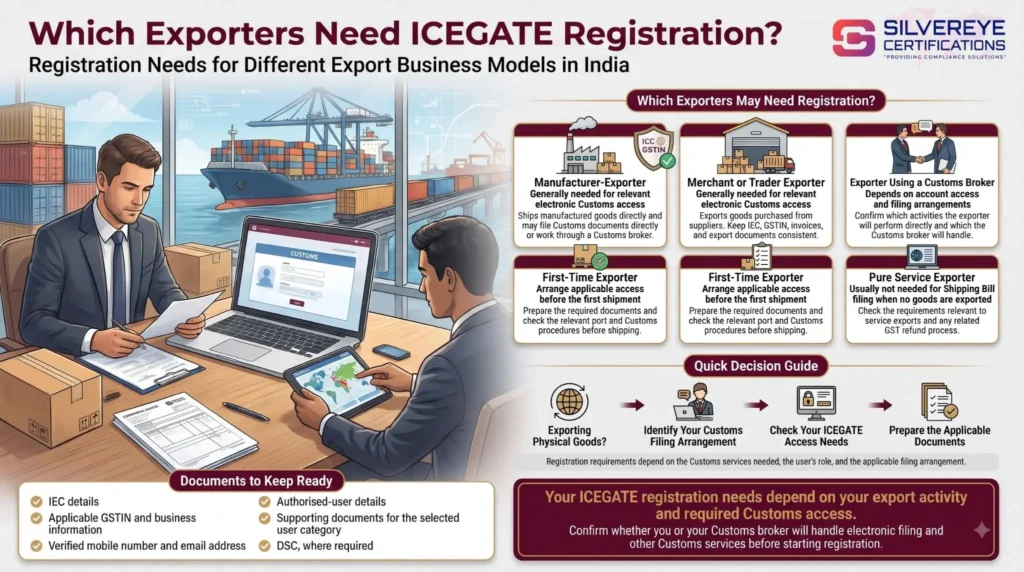
Which Exporters Need ICEGATE Registration?
The need for ICEGATE registration depends on the export activity and the electronic Customs services the business must access.
| Type of exporter | Is ICEGATE registration needed? | Important considerations |
|---|---|---|
| Manufacturer-exporter shipping goods | Generally, yes, for relevant direct electronic Customs access | May file directly or work through a Customs broker |
| Merchant or trader exporter | Generally, yes, for relevant electronic Customs access | Keep IEC, GSTIN, invoices, and export documentation consistent |
| Exporter using a Customs broker | Depends on the required account access and filing arrangement | Confirm which activities the exporter and broker will handle |
| First-time exporter | Should arrange the applicable registration before the first shipment | Prepare the required documents and check port-specific procedures |
| Pure service exporter | Usually not for Shipping Bill filing when no goods are exported | Check the requirements applicable to service exports and any related GST refund process |
Tamil Nadu has a broad export base, including textiles and apparel, leather products, engineering goods, and automobile components. Businesses across these sectors can use the applicable Customs systems when exporting physical goods. The core ICEGATE registration process is national rather than sector-specific.
Benefits of ICEGATE Registration for Exporters in Tamil Nadu
ICEGATE provides electronic access to relevant Customs services, helping exporters manage documentation and monitor transactions.
- Electronic Customs filing: Access the applicable systems for filing Shipping Bills and other required export documents.
- Clearance status tracking: Monitor relevant Shipping Bill and export-clearance updates through available portal services.
- Shipping Bill access: Retrieve relevant Shipping Bill details and documents for record-keeping and eligible claims.
- Refund and incentive monitoring: Track relevant information relating to eligible IGST refunds, duty drawback, and other applicable export benefits.
- Bank-detail coordination: Maintain the appropriate bank and AD Code information for applicable export procedures and eligible payments.
- User access management: Use supported child-user features to provide access to authorised employees or representatives.
- Improved record-keeping: Maintain more organised electronic records for export documentation and compliance checks.
The availability of specific features depends on the export scheme, the user's registration category, and the applicable Customs procedure.
Eligibility and Requirements for ICEGATE Registration for Exporters in Tamil Nadu
Exporters should check the requirements applicable to their business and intended Customs activities before starting the registration process.
- Active IEC: An Importer Exporter Code issued by DGFT is generally required for businesses exporting goods commercially.
- GSTIN details: Keep the applicable GSTIN information ready and confirm that relevant business details are consistent with the IEC records.
- Bank-account details: Prepare the bank details required for the applicable export and payment procedures.
- AD Code information: Obtain the required AD Code documentation from your authorised dealer bank and confirm the registration procedure for the intended port.
- Authorised signatory: Identify the person authorised to represent the business.
- Authorisation letter: Prepare the required authorisation document where applicable.
- Digital Signature Certificate (DSC): Meet the DSC requirements for the selected registration route and intended activities.
- Accessible contact details: Ensure that the registered mobile number and email address are available for OTP verification.
Important: IEC holders should comply with the applicable DGFT confirmation and update requirements. Check the current IEC status before starting the registration or export process.
Documents Required for ICEGATE Registration for Exporters in Tamil Nadu
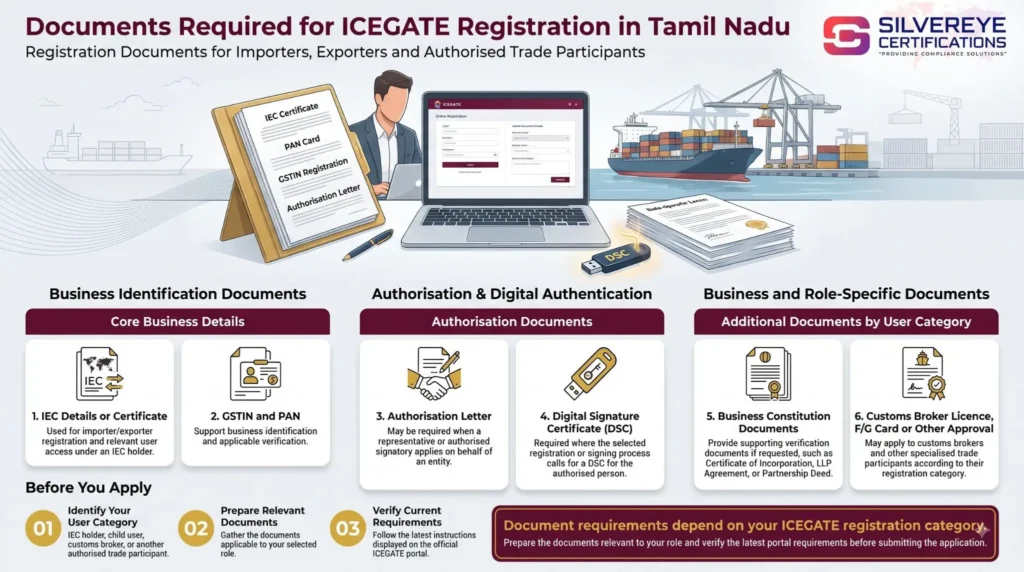
Prepare the documents relevant to your registration category and export activities. Some documents may be required for ICEGATE registration, while others apply to subsequent export or bank-detail registration procedures.
| Document or detail | Purpose | Exporter tip |
|---|---|---|
| IEC certificate or IEC details | Identifies the exporter registered with DGFT | Check that the IEC is active and the details are accurate |
| GSTIN and PAN details | Supports applicable verification and business identification | Check consistency across the relevant records |
| Authorisation letter | Establishes the authority of the person acting for the business, where required | Follow the current role-specific instructions for signatures and format |
| DSC of the authorised person | Supports digital authentication where required | Confirm the certificate requirements and test the signing setup |
| Business constitution proof | May be requested to verify the entity | Keep the applicable incorporation certificate, LLP agreement, or partnership deed available |
| Bank AD Code letter | Supports the applicable AD Code registration process | Confirm the required bank letter format and port-specific procedure |
For a role-wise checklist and common documentation issues, read our Documents Required for ICEGATE Registration guide.
The Exporter's Journey: From IEC to Incentives After ICEGATE Registration
For exporters in Tamil Nadu, ICEGATE registration is one stage in preparing for electronic Customs filing. The overall process includes business registration, bank coordination, account setup, Shipping Bill filing, Customs clearance, and monitoring eligible export incentives.
| Stage | What you need to do | Where |
|---|---|---|
| 1. IEC and GSTIN | Obtain an active IEC and keep the relevant GSTIN details accurate | DGFT and GST portals |
| 2. Bank preparation | Open a suitable business bank account and obtain the AD Code documentation required for your export procedure | Authorised dealer bank |
| 3. DSC | Obtain a compliant Digital Signature Certificate if required for your registration route and filing activities | Licensed Certifying Authority |
| 4. ICEGATE registration | Complete the applicable registration process and monitor your application | ICEGATE portal |
| 5. AD Code and bank details | Complete the applicable port-related or online bank-detail registration process | ICEGATE and the relevant Customs location, as applicable |
| 6. Shipping Bill filing | File the Shipping Bill yourself or arrange filing through an authorised Customs broker | Applicable electronic Customs system |
| 7. Customs clearance | Complete the required checks and obtain the Let Export Order (LEO) when authorised by Customs | Relevant Customs location |
| 8. Incentives and refunds | Monitor eligible duty drawback, RoDTEP, and IGST refund transactions | ICEGATE and other relevant government portals |
Each stage has its own requirements. Confirm the latest bank-detail registration procedure and export-scheme conditions before making your first shipment.
ICEGATE Registration for Exporters in Tamil Nadu: Steps-by-Steps Process
Follow these general steps to apply for ICEGATE registration as an exporter.
| Step | What you need to do |
|---|---|
| 1. Open the portal | Visit icegate.gov.in and select the appropriate registration option |
| 2. Select your role | Choose the applicable Importer/Exporter or IEC-holder registration category |
| 3. Verify IEC and GSTIN | Enter the requested IEC details and select the relevant GSTIN, where applicable |
| 4. Verify contact details | Check the mobile number and email address available for verification |
| 5. Complete OTP verification | Enter the requested OTPs according to the portal's instructions |
| 6. Save your Reference ID | Record the Reference ID if generated and resume the application within the permitted period |
| 7. Complete the registration form | Enter the organisation and authorised-user details and upload the required documents |
| 8. Complete DSC authentication | Register or authenticate the authorised person's DSC where required |
| 9. Submit and monitor | Submit the application and follow the approval or rejection instructions provided by ICEGATE |
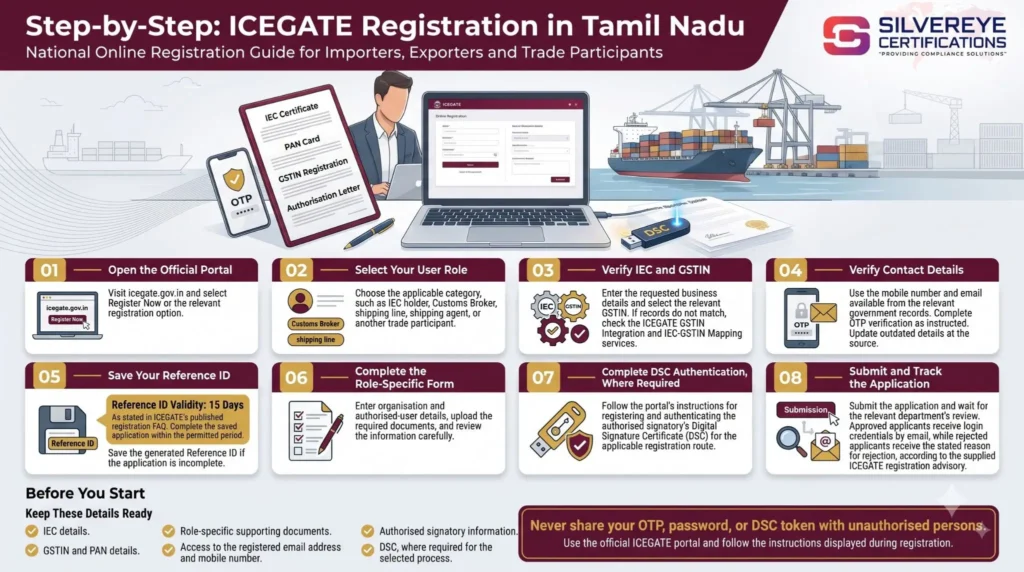
If the portal cannot match your IEC and GSTIN, check the official GSTIN Integration and IEC-GSTIN Mapping services before proceeding.
For the detailed walkthrough, read our ICEGATE Registration Process guide.
AD Code Registration on ICEGATE: An Important Step for Exporters
ICEGATE registration gives exporters access to electronic Customs services, while AD Code and bank-account registration support the applicable export-filing and payment procedures.
An AD Code is associated with the authorised dealer bank handling the exporter's foreign-exchange transactions. Exporters should obtain the required bank documentation and confirm how their bank details must be registered for the intended port and export scheme.
How to Prepare for AD Code Registration
- Obtain the bank letter: Request the required AD Code documentation from your authorised dealer bank.
- Complete ICEGATE registration: Make sure your account is active and you can access the relevant services.
- Follow the applicable registration process: Use the current ICEGATE procedure for registering the AD Code or bank account, as applicable.
- Check the bank details: Ensure the account number, IFSC, IEC, and other requested information match the supporting records.
- Confirm port requirements: Check whether any additional port-specific formalities apply to your intended export location.
- Update changed bank details: If your account changes, follow the applicable update procedure to avoid problems with eligible export payments or incentives.
Do not assume that every AD Code or bank-detail registration follows the same port-wise rule. Confirm the current procedure with ICEGATE, your bank, or the relevant Customs location before filing your first Shipping Bill.
Tamil Nadu Ports and Customs Offices for Exporters
Tamil Nadu exporters use different Customs locations depending on whether their cargo moves by sea, air, or through another designated facility.
| Location or cargo route | Relevant Customs setup | What exporters should check |
|---|---|---|
| Chennai sea exports | Relevant Chennai Sea Customs export formation | Confirm the Customs location applicable to the terminal handling the shipment |
| Chennai air exports | Air Cargo Customs, Meenambakkam | Check the applicable air-cargo filing and clearance procedures |
| Tuticorin sea exports | Commissionerate of Customs, Tuticorin | Confirm the requirements for cargo handled through V.O. Chidambaranar Port and relevant facilities |
| Interior Tamil Nadu | Relevant Customs formation based on the cargo route | Verify the applicable jurisdiction rather than relying only on the business address |
| Kamarajar and Kattupalli ports | Relevant Customs formation assigned to the terminal | Confirm the current Customs jurisdiction and filing requirements |
Customs formations and jurisdictional boundaries can change through official notifications. Confirm the current position with CBIC or the relevant Customs office before filing.
Your ICEGATE registration is not limited to the city where you applied. The applicable Customs location and filing procedure depend on the transaction, cargo route, and relevant system requirements.
After Registration: Tracking, Downloads, and Refunds
Once you begin exporting, use the available electronic services to monitor your Customs documents and related transactions.
- Check Shipping Bill status: Use ICEGATE's Public Enquiry service to check relevant document details and status. The official portal lists Public Enquiries 2.0, with a user manual dated 5 February 2026.
- Access export documents: Use the available document-download services when you need Shipping Bill records for business or compliance purposes.
- Monitor refunds and incentives: Track eligible IGST refunds, duty drawback, and RoDTEP-related transactions through the relevant portal services.
- Keep bank details accurate: Verify that the required bank-account information is registered correctly for the applicable export procedure.
- Maintain consistent records: Check that Shipping Bill information, export invoices, GST returns, and other required documents are consistent where applicable.
A Customs broker may manage routine Shipping Bill filing on your behalf. However, maintaining access to the appropriate ICEGATE services helps your business monitor records and follow up on issues.
How Long Does ICEGATE Registration for Exporters in Tamil Nadu Take?
ICEGATE does not guarantee a fixed approval period for every application. The time required depends on document readiness, successful verification, the registration category, and any queries raised during review.
| Phase | What affects the time required | How to reduce delays |
|---|---|---|
| IEC, bank documents, and DSC preparation | Bank processing, certificate issuance, or incomplete records | Prepare the required documents in advance |
| Online verification and OTPs | Outdated contact details or unsuccessful verification | Ensure your registered mobile number and email are accessible |
| Registration form and uploads | Missing information or unclear documents | Check all fields and upload legible supporting documents |
| ICEGATE application review | Name, PAN, IEC, or authorisation mismatches | Keep the relevant business records consistent |
| AD Code or bank-detail registration | Incorrect bank details or additional verification | Confirm the latest process with your bank and the relevant portal |
Any estimated timeline provided by a consultant should be treated as a guideline, not an official service guarantee. AD Code registration and Customs clearance may require additional time beyond ICEGATE account approval.
ICEGATE Registration for Exporters in Tamil Nadu: Fees
There is no government registration fee for creating an ICEGATE user account. However, exporters may incur costs for related services, documentation, and professional assistance.
| Cost item | Who charges | Cost consideration |
|---|---|---|
| ICEGATE registration | CBIC / ICEGATE | No registration fee |
| DSC and USB token, where required | Licensed Certifying Authority or provider | Varies by certificate type and validity |
| IEC application, if required | DGFT | Applicable government fee |
| Current account and bank documentation | Your bank | Depends on the bank's account terms and service charges |
| Optional consultant or Customs broker assistance | Service provider | Depends on the scope of work |
Before hiring a service provider, request a written quotation that separates bank charges, DSC costs, applicable government fees, and professional service fees.
Validity and Renewal of ICEGATE Registration for Exporters in Tamil Nadu
ICEGATE account registration should be distinguished from the validity of the credentials and business registrations associated with the account. Exporters should keep their account details accurate and ensure that time-limited credentials remain valid.
| Element | What to check | Recommended action |
|---|---|---|
| ICEGATE registration ID | Account status and profile details | Keep business, authorized signatory, and contact information current |
| DSC | Certificate expiry date | Renew before expiry and follow the applicable ICEGATE update procedure |
| IEC | Current status and applicable DGFT requirements | Complete the required confirmation or update process within the prescribed period |
| GSTIN | Active registration status | Address suspension, cancellation, or incorrect details where applicable |
| AD Code and bank details | Current registered bank information and applicable port requirements | Follow the relevant update procedure when bank or account details change |
Important Renewal and Update Tasks
| Task | When to do it | Action |
|---|---|---|
| DSC renewal | Before the certificate expires | Renew through the Certifying Authority and update the certificate on ICEGATE if required |
| Bank-account or AD Code update | When bank details change | Follow the applicable registration process and provide updated bank documentation |
| Authorised signatory change | When the authorised person changes | Update user details and submit the required authorisation documents |
| Child-user management | When staff join, leave, or change roles | Approve appropriate new users and disable access for former users |
Important: Do not assume that all ICEGATE accounts follow the same renewal cycle or that every AD Code change requires the same procedure. Check the latest ICEGATE and DGFT instructions for your circumstances.
Mistakes Tamil Nadu Exporters Make with ICEGATE Registration
Avoiding common errors can help exporters prepare for electronic Customs filing and reduce preventable delays.
| Common mistake | Possible consequence | How to avoid it |
|---|---|---|
| Overlooking applicable AD Code or bank-detail registration | Delays or issues with the relevant export-filing process | Confirm and complete the applicable requirements before the first shipment |
| Entering bank details incorrectly | Delays in processing eligible export payments or incentives | Check the account number, IFSC, and other details against bank records |
| Using outdated contact details | OTP verification or account communication problems | Update the relevant records before beginning registration |
| Neglecting IEC compliance requirements | Potential disruption to export-related transactions | Check IEC status and complete applicable DGFT updates on time |
| Depending entirely on a broker for account access | Reduced direct visibility into records and tracking | Maintain appropriate authorised access to your own business account |
| Allowing the DSC to expire before a shipment | Digital-signature or filing delays where the DSC is required | Check the certificate expiry date and renew it in advance |
| Submitting inconsistent business documents | Verification queries or application rejection | Ensure the relevant IEC, GSTIN, PAN, and authorisation details are consistent |
By preparing documents in advance, maintaining accurate records, and checking the applicable port procedures, exporters can make their ICEGATE registration and subsequent export preparations more manageable.
Why Choose Silvereye Certifications for ICEGATE Registration in Tamil Nadu?
Silvereye Certifications helps exporters in Tamil Nadu understand the ICEGATE registration process and prepare the necessary information for Customs-related activities. Whether you are a first-time exporter or an established business, our team can guide you through the key steps.
- Registration Guidance: Understand the ICEGATE registration process and the applicable requirements for your business.
- Document Assistance: Get help organising business, IEC, GSTIN, authorised signatory and other relevant documents.
- AD Code and Bank Details Support: Understand the steps involved in coordinating your bank details and AD Code information for export transactions.
- Error Resolution Guidance: Identify common issues, such as mismatched details, outdated contact information or DSC-related problems.
- Export Compliance Support: Receive guidance on related export documentation and compliance requirements, depending on your business activities.
Our aim is to help you understand the process, avoid common documentation mistakes and prepare for smoother Customs-related operations. Registration approvals and processing timelines remain subject to the applicable requirements and the relevant authorities.
Conclusion
ICEGATE Registration for Exporters in Tamil Nadu helps businesses access electronic Customs services and manage important export-related activities. Before starting the process, ensure that your IEC and other business details are accurate, your authorised signatory information is up to date, and the required credentials and bank details are ready.
Remember that ICEGATE registration, AD Code or bank-detail registration, and Shipping Bill filing are related but distinct steps. The requirements may vary according to your export activity, port and applicable Customs procedures, so always verify the latest instructions on the official ICEGATE website.
If you need assistance understanding the registration process or preparing the required documents, Silvereye Certifications can guide you through the relevant steps and help you prepare for your export compliance requirements.
Frequently Asked Questions
Is ICEGATE registration for exporters in Tamil Nadu mandatory?
Yes, for goods exporters. ICEGATE registration is needed because Shipping Bills are filed through ICEGATE, so you need an account to ship.
Is ICEGATE registration for exporters in Tamil Nadu free?
The portal charges no fee for ICEGATE registration. You pay for the DSC, any bank charges and any optional consultant.
What documents does ICEGATE registration for exporters in Tamil Nadu need?
IEC, GSTIN, PAN, authorization letter and DSC, plus entity proof. For AD Code registration, a bank letter with the AD Code, account and IFSC details.
What is an AD Code and why do I need it?
It is issued by your authorized dealer bank. Customs does not process Shipping Bills without an AD Code registered against your IEC on ICEGATE.
Do I register the AD Code at every port?
Practitioner sources report it is needed at one port and usable across ports. Confirm the current rule on the portal.
Do service exporters need ICEGATE registration in Tamil Nadu?
Usually not for Shipping Bills, since they ship no goods. Check if any GST refund or service you use requires an account.
Do I need a DSC for ICEGATE registration for exporters in Tamil Nadu?
The standard ICEGATE registration route asks for the authorised person's DSC. A limited simplified route has been described, but it is not for filing Shipping Bills.
How long does ICEGATE registration for exporters in Tamil Nadu take?
No official timeline. Clean applications are commonly approved in 1 to 3 working days.
Which customs office handles my Shipping Bills in Tamil Nadu?
It depends on your port. Chennai has sea and air cargo commissionerates, and Tuticorin and Tiruchirappalli have their own. Confirm current jurisdictions.
Can my customs broker handle everything?
The broker can file for you, but you should still hold your own ICEGATE ID, AD Code registration and email access.
How do I track my Shipping Bill?
Use Public Enquiry with port code, Shipping Bill number and filing date.
Will my refunds go to the right account?
Only if the bank details registered on ICEGATE are correct and current. Update them whenever your bank account changes.
How do I renew ICEGATE registration for exporters in Tamil Nadu?
There is no renewal fee. Renew the DSC, update the IEC each April to June, and update bank details when they change.
Why was my ICEGATE registration for exporters in Tamil Nadu rejected?
Common causes are an inactive IEC, name or PAN mismatches, unclear uploads, missing authorisation or an invalid DSC. The reason is emailed to you.