


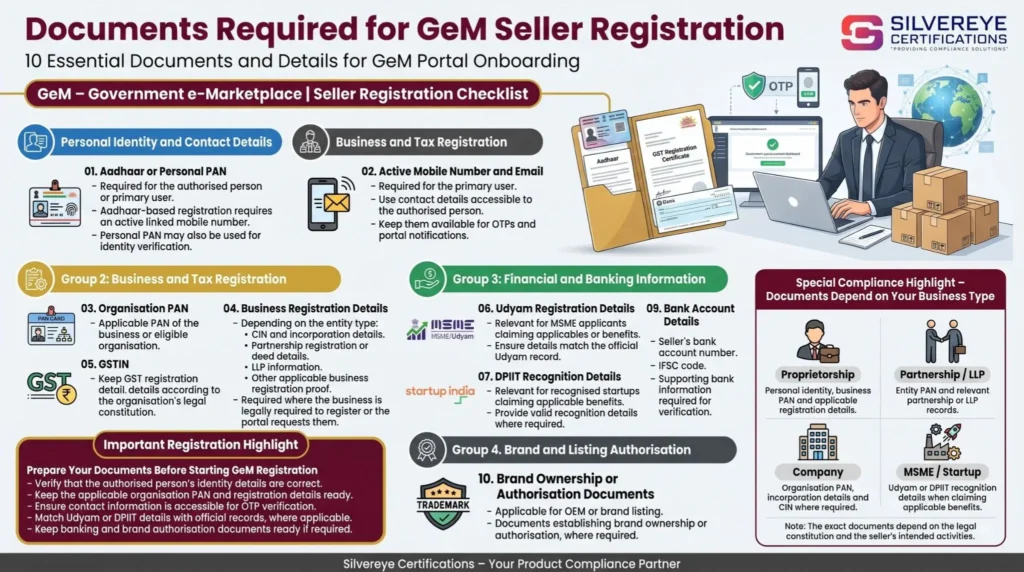
- Start with identity verification: Keep the Aadhaar number or personal PAN details of the authorised person ready, along with the linked mobile number and an active email address.
- Prepare business documents: Arrange the organisation's PAN, proof of business constitution, bank account details and GST or Udyam registration details, wherever applicable.
- Additional documents for OEMs: If you are registering as an Original Equipment Manufacturer (OEM), you may need a company registration certificate and trademark certificate or trademark application details for brand approval.
- Keep all details consistent: Ensure that the business name, PAN, GST details and bank account information match across the relevant records and the GeM registration form. GeM uses online verification to validate several details, so discrepancies may delay registration.
Introduction
Before starting your Government e-Marketplace (GeM) registration, keep the required identity, business and banking documents ready. The documents vary depending on whether you are registering as a seller, service provider or Original Equipment Manufacturer (OEM). You may need personal identity details of the authorized person, organization PAN, business constitution proof, bank account information and GST or Udyam details, wherever applicable. OEMs may also need additional brand-related documents for approval.

Preparing accurate and matching information in advance can help avoid verification errors and delays during the GeM registration process. Here is a practical checklist of the documents and details you should keep ready.
Which Documents Are Required for GeM Portal Registration?
The documents required for GeM registration depend on your business constitution and the type of seller account you want to create. Generally, you need the Aadhaar number or personal PAN of the authorized person, an active mobile number and email ID, business identity details, registered address and bank account information.
Depending on your organization, GeM may also ask for a business PAN, CIN, partnership or LLP details, GSTIN, ITR information, Udyam registration or DPIIT start-up recognition details. Sellers applying for OEM brand approval may need additional brand-ownership or authorization documents.
GeM registration Online requirements can vary according to the entity type and the services being used on the portal. Therefore, keep the relevant details ready and follow the document requirements displayed on the live registration form.
Documents Required for GeM Portal Registration
The Government e-Marketplace (GeM) is India's public procurement platform for government buyers and sellers. Before creating a seller account, prepare the following information and documents to make the registration process smoother.
| S.No. | Document or detail | Purpose | Who needs it? |
|---|---|---|---|
| 1 | Aadhaar number/Virtual ID or personal PAN | Verifies the identity of the primary user | All primary users, using an available verification method |
| 2 | Mobile number | OTP and identity verification | All primary users; Aadhaar-linked if using Aadhaar |
| 3 | Active email ID | Account communication and notifications | All primary users |
| 4 | Business PAN or proprietor's PAN | Identifies the registered business or proprietor | According to business constitution |
| 5 | Business constitution details | Establishes whether the entity is a proprietorship, firm, company, trust or society | All business entities |
| 6 | CIN, LLP or partnership details, or other registration proof | Verifies the legal constitution of the organisation | As applicable to the entity |
| 7 | Registered business address | Records the organisation's address | All sellers |
| 8 | Bank account number and IFSC code | Enables receipt of payments for GeM transactions | All sellers |
| 9 | GSTIN | Supports tax and transaction-related requirements | Where applicable |
| 10 | ITR details and acknowledgement | Used for verification and certain bidding requirements | As required by GeM |
| 11 | Udyam registration details | Supports MSME/MSE status verification | Sellers claiming applicable MSE status |
| 12 | DPIIT recognition details | Verifies eligible start-up status | Sellers claiming start-up recognition |
| 13 | Additional user identity and contact details | Creates secondary user accounts with assigned roles | If additional users are created |
| 14 | Trademark certificate, application or other brand documents | Supports OEM brand approval, as applicable | OEMs seeking brand approval |
Important: The business PAN requirement depends on the constitution type. A proprietorship generally uses the proprietor's PAN, whereas companies, firms and other entities use their respective organisation PAN. GeM may also request additional information during profile completion or bidding.
GST Requirement: Is GSTIN Mandatory for Every GeM Seller?
GSTIN should not be described as a universal requirement for every seller in every situation. Its applicability depends on the seller's tax status, the nature of the transaction and GeM applicable requirements.
GeM published seller-registration prerequisites also distinguish GST-related requirements from basic identity and business information. Its earlier guidance states that, without GSTIN, a seller may not be able to accept orders exceeding ₹2.5 lakh. However, because portal rules and tax requirements can change, check the current GeM form and applicable GST provisions before relying on this threshold.
Documents Required for GeM Registration Based on Seller Type
The business documents requested during registration depend on the legal structure of your organisation. Use the following table as a preparation guide:
| Seller type | Business details or proof | Practical tip |
|---|---|---|
| Proprietorship | Proprietor's PAN and applicable business details | Use the proprietor's correct name and PAN details. |
| Partnership firm | Firm PAN and partnership details | Ensure the authorised partner's details match the relevant records. |
| LLP | LLP PAN and LLP identification details | Keep the registered LLP name and identification details consistent. |
| Private/Public Limited Company | Company PAN, CIN and authorised person's details | The company information may be verified against MCA records. |
| MSME/MSE | Udyam registration details, where applicable | Keep the Udyam information ready if you are claiming MSE status. |
| DPIIT-recognised start-up | DPIIT recognition details | Use the correct recognition information when selecting the start-up category. |
| Trust or Society | Entity PAN and registration details | Ensure the primary user is authorised to represent the organisation. |
| Service provider | Documents based on the organisation's legal constitution | GeM allows registration for product selling, service provision or both, subject to applicable requirements. |
GeM registration tip: The primary user should be an authorized person of the organization. GeM's published guidance states that the primary user's details may be verified against Income Tax Return records. After primary registration, the account holder can create secondary users and assign roles such as bid participation, catalogue management and order fulfilment.
Note on OEMs: OEM brand approval is a separate requirement from creating a basic seller account. The documents requested depend on the brand, ownership and authorization status. Check the current OEM panel requirements before submitting a brand-approval request.
Who Needs Which Documents: Primary and Secondary Users on GeM?
GeM allows a seller organization to create a primary user account and, if needed, additional secondary user accounts. The primary user manages the organization's seller account, while secondary users can be assigned specific responsibilities such as catalogue management, bid participation and order fulfilment.
| User type | Information required | Important points |
|---|---|---|
| Primary user (account owner) | Aadhaar number/Virtual ID or personal PAN, mobile number and active email ID | Under GeM's seller terms, the primary user should be an eligible director, partner or proprietor, as applicable to the organisation. |
| Secondary user (team member) | Identity details, mobile number and active email ID | The primary user creates secondary accounts and assigns roles according to the team's responsibilities. |
Keep these additional points in mind:
- Personal PAN verification: If you register using a personal PAN, GeM's published prerequisites specify that the fourth character must be P (for example,
XXXPXXXXXX). This is different from the organisation's PAN, whose fourth character depends on the entity type. - Choose the primary user carefully: The primary user has important account-management responsibilities, including managing secondary users and organisation details. Select someone authorised to represent the business.
- Secondary-user verification: GeM's published registration prerequisites specify that secondary users should follow the same Aadhaar-based or PAN-based registration method as the primary seller. Follow the current portal instructions when creating additional accounts.
Practical advice: Avoid assigning the primary-user role casually to an outside vendor or consultant. Keep account ownership and access under the control of an authorized person within your organization.
OEM Brand Approval and Vendor Assessment Documents
If you are registering only as a regular seller or service provider, you may not need every document listed in this section. However, manufacturers, brand owners and resellers should understand the additional requirements for OEM brand approval and vendor assessment.
| Situation | Documents or requirements | What to remember |
|---|---|---|
| Listing your own brand as an OEM | Brand ownership documents, such as trademark registration or application details, and other company or manufacturer documents requested by GeM | The exact documents depend on the brand-approval category and the current GeM requirements. |
| Reselling another company's brand | OEM authorisation and relevant brand or product details | Check that the OEM and brand are eligible for the relevant GeM catalogue category. |
| Vendor assessment | Vendor profile, financial information, technical details and supporting documents | The applicable assessment process is handled through GeM's designated assessment mechanism, including RITES. |
| Vendor assessment exemption | Documents supporting the specific exemption category claimed | Apply through the prescribed exemption process and provide evidence required under the current policy. |
Vendor Assessment Exemptions: What Should You Check?
GeM's vendor assessment requirements and exemption categories can change through policy updates. The Vendor Validation Policy v5.0, effective from 25 September 2026, should be checked before applying.
Do not assume that any of the following automatically gives an OEM an exemption:
- High annual turnover
- Government or public-sector ownership
- Holding a BIS licence for a product
- DPIIT start-up recognition
- Udyam or MSME registration
An exemption depends on the exact eligibility conditions and supporting documents specified in the current policy. Udyam registration alone should not be treated as automatic vendor-assessment exemption.
Before submitting an assessment or exemption application, review the latest policy and instructions available through the GeM portal and RITES vendor-assessment platform.
GeM Registration Eligibility and How to Prepare Your Documents
Businesses that meet GeM's seller-registration requirements can create an account to offer eligible products or services to government buyers. The applicable documents depend on the organisation's legal constitution and the activities it intends to undertake on the portal.
Do not assume that MSME registration or a particular turnover level is universally required for basic seller registration. However, additional financial, tax or business information may be necessary for profile verification, bidding, reverse auctions or specific procurement categories.
Seven Checks Before Starting GeM Registration
Use this checklist to reduce avoidable errors during registration:
- Match your business details: Compare the organisation's name and address across PAN, GST records, bank details and registration certificates. Correct discrepancies before submitting the form.
- Check your mobile number: Make sure the mobile number used for Aadhaar-based verification is active and can receive OTPs. For PAN-based verification, keep the relevant PAN details ready.
- Select the right primary user: Choose an eligible director, partner or proprietor who is authorised to manage the seller account.
- Prepare clear document copies: Keep readable, complete and up-to-date scans of the documents requested by the portal. Follow the file format and size limits displayed on the upload screen.
- Check certificate validity: Review the validity of relevant licences, registrations, authorisations and other supporting documents before uploading them.
- Keep bank details ready: Verify the bank account number and IFSC code. Keep a cancelled cheque or bank statement available if the portal requests supporting proof.
- Confirm your business constitution: Identify whether you are registering as a proprietorship, partnership, LLP, company, trust, society or another eligible entity. Select the correct category and provide matching registration details.
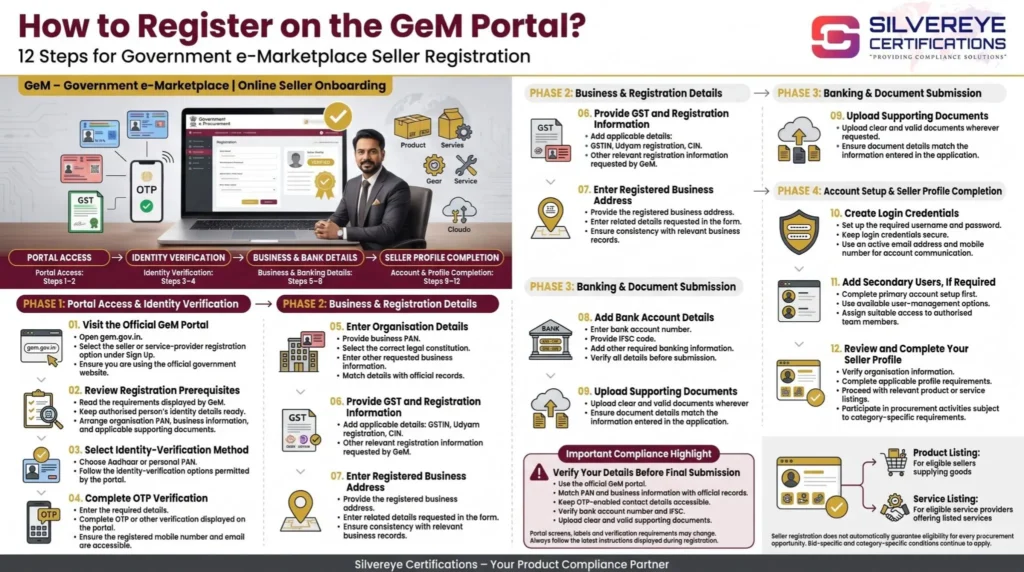
Final tip: Review every entry before submitting the form. Incorrect PAN details, mismatched organisation names, incomplete documents or an unauthorised primary user can lead to verification issues and delay your GeM registration.
Fees, Validity and Renewal for GeM Registration
GeM seller registration does not carry a registration fee. However, sellers and service providers may incur charges when they receive orders or apply for specific services, such as OEM vendor assessment.
The following table explains the main charges and their applicability.
GeM Seller Registration and Transaction Fees
| Charge | Amount or status | When it applies |
|---|---|---|
| Seller registration | ₹0 | Creating a basic seller or service-provider account |
| Caution money | Discontinued | GeM removed the caution money deposit requirement for sellers and service providers in July 2025. |
| Annual account renewal fee | No general annual account-renewal fee identified in the published material reviewed | Basic seller account maintenance; check the current portal terms. |
| Transaction charge on orders up to ₹10 lakh | Nil | Orders within this value range are exempt under the revised revenue policy. |
| Transaction charge on orders above ₹10 lakh and up to ₹10 crore | 0.30% of the order value | Applicable under the revenue policy effective from 9 August 2024. |
| Transaction charge on orders above ₹10 crore | Capped at ₹3 lakh | Applicable to orders exceeding ₹10 crore. |
| OEM vendor assessment | Payable to RITES, where assessment is required | Depends on the seller category, applicable assessment route and current fee schedule. |
| Consultant or documentation support | Depends on the service provider | A private professional fee, not a GeM registration charge. |
What about the Annual Milestone Charge?
Some older GeM guidance and third-party articles refer to an Annual Milestone Charge of ₹10,000 after a seller crosses a specified sales threshold. However, I could not independently confirm that this charge remains applicable under the latest published revenue policy. Do not include it as a confirmed current charge without checking the seller's live GeM dashboard.
Important: The transaction charge is different from a registration fee. It relates to orders placed through GeM and should be considered when calculating the cost of fulfilling government contracts.
GeM Seller Account Validity and Vendor Assessment Renewal
Basic seller registration and vendor assessment are two different things. A seller account does not have the same validity period as a vendor-assessment report.
| Item | Validity or status | Action required |
|---|---|---|
| Basic seller account | No fixed expiry period identified in the published guidance reviewed | Keep the seller profile, business information and supporting documents updated. |
| Vendor-assessment report | Generally three years, or until an earlier expiry of a supporting compliance document | Apply for a fresh assessment at least two months before the existing report expires. |
| Vendor-assessment exemption (VAE) | Depends on the exemption category and supporting document; certain exemptions are valid for three years or until the supporting document expires, whichever is earlier | Track the validity of the document supporting the exemption and apply for extension or reassessment where required. |
| GST, Udyam and other business documents | As specified by the issuing authority | Update the GeM profile when details change or a document expires. |
| Bank account details | No common fixed validity period | Update the seller profile if the account number, IFSC or other banking information changes. |
Renewal reminder: Under GeM's Vendor Validation Policy v5.0, vendors with an existing assessment should apply for a fresh vendor assessment at least two months before expiry. The validity may also be shortened if a compliance document submitted during assessment expires earlier.
Where Each Document Is Used During GeM Registration
GeM verifies different details at different stages of seller registration and profile completion. Keeping the relevant information ready can help you avoid repeated corrections.
| Registration stage | Documents or details used |
|---|---|
| Start seller registration | Review the seller-registration prerequisites and select the appropriate seller or service-provider category. |
| Verify the primary user | Aadhaar number/Virtual ID or personal PAN, mobile number and email ID. |
| Enter organisation details | Organisation or proprietor PAN, constitution details, CIN, LLP or partnership information, as applicable. |
| Add tax and address information | GSTIN, where applicable, ITR information if requested and registered business address. |
| Add bank details | Bank account number, IFSC and supporting bank proof if requested. |
| Upload supporting documents | Documents requested by the portal based on the entity type and registration category. |
| Create secondary users | Required identity and contact details of the additional users. |
| Apply for OEM brand approval | Trademark, brand ownership or authorisation documents, as applicable. |
| Apply for vendor assessment | Application through GeM, followed by the prescribed process on the RITES platform. |
GeM uses online verification mechanisms to validate information against relevant databases, including Aadhaar, MCA and Udyam records where applicable. Therefore, ensure that the information entered in the seller profile matches the original records.
Why GeM Document Verification Fails: Common Mistakes to Avoid
Even when all the required documents are available, errors in the details or verification process can delay registration. The following table covers common problems and ways to prevent them.
| Problem | Why it happens | How to avoid it |
|---|---|---|
| Details fail validation | Business name, PAN or registration information differs from official records. | Enter details exactly as they appear in the relevant certificates and databases. |
| OTP is not received | The registered mobile number is inactive or not linked to Aadhaar when Aadhaar verification is used. | Check the mobile linkage and network availability before starting registration. |
| Document upload is rejected | The file is blurred, incomplete, cropped, expired or in an unsupported format. | Upload clear, complete documents in the format and size accepted by the portal. |
| Wrong person registers the account | The primary user is not authorised to represent the organisation. | Use an eligible proprietor, director, partner or authorised representative, as applicable. |
| Bank verification fails | Account number, IFSC or account-holder information is incorrect or inconsistent. | Verify the details against a current bank document before submitting them. |
| Reseller or brand-related request is rejected | The OEM, brand or required authorisation does not meet the applicable GeM conditions. | Confirm the OEM's GeM status and the current brand-approval requirements before applying. |
| Vendor-assessment application is delayed | Documents are incomplete or non-conformities are not answered within the prescribed timeline. | Review the application carefully and respond to observations through the RITES portal within the specified time. |
Mistakes to Avoid During GeM Registration
- Do not pay anyone a GeM registration fee. Basic seller registration is free. A consultant may charge for professional assistance, but that is separate from a government portal fee.
- Do not rely on old caution-money information. GeM removed the caution money requirement in July 2025.
- Do not trust outdated vendor-assessment fee figures. Assessment charges have been rationalised. Check the current RITES fee schedule before making payment.
- Do not share OTPs or primary account credentials unnecessarily. Keep account access with authorised personnel.
- Do not assume Udyam registration automatically exempts an OEM from vendor assessment. Exemption depends on the applicable Vendor Validation Policy and supporting documents.
- Do not ignore portal observations. Respond to verification requests and assessment non-conformities within the prescribed timeline.
Why Choose Silvereye Certifications for GeM Registration?
Registering on the Government e-Marketplace (GeM) involves more than creating a seller account. Businesses must provide accurate identity and organisation details, complete verification, prepare the required documents and understand the additional requirements for OEM brand approval or vendor assessment, where applicable.
Silvereye Certifications (SEYECS) provides professional guidance and documentation support to help businesses navigate the GeM registration process.
Here is how Silvereye Certifications can assist:
- Eligibility Guidance: Help you understand the applicable seller category and registration requirements based on your business constitution.
- Document Checklist: Guidance on preparing PAN, business registration, GST, Udyam, bank and other supporting details, as applicable.
- Registration Assistance: Support with completing the GeM seller registration process and entering accurate business information.
- OEM Brand Approval Guidance: Assistance in understanding trademark, brand ownership and authorisation requirements.
- Vendor Assessment Support: Guidance on the applicable assessment process, supporting documents and exemption requirements.
- Profile and Verification Support: Help identify documentation gaps and understand portal observations or verification issues.
Whether you are a new business entering government procurement or an established manufacturer planning to list products on GeM, Silvereye Certifications aims to make the registration and documentation process easier to understand.
Please note: GeM is the official government procurement platform and independently manages seller registration, verification, brand approval and vendor assessment. Silvereye Certifications provides consultancy and application support; it does not issue GeM approvals or guarantee registration or assessment outcomes.
Conclusion
GeM registration gives eligible businesses an opportunity to offer their products and services to government buyers through India's public procurement platform. However, successful registration requires accurate identity details, appropriate business documents, valid banking information and compliance with the requirements applicable to the seller category.
Before starting, prepare your PAN, business constitution details, registered address, bank information and other applicable documents. OEMs and resellers should also check the latest brand approval and vendor assessment requirements. Remember that basic GeM seller registration is free, although transaction charges and other applicable fees may arise when using additional services or receiving orders.
Review the latest instructions on the official GeM portal before submitting your application. With documentation guidance and registration support from Silvereye Certifications (SEYECS), businesses can better understand the requirements and prepare for their GeM seller registration with greater confidence.
Frequently Asked Questions
What documents are required for GeM registration?
Identity of an authorised person (Aadhaar or personal PAN), a linked mobile, an email ID, organisation PAN, constitution proof, bank details, and GST or Udyam where applicable.
Is GST mandatory?
GeM has historically asked for a GSTIN above ₹20 lakh turnover, and most sellers hold one. The live form shows what applies.
Is Udyam registration compulsory?
It is relevant for MSMEs. We did not find it listed as required for every seller.
Can I register with only a PAN?
Yes, a personal PAN can be used for the primary user, provided its fourth letter is "P". Other business details are still requested.
Is Aadhaar mandatory?
You can choose Aadhaar or a personal PAN for the primary user. Secondary users register with the same method as the primary.
Which bank document should I keep?
A cancelled cheque or bank statement, plus account number and IFSC. GeM validates the account.
What do OEMs need extra?
A company registration certificate and a trademark certificate or application for brand approval, and vendor assessment in applicable categories.
Do resellers need vendor assessment documents?
Generally they rely on OEM authorisation, and their assessment applications are processed only where the OEM is active on GeM.
Is there a fee for submitting documents?
No. GeM registration is free, and caution money for sellers was removed in 2025.
How long do documents stay valid on GeM?
We found no expiry date for the basic account. Vendor assessment lasts 3 years. Update your profile when certificates change.
Why was my document rejected?
Usually a blurred, cropped or expired scan, or a name or number that does not match government records.
Who can submit documents for my company?
An authorised person: a director, key person or authorised signatory as per the ITR.