
- The GeM portal registration process covers sign-up, identity verification, business validation, seller-profile completion, and product or service catalogue creation before bidding.
- Creating a seller or service-provider account on GeM is free. The caution money requirement for sellers was discontinued in 2025.
- Proprietors, companies, MSMEs, OEMs, resellers and service providers may have different document, verification and onboarding requirements.
- OEM vendor assessment, where required, is generally valid for three years. The basic GeM seller account has no standard expiry date published in the information reviewed.
Introduction
The GeM Portal Registration Process allows businesses, manufacturers, resellers and service providers to create seller accounts on the Government e-Marketplace (GeM) and participate in government procurement. Through this online platform, eligible sellers can list their products or services, respond to government bids and receive purchase orders from authorised government buyers.

The registration process involves several stages, including account creation, identity verification, business validation and seller-profile completion. Although GeM registration is free, applicants must provide accurate business details and meet the applicable requirements for their seller category. OEMs may also need to complete vendor assessment or obtain an applicable exemption before listing certain products.
In this guide, we explain the GeM seller registration process step by step, including eligibility, required documents, registration fees, OEM and reseller requirements, common mistakes and what to do after account activation.
What Is the GeM Portal Registration Process?
The GeM portal registration process is the online procedure through which an eligible business or individual creates a seller or service-provider account on the Government e-Marketplace (GeM). It involves registering an authorized person, verifying identity and business details, completing the seller profile and adding products or services to the catalogue.
GeM's official seller guidance describes registration as a simple process: create a user ID and password, update the seller profile with business and bank details, and add the products or services you intend to offer. Depending on the organization and seller category, additional verification, documentation, brand approval or vendor assessment may apply.
GeM seller registration is free. The caution money deposit previously required during onboarding was discontinued in July 2025. However, separate charges may apply later under the platform's transaction-charge and vendor-assessment policies.
GeM Registration Process at a Glance
The registration journey can be understood in five practical stages. These stages are a guide to the seller's onboarding journey, rather than a separate five-stage procedure prescribed by GeM.
| Stage | What happens | Who is involved |
|---|---|---|
| 1. Account creation | Select the seller or service-provider registration option and create login credentials. | Authorised person |
| 2. Identity verification | Verify the primary user's identity using an accepted method, such as Aadhaar or personal PAN. | Primary user and GeM |
| 3. Business validation | Provide the organisation's PAN, constitution and other requested business details for verification. | Applicant and GeM |
| 4. Profile completion | Add the registered address, bank details, contact information and other applicable profile information. | Seller |
| 5. Catalogue and procurement setup | Add products or services and complete any applicable brand, category or vendor-assessment requirements before participating in procurement. | Seller and, where applicable, the designated assessment agency |
The initial account setup and profile completion are not the same as product approval or eligibility to participate in every bid. Catalogue requirements, OEM validation and bid conditions may involve additional steps. GeM also provides separate seller training modules for registration and account management, catalogue management, bid and reverse-auction participation, and order fulfilment.
Why Complete GeM Seller Registration?
Registering on GeM can help eligible businesses access the government procurement marketplace.
- Access to government buyers: GeM connects sellers with authorised government organisations, including ministries, departments and public sector entities.
- A large procurement marketplace: GeM recorded ₹5.4 lakh crore in gross merchandise value during FY 2024–25, according to the Ministry of Commerce and Industry.
- No registration fee: Sellers and service providers can create their GeM accounts without paying a registration fee.
- Lower transaction costs: Under the October 2026 policy announcement, orders up to ₹10 lakh are exempt from transaction charges, and the charge for higher-value orders is subject to the revised policy.
- Products and services: Eligible businesses can register to offer products, services or both, as supported by the seller-registration workflow.
Important: Registration does not guarantee government orders. Buyers evaluate offers against the relevant specifications, eligibility conditions, pricing, bid requirements and delivery commitments.
Eligibility and Requirements Before You Begin
Businesses should first confirm that their organization type and authorized representative meet GeM's registration requirements. GeM's published seller-registration prerequisites identify proprietorships, partnership or LLP firms, companies, trusts, societies, associations and government entities among the organization types covered by its registration process.
Before starting, check the following:
- Authorised primary user: Registration should be completed by an authorised person, such as the organisation's director, key person or proprietor.
- Identity verification: Keep the authorized person's Aadhaar or personal PAN details ready, according to the verification method offered by the portal.
- Aadhaar-linked mobile number: If using Aadhaar, ensure that the linked mobile number is active for OTP verification.
- Personal PAN details: If using personal PAN, enter the exact PAN details requested. GeM's published prerequisites specify that the fourth character of the personal PAN should be P.
- Active email address: Use an email account that the authorised person can access for activation and portal communication.
- Organisation PAN: Keep the business PAN ready. The PAN type must correspond to the organisation's legal constitution.
- Business registration details: Companies may need their CIN and incorporation details; firms and other entities should provide the applicable constitution information.
- Bank account details: Keep the business bank account number and IFSC code ready for payment-related verification.
- GST information: Provide GSTIN wherever applicable and as requested by the current portal workflow. GST obligations should be checked against the applicable GST provisions rather than assuming one universal GeM turnover threshold.
- ITR information: GeM's published prerequisites identify verified ITR details as relevant to bid and reverse-auction participation, subject to stated exemptions. They are not described as mandatory for every seller who only wants to complete basic registration.
MSME registration is not a universal prerequisite for creating a GeM seller account. However, businesses claiming MSE-related benefits should provide the applicable Udyam information and satisfy the conditions for the particular benefit or procurement opportunity.
Documents Required for GeM Registration by Seller Type
The documents and information requested depend on the organization's legal constitution and the activities it plans to undertake on GeM. Use this table as a preparation guide and follow the current portal checklist when applying.
| Seller type | Primary user's identity | Organisation details and supporting information |
|---|---|---|
| Proprietorship | Proprietor's Aadhaar or personal PAN | Proprietorship PAN details, business address and bank information |
| Partnership firm | Authorised partner's identity details | Firm PAN, partnership details and applicable authorised-person information |
| LLP | Authorised person's identity details | LLP PAN and registration details |
| Private or public limited company | Director or other eligible authorised person's identity details | Company PAN, CIN and incorporation information |
| MSME | Identity details according to the legal constitution | Organisation documents and Udyam details, where applicable |
| DPIIT-recognised startup | Identity details according to the legal constitution | Organisation documents and startup recognition details, where relevant |
| Trust or society | Authorised person's identity details | Entity PAN and applicable registration details |
| Service provider | Authorised person's identity details | Organisation PAN, bank information and details relevant to the services offered |
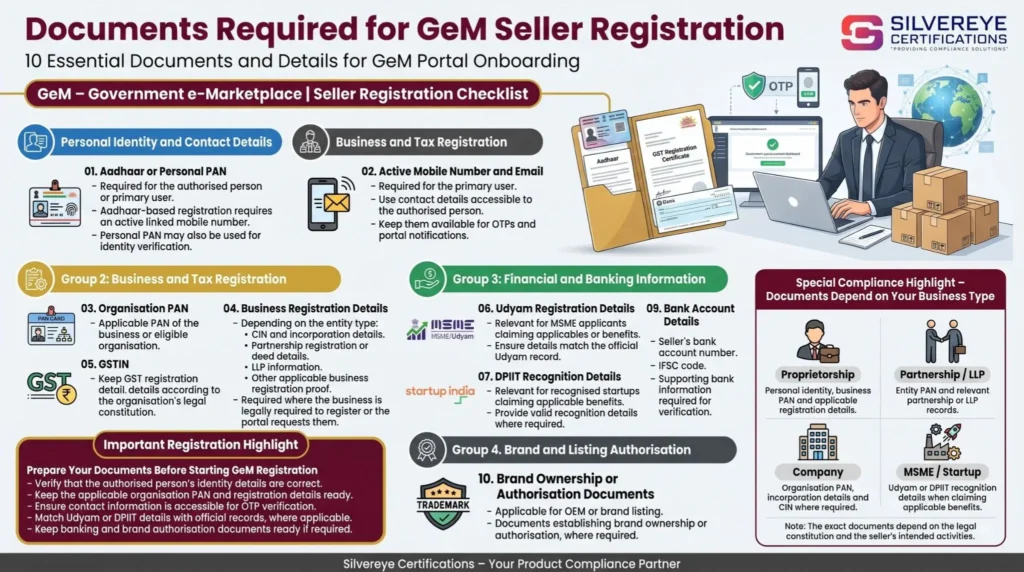
Additional information may be requested for particular activities. For example, ITR details may be needed for bid or reverse-auction participation, while brand-related documents may be required for certain OEM listings.
Which GeM Registration Path Applies to You?
The basic seller-account creation process is broadly similar, but the requirements after registration depend on what you intend to sell and your role in the supply chain.
| Seller category | Registration and onboarding considerations |
|---|---|
| Service provider | Select the service-provider option during registration and complete the profile and service-related requirements for the relevant category. |
| Product seller | Create a seller account and add products under the appropriate catalogue categories, subject to listing requirements. |
| OEM or manufacturer | May need to complete brand-related checks and vendor assessment in categories where GeM requires it, unless an applicable exemption is available. |
| Reseller | Must follow the product-category rules for offering goods, including any applicable OEM authorisation, catalogue pairing or other conditions. |
| MSME | Can provide valid Udyam information when claiming applicable MSE status or benefits. MSME status alone should not be treated as a universal OEM vendor-assessment exemption. |
| Startup | Can provide DPIIT recognition details where relevant to a specific benefit, exemption or procurement condition. |
OEM and reseller requirements need particular attention. GeM's procurement terms distinguish between product categories and catalogue arrangements. For example, some categories allow resellers to offer products against an OEM-created catalogue, while other category arrangements permit different listing practices.
Therefore, do not assume that every reseller must follow the same OEM pairing process or that every OEM must complete an identical assessment. Check the applicable GeM category conditions and current Vendor Validation Policy before listing products.
For OEMs, vendor assessment is a separate requirement from basic seller registration. It applies to the categories and cases covered by the relevant GeM policy. Assessment exemptions, where available, must be checked against the current policy and supporting documents. GeM announced a reduction in OEM vendor-assessment charges in its 2025 reforms and reported further reductions of 66% to 92% since January 2024 in its October 2026 announcement.
Before applying: Check the latest instructions on GeM's official portal and its seller training resources. Portal requirements and category-specific policies may be updated, so use the live instructions rather than relying only on older third-party checklists.
Step-by-Step GeM Seller Registration Process
The GeM seller registration process is completed online. Before starting, keep the authorized person's identity details, organization PAN, business registration information and bank details ready. The exact fields and verification steps may vary according to the organization type and the portal's current workflow.
1. Open the official GeM portal
Visit gem.gov.in and select the seller or service-provider registration option under Sign Up. Make sure you are using the official government website. Review the seller-registration prerequisites before proceeding.
2. Verify the primary user's identity
Choose an accepted identity-verification method, such as Aadhaar or personal PAN. If you use Aadhaar, keep the linked mobile number active for OTP verification. If you use PAN, enter the exact PAN details requested by GeM.
3. Select your organization type
Choose the correct business constitution, such as proprietorship, partnership, LLP, private or public limited company, trust or society. The organisation type determines which business details and PAN information you must provide.
4. Enter business and registration details
Provide the organisation PAN, incorporation or registration details and other information requested by the portal. For companies, this may include the Corporate Identification Number (CIN). Ensure that the information matches the relevant official records.
5. Provide GST, Udyam and other applicable details
Enter your GSTIN, Udyam registration number or other relevant business information wherever applicable. Requirements depend on your organisation and the information requested by GeM. Do not enter details that do not apply to your business.
6. Add your business address and bank details
Enter the registered business address and the bank account information requested by the portal. Check the account number, account-holder name and IFSC carefully to avoid verification or payment-related problems.
7. Submit the requested supporting information
Provide the documents and declarations required for your organisation type. Upload clear, complete and valid files, and check that the details are consistent with your application.
8. Create and secure your login credentials
Complete the account-creation process and keep your user ID and password secure. Do not share OTPs or login credentials with unauthorised persons.
9. Create secondary user accounts, if needed
The primary user can create secondary user accounts within the organization and assign roles and responsibilities. GeM's terms place responsibility on the primary user for actions and transactions carried out by secondary users. Give access only to authorized team members.
10. Complete your seller profile
Log in and complete the profile information requested by GeM, including relevant business, contact, address and banking details. Review the information before moving to the next stage.
11. Add products or services to your catalogue
Use the catalogue section to select the relevant product or service category and provide the required descriptions, specifications and other listing information. OEMs may have additional brand or vendor-validation requirements, depending on the category.
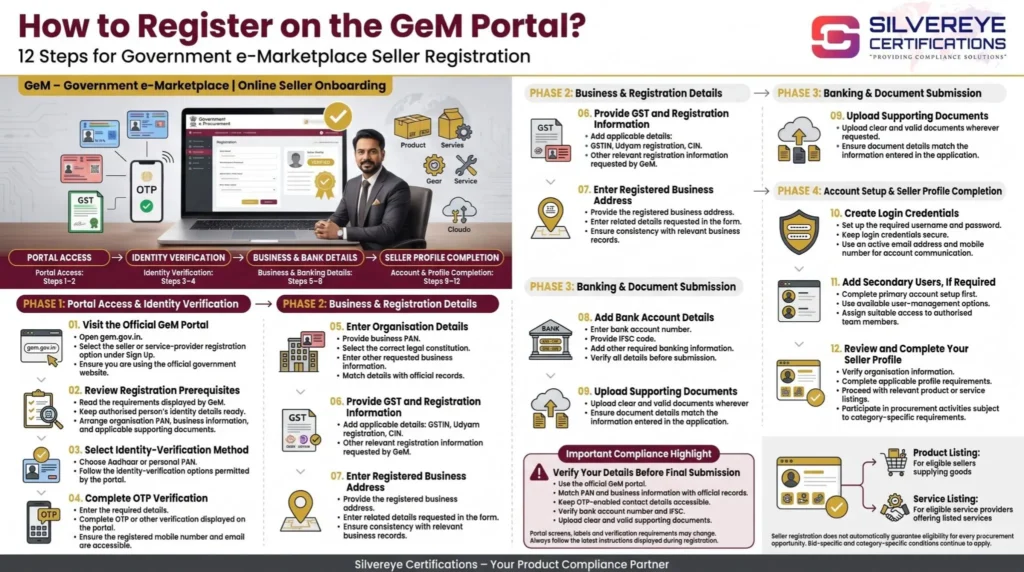
Important: Basic seller registration does not automatically approve every product listing or make a seller eligible for every bid. Check the applicable category conditions, technical specifications and procurement requirements before offering products or services. GeM provides separate official training courses for registration, catalogue management, bid participation and order fulfilment.
GeM Registration Fees, Validity and Renewal (2026)
GeM registration is free for sellers and service providers. However, other charges may apply when sellers receive orders or when an OEM needs vendor assessment.
The fee information below reflects the official Ministry of Commerce and Industry announcements available as of 23 November 2026. Always check the applicable charge displayed on GeM before making a payment.
GeM Registration Fees and Other Charges
| Charge | Amount or status | When it applies |
|---|---|---|
| Seller or service-provider registration | ₹0 | Creating an account on GeM |
| Caution money | Discontinued | The requirement was removed for sellers and service providers in July 2025 |
| Transaction charge on orders up to ₹10 lakh | Nil | No transaction charge under the revised revenue policy |
| Transaction charge on orders above ₹10 lakh and up to ₹10 crore | 0.30% of order value | Applicable under the revised transaction-charge structure |
| Transaction charge on orders above ₹10 crore | Flat ₹3 lakh | Subject to the applicable revenue policy |
| OEM vendor assessment | Depends on the applicable assessment category | Payable when assessment is required and no exemption applies |
| Consultancy or agency fee | Depends on the service provider | A private professional fee, not a GeM registration charge |
GeM's October 2026 announcement confirmed the reduction in transaction charges to 0.30%, the increase in the zero-charge order threshold to ₹10 lakh and the ₹3 lakh cap for orders above ₹10 crore. It also reported that nearly 97% of orders attract no transaction charge.
GeM Account Validity and Vendor Assessment
A basic seller account and an OEM vendor assessment are separate. Do not assume that the validity period of an assessment certificate is the same as the life of the seller account.
| Item | What to know | Recommended action |
|---|---|---|
| Basic seller account | GeM's public registration guidance does not specify a standard annual account-renewal cycle | Keep your account and business information updated |
| OEM vendor assessment | Applies to OEMs in categories covered by the vendor-validation requirements, subject to exemptions | Check the assessment report and current policy for validity and reassessment requirements |
| Assessment exemption | Depends on the applicable exemption category and supporting documents | Monitor the validity and status of the underlying certificate |
| Vendor Validation Policy | GeM publishes vendor-assessment requirements and guidance | Consult the latest version before applying |
Vendor assessment is a separate process used to evaluate relevant OEM credentials. GeM's official overview identifies vendor profile, financial capacity and technical or production capability among the assessment parameters. RITES conducts the assessment through the prescribed process.
Practical tip: Keep a record of your vendor-assessment report, supporting certificates and their expiry dates. If your eligibility depends on a BIS licence or another certificate, check whether its status affects your assessment or exemption.
How Long Does GeM Registration Take, and Why Can It Be Delayed?
GeM does not provide one universal guaranteed turnaround time for every seller-registration application. The time required depends on identity verification, business-data validation, document completeness and any additional approval required for the seller's category.
The initial account-creation process is different from OEM vendor assessment, brand approval and catalogue review. These additional activities can extend the time before a seller is ready to offer particular products.
Common Reasons for GeM Registration Delays
- PAN and business-detail mismatch: Differences between the organisation's PAN, registration records and information entered on GeM can affect verification.
- Aadhaar OTP problems: An inactive mobile number linked to Aadhaar can prevent identity verification.
- Incorrect organisation type: Selecting the wrong legal constitution can lead to incorrect PAN or registration details.
- Unauthorised primary user: The primary user must meet GeM's applicable authorisation requirements for the organisation.
- Incomplete or unclear documents: Missing pages, unreadable scans, expired certificates or inconsistent information can result in clarification requests.
- Incorrect bank information: Errors in the account number, IFSC or account-holder details may create verification and payment issues.
- Incomplete vendor-assessment application: Missing information about the OEM's business profile, financial position or manufacturing capability can delay assessment.
- Unanswered clarification requests: Delayed responses to GeM or the designated assessment agency can extend the review process.
GeM's registration prerequisites and terms emphasise accurate business information and verification against relevant government records. Sellers are responsible for ensuring that the information they provide is correct and updated.
Common GeM Registration Mistakes to Avoid
- Paying an unofficial registration fee: Basic seller registration is free. If you hire a consultant, confirm that the amount is a professional service fee and not a compulsory GeM registration charge.
- Using incorrect PAN details: Check the personal PAN of the primary user and the organisation's PAN separately. They serve different verification purposes.
- Sharing OTPs and login credentials: Keep control of the primary account and provide secondary access only to authorised team members.
- Assuming Udyam registration guarantees OEM assessment exemption: MSME status alone should not be treated as a universal exemption. Check the current vendor-validation policy and applicable conditions.
- Ignoring category-specific requirements: OEMs, resellers and service providers may have different catalogue, authorisation and assessment requirements.
- Using outdated fee information: Verify current transaction charges and vendor-assessment fees through official GeM announcements and the live portal.
- Failing to update business information: Changes in business, banking or other relevant details should be reflected on GeM and the corresponding government records as required by the platform's terms.
- Ignoring assessment and certificate validity: Maintain a record of relevant vendor-assessment reports, BIS licences and other supporting documents, and check their status before using them for listings or exemptions.
Why Choose Silvereye Certifications for GeM Registration?
Registering on the Government e-Marketplace involves more than creating a seller account. Businesses must provide accurate details, complete profile verification and meet the applicable requirements before listing products or services and participating in government procurement.
Silvereye Certifications provides practical guidance and application support to help businesses navigate the GeM registration process.
- Eligibility Guidance: Understand the applicable registration requirements based on your business constitution and seller category.
- Document Assistance: Get support in preparing and checking business, identity, PAN, GST and bank-related details before submission.
- Registration Support: Receive step-by-step guidance for account creation, profile completion and the online registration process.
- Catalogue Guidance: Understand the requirements for adding products or services to the GeM portal.
- Issue Resolution Guidance: Get assistance in understanding application errors, verification issues and portal-related queries.
- Transparent Assistance: Receive clear guidance on the applicable process, documentation and professional service charges.
Our aim is to make the registration process easier to understand and help businesses prepare accurate applications. GeM registration, seller approval and procurement decisions remain subject to the platform's applicable rules and verification by the concerned authorities.
Conclusion
GeM registration gives eligible businesses an opportunity to connect with government buyers through the Government e-Marketplace. However, successful onboarding requires accurate business information, appropriate documents and a properly completed seller profile.
Before starting the process, check your eligibility, keep the required documents ready and review the latest instructions on the official GeM portal. After registration, complete the relevant catalogue requirements and understand the applicable conditions before participating in bids or accepting orders.
If you need assistance with the GeM seller registration process, Silvereye Certifications can guide you through the documentation, application and profile setup stages so you can approach the process with greater clarity and confidence.
Frequently Asked Questions
What are the stages of the GeM registration process?
Account creation, identity verification, business validation, profile completion, then catalogue and bidding.
Does the GeM portal registration process cost anything?
No. Registration is free. Transaction charges start only on orders above ₹10 lakh, and some OEMs pay for vendor assessment.
Who is eligible to register as a seller on the GeM portal?
Manufacturers, eligible resellers, businesses, startups, MSMEs and service providers can register on GeM, subject to the platform's registration conditions and applicable category requirements. The registration must be completed by an eligible primary user for the business entity.
Is Aadhaar mandatory for GeM registration?
No. Aadhaar is not the only identity verification option. The primary user can use Aadhaar/Virtual ID or personal PAN, subject to the applicable verification requirements. For Aadhaar-based verification, the registered mobile number must be linked to Aadhaar.
Can an MSME register on the GeM portal?
Yes. Eligible Micro and Small Enterprises can register on GeM and provide their applicable Udyam/MSME details. MSME recognition may help sellers access relevant procurement benefits, subject to the conditions of the applicable government procurement policy and bid.
Is OEM vendor assessment mandatory for every GeM seller?
No. OEM vendor assessment is not a universal requirement for every seller. It applies to OEMs in categories covered by GeM's vendor assessment policy, subject to applicable exemptions. Requirements can vary by product category and seller status.
Can a reseller register on GeM?
Yes. Eligible resellers can register on GeM. However, product listing and selling requirements may vary by category. Certain products or brands may require OEM authorization or other supporting documents, so sellers should check the applicable catalogue conditions.
Can a business register on GeM to sell both products and services?
Businesses may participate as product sellers, service providers or both, depending on their business activities and the categories available on GeM. They must meet the applicable requirements for each product or service category.
Is GeM registration valid for a lifetime?
GeM's public registration guidance does not specify a standard annual renewal cycle for every seller account. Sellers should keep their business, contact, bank and compliance details updated and follow any renewal or revalidation instructions displayed on the portal.
Is GST registration compulsory for GeM sellers?
GST requirements depend on the seller's business, the nature of its supplies and applicable GST law. The GeM portal may also require GST-related details for certain transactions or order conditions. Check the current portal requirements and your GST applicability before registering.