


- GeM Portal registration can be completed online without visiting a government office. There is no sign-up fee, and the caution money requirement for sellers was removed in 2025.
- OTP-based identity verification: An authorized person must verify their identity using Aadhaar or personal PAN, along with a registered mobile number and email address.
- Real-time information checks: GeM verifies PAN, business constitution and other submitted details against relevant government records during registration. Enter your details carefully and ensure that names, spellings and business information match the official records.
- Transaction charges apply later: GeM's revenue policy, effective from 9 August 2024, provides for a nil transaction charge on orders up to ₹10 lakh and a 0.30% transaction charge on orders above ₹10 lakh.
Introduction
GeM Portal Online Registration allows manufacturers, traders, businesses and service providers to sell their products and services to government buyers across India through the Government e-Marketplace. In 2026, the seller registration process is entirely online, with no office visit or sign-up fee required. Applicants can create an account, verify their identity using Aadhaar or personal PAN, and complete their business profile digitally.

However, successful registration depends on accurate business information and verification against government records. Understanding the GeM registration process, eligibility requirements and applicable charges can help sellers avoid common mistakes and prepare their accounts for product listing, service offerings and participation in government procurement.
How to Complete GeM Portal Online Registration in India (2026)
GeM Portal Online Registration allows eligible businesses, manufacturers, traders and service providers to create seller accounts on the Government e-Marketplace and offer products or services to government buyers. The registration process is completed online through the official GeM portal, starting with identity verification and organisation details, followed by profile completion and catalogue creation.
Seller registration is free, and the government has removed the mandatory caution money deposit for sellers and service providers. However, sellers should understand the difference between registration charges and transaction charges. Orders up to ₹10 lakh attract no transaction charge, while orders above ₹10 lakh and up to ₹10 crore attract a 0.30% charge on the total order value. Orders above ₹10 crore are subject to a maximum transaction charge of ₹3 lakh.
The time required to complete registration depends on identity verification, business-record validation and the information requested by the portal. Preparing the correct documents in advance can help avoid delays and clarification requests.
What Is GeM Online Seller Registration?
The Government e-Marketplace (GeM) is India's national public procurement platform operated under the Ministry of Commerce and Industry. It provides an online marketplace where government organisations can procure products and services from registered sellers and service providers.
GeM connects sellers with government buyers, including central ministries, state departments, public sector enterprises and other eligible public organisations. According to the Press Information Bureau, the platform recorded a Gross Merchandise Value (GMV) of ₹5.4 lakh crore during FY 2024–25.
For a business, GeM seller registration means creating an account, verifying the authorised person's identity, submitting organisation information and completing the seller profile. Once the required profile details are completed, the seller can proceed with product or service catalogue creation, subject to applicable category requirements.
GeM also validates seller information against government databases. Its terms and conditions identify sources such as PAN, MCA21, Udyam and GSTN for relevant information checks. This makes consistency between your business records and registration details particularly important.
Why Register as a Seller on the GeM Portal?
| Registration benefit | What it means for sellers |
|---|---|
| Free seller registration | Creating a seller account does not require a registration fee. |
| No caution money deposit | The mandatory caution money requirement for sellers and service providers was removed in July 2025. |
| Access to government buyers | Registered sellers can offer eligible products and services to government organisations through GeM. |
| Product and service selling | Sellers can register for product selling, service provision or both, as supported by the registration options. |
| Online procurement opportunities | The platform supports procurement through direct purchases, bids and reverse auctions, subject to applicable conditions. |
| Support for small businesses | GeM provides opportunities for MSEs, startups, women entrepreneurs, artisans and other eligible seller groups. |
The removal of caution money and the revised transaction-charge structure were announced as measures to reduce seller participation costs.
Important: GeM registration does not guarantee government orders. Your product or service suitability, pricing, technical specifications, catalogue quality, bid eligibility and delivery performance influence your business opportunities.
GeM Seller Registration Eligibility: Who Can Apply?
Businesses and organisations can apply for GeM seller registration if they meet the portal's identity, organisation and verification requirements. The registration process provides different organisation-constitution options, so the documents required depend on the legal structure of the applicant.
Common applicant categories include:
- Proprietorship firms: Individual business owners registering their proprietorship.
- Partnership firms: Businesses operating under a partnership structure.
- Limited Liability Partnerships (LLPs): Registered LLPs applying through an authorised person.
- Private and public limited companies: Companies registered under the applicable company law.
- Trusts and societies: Eligible registered trusts, societies and similar organisations.
- Government entities: Government organisations registering under the relevant account category.
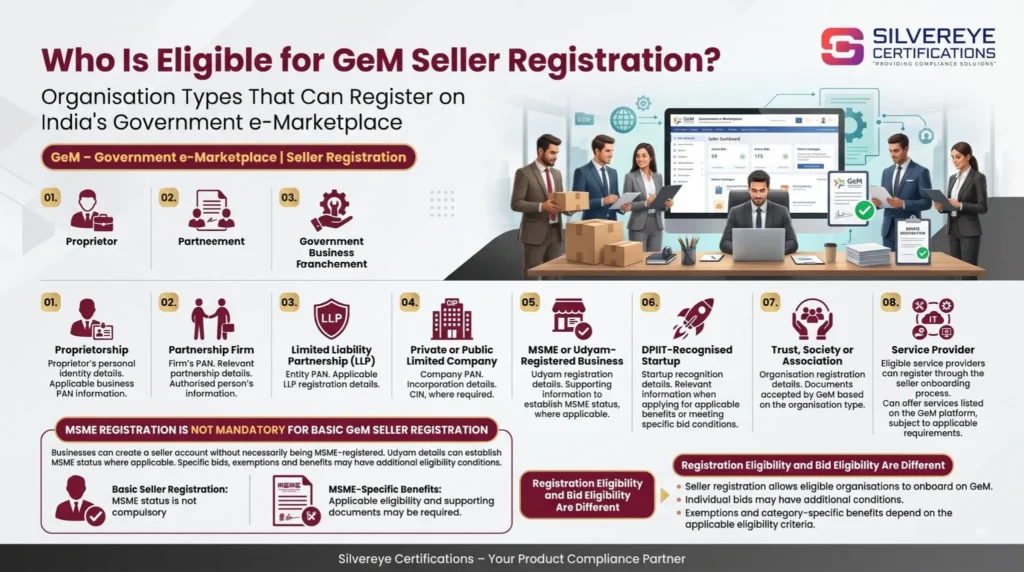
GeM's seller-registration prerequisites identify these organisation types and specify that registration must be completed by an authorised person, such as a director, key person or proprietor, as applicable.
Important Conditions to Check Before Applying
Before starting the application, check the following:
- Authorised person: The person creating the seller account must have the appropriate authority to represent the organisation.
- Identity verification: The primary user must have the required Aadhaar or personal PAN details. The fourth character of the personal PAN used under the PAN-based route must be P, according to GeM's published prerequisites.
- Mobile number: For Aadhaar-based verification, access to the Aadhaar-linked mobile number is required.
- Active email address: Use an email account that the organisation can access for future communication.
- Organisation PAN: Keep the PAN belonging to the business or legal entity ready, as applicable.
- Business constitution: Select the correct legal structure, such as proprietorship, firm, company or trust/society.
- Bank account: Keep the organisation's bank account number and IFSC details available for payment-related verification.
- Registered address: Prepare the complete business address and contact details requested by the portal.
These requirements are based on GeM's published seller-registration prerequisites. Because the document available publicly is an older version, applicants should follow the current fields and instructions displayed during live registration.
Documents and Details Required for GeM Seller Registration
Preparing your business documents before opening the registration form can make the application process easier. The exact documents depend on your organisation's constitution, registration status and the activities you intend to undertake on GeM.
| Document or information | Applicable to | Purpose |
|---|---|---|
| Aadhaar number or Virtual ID | Primary authorised user choosing Aadhaar verification | Identity verification |
| Personal PAN | Primary authorised user choosing PAN verification | Alternative identity-verification route |
| Mobile number and email ID | Primary authorised user | OTP verification and account communication |
| Organisation PAN | Business or legal entity | Organisation and financial identity verification |
| CIN | Applicable registered companies | Company identification and validation |
| Partnership or LLP details | Partnership firms and LLPs | Verification of business constitution |
| Trust or society registration details | Applicable trusts and societies | Verification of legal status |
| GSTIN | Where applicable under the portal's requirements | Tax and business verification |
| Bank account number and IFSC | Seller organisation | Payment and bank-account details |
| Registered office and billing address | Seller organisation | Business profile and transaction records |
| Udyam registration details | Registered MSMEs claiming applicable MSE status or benefits | MSME-related verification |
| DPIIT startup recognition details | Eligible recognised startups claiming applicable startup status or benefits | Startup-related verification |
| ITR details and acknowledgements | Where required for bid or reverse-auction participation | Financial and eligibility verification |
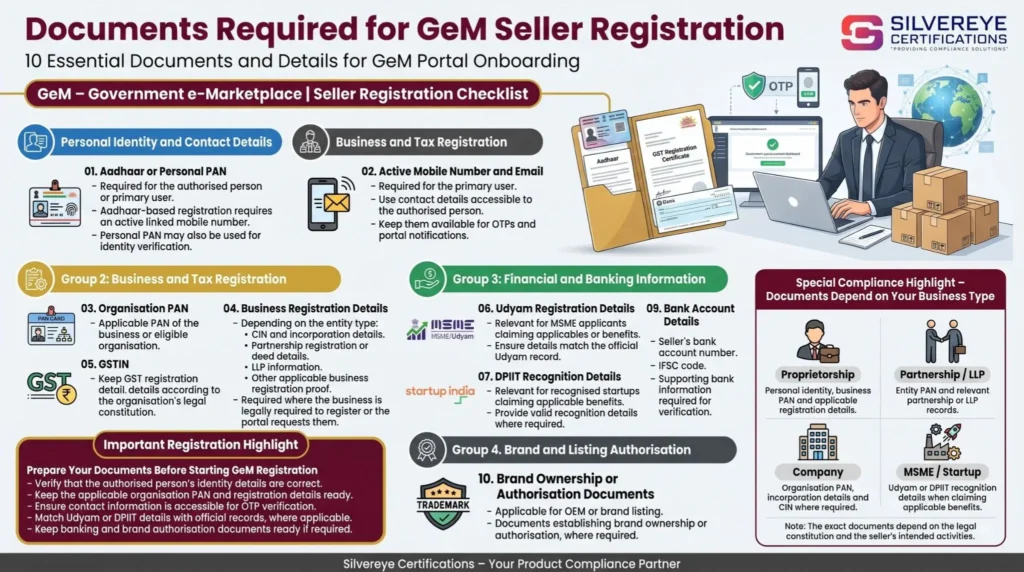
Important Document Requirements for Different Sellers
1. Aadhaar or personal PAN of the authorised person
The primary user must complete identity verification using an accepted method. GeM's published prerequisites specify an Aadhaar number or Virtual ID with an Aadhaar-linked mobile number, or personal PAN details with the required name and date-of-birth information.
2. Organisation PAN and constitution proof
The business PAN and supporting organisation details should correspond to the selected constitution. For example, a company may need its CIN, while a partnership or LLP must provide the relevant firm details.
3. GSTIN and bank details
Keep your GSTIN, where applicable, and the organisation's bank account number and IFSC ready. Enter the details carefully and ensure they correspond with the relevant business records.
4. Udyam and DPIIT recognition
Udyam registration is relevant to businesses claiming eligible Micro and Small Enterprise benefits. Similarly, recognised startups should keep their DPIIT recognition details ready if they intend to claim applicable startup-related benefits. These details are not universal substitutes for the organisation's PAN or constitution documents.
5. Income Tax Return details
An important distinction is that ITR information is not a universal document requirement for simply creating every seller account. GeM's published prerequisites separately identify ITR details for participation in bids and reverse auctions, subject to conditions such as the organisation's age and applicable exemptions. Check the current portal requirements and the conditions of the specific bid before applying.
GeM Portal Online Registration: Step-by-Step Process for Sellers
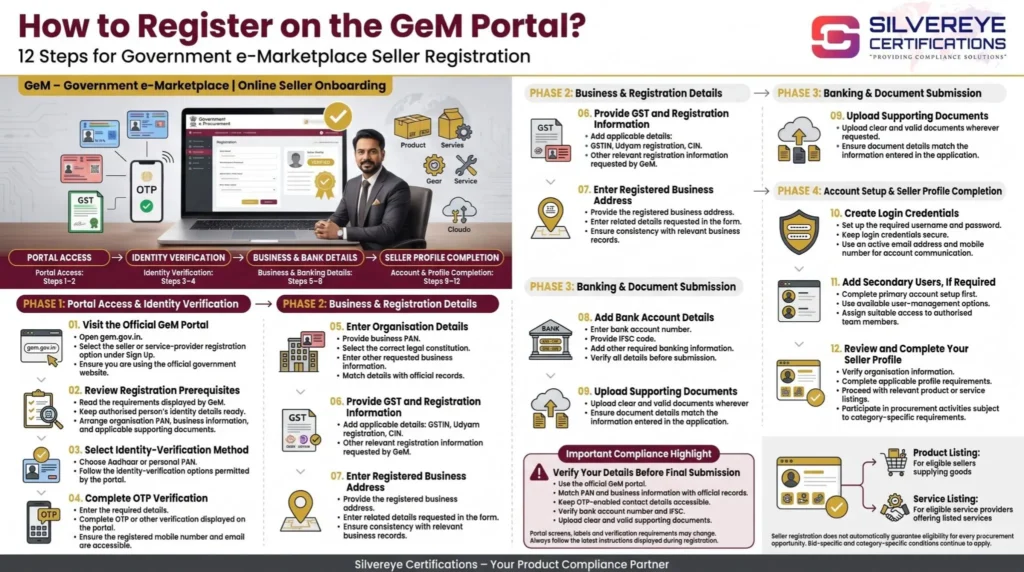
The GeM seller registration process is completed online through the official Government e-Marketplace portal. The exact button names and screen layout may change when GeM updates its registration system. Therefore, use the following steps as a practical guide and follow the instructions displayed on the live portal.
Step 1: Visit the Official GeM Portal
Open https://gem.gov.in/ in your browser. Check that you are accessing the official government website before entering personal or business information. Avoid registration links received through unknown emails, messages or third-party websites.
Step 2: Select Seller or Service Provider Registration
Choose the Sign Up or seller registration option available on the portal. Select the appropriate registration category:
- Product Seller: For businesses intending to sell products to government buyers.
- Service Provider: For businesses offering services through GeM.
- Both: Where the portal provides this option and the business intends to offer products as well as services.
Read the registration prerequisites and terms before proceeding.
Step 3: Verify the Primary User's Identity
Select an accepted identity-verification method for the authorised person creating the account. Depending on the registration route, GeM may request:
- Aadhaar number or Virtual ID, with access to the Aadhaar-linked mobile number.
- Personal PAN, along with the identity details requested by the portal.
Enter the details exactly as they appear in the relevant records. For PAN-based verification, follow GeM's prescribed conditions for the personal PAN of the authorised user.
Step 4: Complete Mobile and Email Verification
Enter the mobile number and email address requested during registration. Complete the OTP or email verification steps displayed on the portal.
Make sure the authorised person can access these communication channels. They may be needed for future account notifications, verification and official communication.
Step 5: Enter Business and Organisation Details
Select the correct organisation constitution and provide the business information requested by GeM.
Depending on the legal structure, the portal may ask for details such as:
- Organisation PAN
- CIN for an applicable company
- Partnership or LLP details
- Proprietorship information
- Trust or society registration details
GeM checks relevant information against government databases. A mismatch in the organisation name, PAN or registration details may prevent successful validation.
Step 6: Add GSTIN, Udyam and Business Address Details
Enter the GSTIN, Udyam registration number, registered office address and other business information wherever applicable.
Do not enter information simply because it appears in an older registration guide. Follow the requirements applicable to your organisation and the fields displayed in the current registration form.
Step 7: Enter Bank Account Details
Provide the bank account information requested for the seller profile, including:
- Account holder's name
- Bank account number
- IFSC code
- Other bank details requested by GeM
Check the account number and IFSC carefully before submitting. Incorrect bank information can create problems during subsequent payment-related processes.
Step 8: Upload the Required Documents
Upload the documents requested for your organisation's constitution and registration category. Ensure that each file is readable, complete and valid.
Use the document formats and file-size limits specified by the portal. Do not upload unrelated certificates or documents that do not belong to your business.
Step 9: Create Your GeM Login Credentials
After completing the required verification and registration details, create your GeM user ID and password as instructed.
Use a strong, unique password and store it securely. Do not share your OTP or password with consultants or unauthorised persons.
Step 10: Submit the Registration and Check Your Account
Review the details entered in the application and submit the registration. Save the registration confirmation and seller details for future reference.
After account creation, log in and complete any remaining profile requirements displayed on your dashboard. Account creation alone does not mean that your product or service catalogue is ready for publication.
Step 11: Add Secondary Users, Where Required
If your organisation needs multiple people to manage its GeM activities, use the secondary-user facility where available.
Depending on the permissions provided, different users may assist with activities such as catalogue management, bid participation and contract management. Assign access according to each person's responsibilities and follow the current account-management instructions.
Important: Keep the primary account under the control of an appropriately authorised person. Check the permissions available to primary and secondary users before assigning responsibility for organisation-level changes.
GeM Online Registration Fees and Transaction Charges in 2026
GeM seller registration is free, but certain charges may apply when a seller receives orders or requires additional services such as OEM vendor assessment.
The latest GeM reforms announced on 28 October 2026 confirm a reduction in transaction charges and the continuation of the caution-money exemption. The following table reflects the government-reported policy position as of 24 November 2026.
GeM Seller Registration and Transaction Fee Structure
| Charge type | Amount or status | When it applies |
|---|---|---|
| Online seller registration | ₹0 | Account creation |
| Caution money | Discontinued | No longer required for seller and service-provider onboarding |
| Annual account renewal fee | No general charge established in the official material reviewed | Check the current portal terms for any account-specific requirement |
| Transaction charge on orders up to ₹10 lakh | Nil | Orders within this value range |
| Transaction charge on orders above ₹10 lakh and up to ₹10 crore | 0.30% of total order value | Applicable orders within this value range |
| Transaction charge on orders above ₹10 crore | Maximum ₹3 lakh | Applicable high-value orders |
| OEM vendor assessment | Depends on assessment category and applicable policy | Where assessment is required and no exemption applies |
| Consultant or agency fee | Depends on the service provider | Private professional assistance, not a GeM registration charge |
The transaction-charge structure is based on GeM's revenue-policy reforms. The 28 October 2026 government announcement confirms that approximately 97% of orders attract no transaction charge. =
Important distinction: The 0.30% charge applies to the total order value, not merely the portion exceeding ₹10 lakh. For orders above ₹10 crore, the transaction charge is capped at ₹3 lakh.
Are There Any Annual Charges or Renewal Fees on GeM?
A basic seller account should not be confused with an OEM vendor assessment or other category-specific requirements.
- Basic seller account: GeM's published registration material describes free seller onboarding. I could not verify a universal annual account-renewal fee in the official material reviewed.
- Caution money: The requirement was removed for all sellers and service providers. Sellers who previously deposited caution money can check the withdrawal facility available through the Caution Money Dashboard.
- Vendor assessment: Certain OEMs may need to complete vendor assessment through the prescribed process. Assessment fees and exemptions depend on the applicable GeM policy.
- Consultancy charges: Fees charged by private consultants for documentation or application support are separate from government registration fees.
Do not include an assumed ₹10,000 Annual Milestone Charge as a standard GeM fee. I could not verify this amount or a universal ₹20 lakh sales threshold in the official GeM and government sources reviewed. Confirm any such charge directly through the current portal policy before making a payment.
GeM Registration Validity and Renewal Requirements
One common misconception is that every GeM seller must renew their account annually. Basic seller-account registration and OEM vendor assessment are separate matters and should not be treated as the same renewal process.
| Registration or assessment | Validity and renewal position | What the seller should do |
|---|---|---|
| Basic seller account | No universal annual renewal period established in the official material reviewed | Keep business, contact and bank details updated |
| OEM vendor assessment | Depends on the applicable vendor-assessment and validation policy | Check the assessment certificate and current policy for its validity and renewal requirements |
| Assessment exemption | Depends on the applicable exemption conditions | Retain supporting documents and monitor changes in eligibility |
| Vendor Validation Policy | Subject to updates by GeM | Read the latest policy before applying as an OEM or reseller |
Does a GeM Seller Account Need Annual Renewal?
There is no verified universal annual renewal requirement for every basic seller account in the official registration material reviewed. However, sellers must maintain accurate information and comply with applicable platform conditions.
If you are an OEM or reseller, check whether your business requires vendor assessment, validation or an exemption under the latest GeM policy. Do not assume that a basic seller account and an assessment certificate have the same validity period.
How Long Does GeM Online Registration Take?
GeM does not provide a single guaranteed completion time that applies to every seller registration. The actual time depends on identity verification, organisation validation, document readiness and any additional checks required for the applicant.
| Registration stage | What affects the time |
|---|---|
| Identity verification | Availability of the authorised person's Aadhaar or PAN details and successful OTP verification |
| Organisation verification | Matching PAN, CIN, constitution and other business information with government records |
| Profile completion | Availability and accuracy of address, GST and bank details |
| Document verification | Readability, validity and correctness of uploaded documents |
| OEM vendor assessment | Assessment category, document review and applicable verification requirements |
| Brand and catalogue approval | Category-specific requirements, supporting evidence and review |
Some registration checks may happen during the online application itself. However, additional document review, vendor assessment or catalogue-related approval can take longer.
Practical advice: Do not plan your first GeM bid or order around an assumed one-to-seven-working-day registration period. Complete your profile early and check the dashboard for pending requirements or verification requests.
Common GeM Online Registration Problems and How to Resolve Them
Most registration difficulties relate to identity verification, business-data mismatches, document uploads or incorrect account permissions. Check the following before submitting a support request.
| Common problem | Possible reason | What to do |
|---|---|---|
| OTP does not arrive | Aadhaar-linked mobile is inactive or unavailable, or there is a network issue | Check mobile connectivity and the registered number. Use the alternative verification route if permitted. |
| Personal PAN is rejected | PAN details do not match the authorised person's records or do not meet GeM's requirements | Recheck the PAN and identity details before retrying. |
| Organisation details fail validation | Business name, PAN, CIN or constitution details differ from official records | Enter details exactly as recorded in the relevant government database. |
| Document upload fails | File is blurred, incomplete, expired or exceeds the permitted size | Prepare a clear, complete file in the format and size accepted by the portal. |
| Bank details cannot be verified | Incorrect account number, IFSC or account-holder information | Verify the bank details using an official bank document. |
| Company information cannot be edited | User permissions may not allow organisation-level changes | Log in through the authorised primary account or follow the portal's account-management instructions. |
| OEM or reseller assessment is unsuccessful | Missing documentation, eligibility issues or an inactive OEM/category association | Review the applicable assessment requirements and correct the supporting information. |
How to Avoid GeM Registration Scams
GeM seller registration does not require a registration fee. Be cautious if anyone asks you to pay money to activate your account, guarantee a government order or bypass verification.
- Use only the official gem.gov.in website.
- Never share your OTP, password or login credentials.
- Do not transfer money to personal bank accounts for seller activation.
- Verify any vendor-assessment or other applicable charge through the official portal.
- Keep payment receipts and application references for any legitimate transaction.
- If you use a consultant, retain control of your account and verify every submission before it is made.
GeM's own registration material explicitly warns sellers that registration is free and advises them not to pay anyone for registration.
Why Choose Silvereye Certifications (SEYECS) for GeM Registration Assistance?
Completing GeM seller registration involves more than creating an account. Businesses must select the correct organisation details, complete identity verification, provide accurate documents and prepare their seller profiles before listing products or services. Silvereye Certifications (SEYECS) provides professional guidance to businesses looking for assistance with the GeM registration process.
Here is how Silvereye Certifications can support your registration journey:
- Guidance on seller registration: Get assistance in understanding the GeM registration process, seller categories and applicable requirements for your business.
- Document preparation support: Receive guidance on organising business documents, PAN, GST and other information required for the application.
- Business profile assistance: Get help reviewing organisation details and identifying inconsistencies that may lead to verification issues.
- Product and service listing guidance: Understand the information and supporting documents needed to prepare product or service catalogues on GeM.
- Application support: Receive guidance at different stages of registration, from account creation to profile completion and applicable verification requirements.
- Transparent consultancy: Understand the scope of professional assistance and applicable service charges before proceeding.
At Silvereye Certifications (SEYECS), our focus is to make the registration process easier to understand through practical guidance and documentation support. We help businesses prepare their applications while keeping them informed about the relevant requirements.
Please note: Silvereye Certifications (SEYECS) is a consultancy brand, not a GeM registration authority. Seller accounts, verification and approvals are handled through the official Government e-Marketplace portal.
Conclusion
GeM Portal Online Registration provides businesses, manufacturers, traders and service providers with an opportunity to participate in India's government procurement marketplace. Although seller registration is free and completed online, applicants must provide accurate identity and organisation details, complete the required verification and maintain their seller profiles.
Before applying, check your business constitution, PAN, GST details, bank information and supporting documents. Also understand the applicable transaction charges, OEM assessment requirements and catalogue-related conditions before planning to sell through the platform.
If you need professional assistance with the GeM seller registration process, document preparation or profile setup, Silvereye Certifications (SEYECS) can guide you through the relevant steps. A properly prepared application can help reduce avoidable errors and make your GeM onboarding journey more organised.
Frequently Asked Questions
Can I register on GeM completely online?
Yes. Sign-up, verification, document upload and login creation all happen on gem.gov.in.
Is there a fee for GeM online registration?
No. GeM charges nothing to create a seller or service-provider account. Later costs depend on orders and, for some OEMs, vendor assessment.
Is caution money still payable?
No. GeM removed caution money for sellers in its August 2025 reforms.
Who should open the account?
A director, key person or authorised signatory as per the ITR, since GeM requires an authorised person as the primary user.
Which documents do I need for GeM Registration?
Aadhaar or personal PAN of the authorised person, linked mobile, email ID, organisation PAN, constitution proof, bank details, and GST or Udyam details where applicable.
Why is my OTP not coming?
Usually the mobile number is not linked to your Aadhaar, or the number is inactive. Fix the linkage and try again.
How long does approval take?
GeM gives no fixed time. Guides quote one to seven working days, and accurate documents speed things up.
Do I have to renew GeM registration every year?
We found no yearly renewal fee or expiry date for the basic account. Vendor assessment lasts 3 years.
Do I need GST to register?
GeM has historically asked for a GSTIN above ₹20 lakh turnover, and most sellers have one. The live form shows what applies to you.
Can I register as an individual for GeM registration?
Yes, with a personal PAN or Aadhaar of the proprietor, subject to GeM's checks.