
- Registration on the Government e-Marketplace (GeM) portal is free for sellers and service providers. The caution money requirement was removed in 2025.
- Documents to keep ready: Keep the Aadhaar or personal PAN details of an authorised person, the business PAN, bank account details and GST or Udyam information, wherever applicable.
- Charges after registration: Transaction charges may apply to orders above ₹10 lakh at the applicable rate. The stated rate is 0.30%. Some Original Equipment Manufacturers (OEMs) may also need to pay for vendor assessment.
- Maintain an updated profile: Vendor assessment is generally valid for three years. Keep your seller profile, GST information and bank details accurate and updated to avoid issues during procurement and payment processes.
Introduction
The Government e-Marketplace (GeM) is an online public procurement platform that enables government departments, ministries, public sector undertakings and other authorized organizations to purchase goods and services from registered sellers and service providers. For businesses, GeM provides an opportunity to participate in government procurement, showcase their products or services and receive orders through a transparent digital process.

Registering on GeM is the first step for businesses that want to become government suppliers. Although registration is free, sellers must provide accurate business, identity and bank details and meet the applicable requirements for their seller or service-provider category. Understanding the registration process, required documents, applicable charges and ongoing compliance obligations can help businesses avoid delays and manage their GeM accounts effectively.
This guide explains GeM seller registration in India, including eligibility, documents, step-by-step registration, fees, vendor assessment and important points to consider before selling on the portal.
What Is GeM Portal Registration?
GeM portal registration is the online process through which a business or eligible individual creates a seller or service-provider account on the Government e-Marketplace (GeM). The account allows registered businesses to list products or services and participate in government procurement through the official portal.
During registration, the applicant verifies the identity of an authorized person using Aadhaar or personal PAN and provides the organization's details, business PAN and other information requested by GeM. GST, Udyam and bank details are added or verified wherever applicable.
Registration is free of charge, and the caution money requirement for sellers was discontinued in July 2025. However, other charges may apply later, depending on the order value and the seller's category. For example, GeM's revised transaction-charge structure exempts orders up to ₹10 lakh, while orders above this threshold attract the applicable charge.
What Is the GeM Portal and Why Should You Register?
The Government e-Marketplace (GeM) is India's national online public procurement platform, launched in 2016 and operated under the Ministry of Commerce and Industry. It enables eligible government organizations to procure goods and services from registered sellers and service providers through a digital marketplace.
GeM connects suppliers with government buyers, including central ministries, state departments, public sector undertakings, autonomous bodies and other authorized organizations. Its digital procurement system supports online product and service listings, bidding, reverse auctions, purchase orders and order-related processes.
The platform has become a significant channel for government procurement. According to the Press Information Bureau, GeM recorded ₹5.4 lakh crore in gross merchandise value (GMV) during FY 2024–25. This reflects the scale of procurement activity taking place through the platform and the opportunities available to registered suppliers.
Benefits of GeM Seller Registration
| Benefit | What it means for your business |
|---|---|
| Access to government buyers | Your listed products or services can become visible to eligible government organisations looking for suppliers. |
| Free registration | Creating a seller account does not require a registration fee. The caution money requirement was also discontinued in 2025. |
| Reduced transaction charges | Orders up to ₹10 lakh are exempt from transaction charges under the revised structure. |
| Product and service listings | Eligible businesses can offer goods, services or both through their GeM account. |
| Online procurement process | Bidding, reverse auctions, purchase orders and other procurement activities are handled digitally. |
| Opportunities for small businesses | GeM supports participation by micro and small enterprises, startups, women entrepreneurs, artisans and self-help groups. |
| Digital order management | Sellers can manage listings, orders, invoices and related activities through the portal. |
GeM registration does not guarantee government orders. Your chances of winning business depend on factors such as product or service suitability, pricing, technical eligibility, bid conditions, delivery capability and past performance.
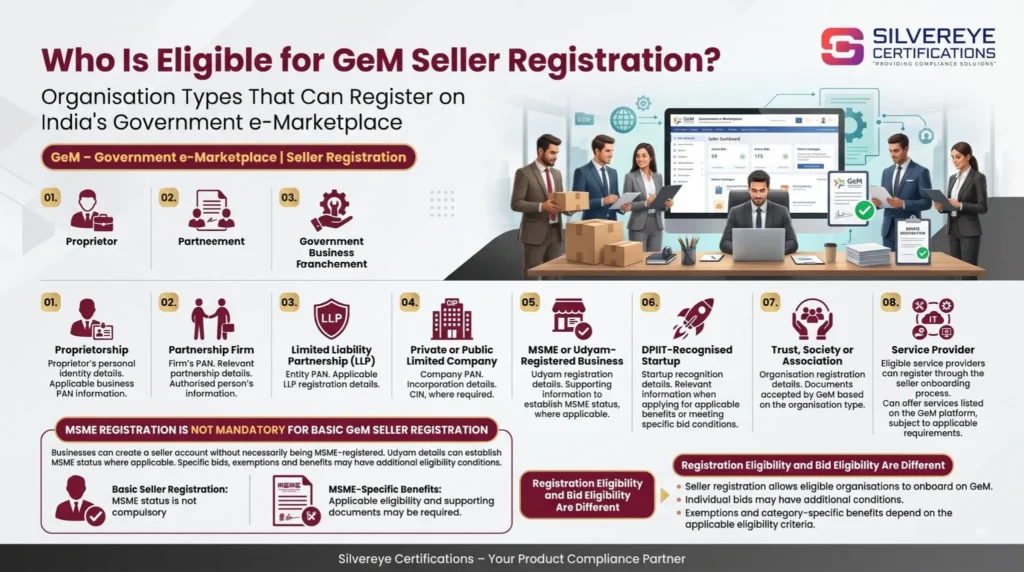
Who Is Eligible for GeM Registration?
Businesses and eligible organisations that supply goods or services can apply for seller registration, subject to GeM's registration and verification requirements. You do not have to be an MSME simply to create a seller account. However, additional eligibility conditions may apply when participating in a particular bid, claiming an exemption or seeking a category-specific benefit.
Common organisation types include:
| Seller or organisation type | Registration consideration |
|---|---|
| Proprietorship | The proprietor provides personal identity details and the business PAN information applicable to the proprietorship. |
| Partnership firm | The firm provides its PAN and relevant partnership and authorised-person details. |
| Limited Liability Partnership (LLP) | The LLP provides its entity PAN and applicable registration details. |
| Private or public limited company | The company provides its PAN, incorporation details and CIN, where required. |
| MSME or Udyam-registered business | The business can provide its Udyam details to establish its MSME status where applicable. |
| DPIIT-recognised startup | The startup can provide its recognition details when applying for relevant benefits or meeting specific bid conditions. |
| Trust, society or association | Registration depends on the organisation type and the documents accepted by GeM. |
| Service provider | Eligible service providers can register through the seller onboarding process and offer services listed on the platform. |
Who can open the account?
The person completing registration must be authorised to represent the organisation, such as its proprietor, director or an eligible key person or authorised signatory. GeM's seller-registration prerequisites allow identity verification through either Aadhaar or personal PAN.
- Aadhaar-based verification: The mobile number linked to the Aadhaar must be active to receive the required OTP.
- Personal PAN-based verification: The applicant must enter the correct PAN details. GeM's published prerequisites specify that the fourth character of the personal PAN must be P.
The organization must also provide its own PAN and other details according to its legal constitution.
GST requirements depend on the nature of the business, its turnover, the goods or services supplied and the applicable GST provisions. Do not assume that every seller must obtain GST registration solely because they want to create a GeM account. Check the current GeM registration form and the applicable GST rules for your business before applying.
OEMs and resellers
Both Original Equipment Manufacturers (OEMs) and resellers can participate on GeM, subject to the relevant category and listing conditions. OEMs seeking to list certain brands or products may need to complete a separate vendor-assessment process. Resellers may need to meet the applicable authorization or sourcing requirements for the products they offer.
Documents Required for GeM Portal Registration
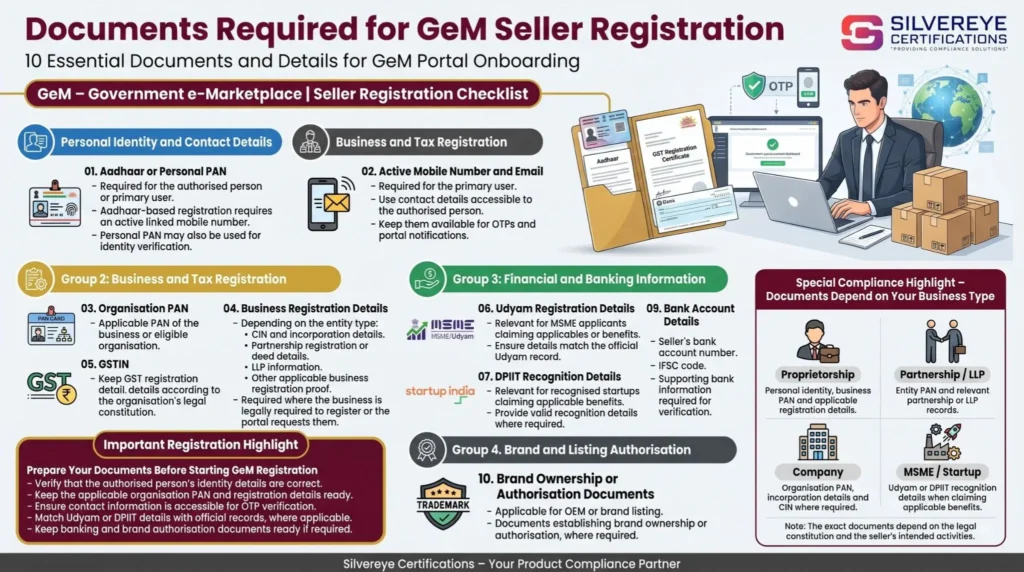
Before starting the application, organise the identity, business and banking information relevant to your organisation. The exact requirements can vary according to the legal constitution, seller category and activities you plan to undertake.
| Document or information | Who needs it | Important details |
|---|---|---|
| Aadhaar or personal PAN | Authorised person or primary user | Aadhaar-based registration requires an active linked mobile number. Personal PAN can also be used for identity verification. |
| Active mobile number and email address | Primary user | Use contact details that the authorised person can access for OTPs and portal notifications. |
| Organisation PAN | Business or eligible organisation | Enter the PAN applicable to the organisation's legal constitution. |
| Business registration details | Depending on entity type | May include CIN, incorporation details, partnership or LLP information, or other applicable registration proof. |
| GSTIN | Where applicable | Keep the GST registration details ready if your business is required to register or the portal requests them. |
| Udyam registration details | MSME applicants claiming applicable status or benefits | Ensure the information matches the official Udyam record. |
| DPIIT recognition details | Recognised startups claiming applicable benefits | Provide valid recognition details where required. |
| Income Tax Return information | Where required for participation | GeM may require ITR details for bid or reverse-auction participation, subject to its rules and applicable exemptions. |
| Bank account details | Seller account | Keep the account number, IFSC and supporting bank information ready for verification. |
| Brand ownership or authorisation documents | Where applicable to OEM or brand listing | Documents may be required to establish brand ownership or authorisation for the relevant listing. |
Tips to Avoid Registration Errors
- Match business details: Ensure the organisation name, PAN, GST and bank information are consistent with the relevant official records.
- Use active contact details: Keep the authorised person's mobile number and email address accessible throughout registration.
- Check PAN details carefully: Select the correct organisation type and enter the corresponding PAN information.
- Keep supporting documents readable: Upload clear, complete and valid documents wherever the portal asks for them.
- Review the information before submission: Check the registered address, authorised-person details and bank information to reduce verification issues.
Important: GeM's document requirements can change, and not every document in this list is mandatory for every applicant. Follow the latest instructions displayed on the official portal for your organisation type and seller category.
GeM Portal Registration Fees, Validity and Renewal (2026)
GeM seller registration is free, but businesses should understand the charges that may apply after onboarding. These include transaction charges, the annual milestone charge and vendor-assessment fees for eligible OEMs. The caution money deposit previously collected from sellers and service providers was discontinued in July 2025.
The following fee information reflects GeM's published policy announcements and available guidance as of 23 November 2026. Since GeM can revise its revenue and vendor-validation policies, check the latest fee displayed on the official portal before making a payment.
GeM Registration Fees and Charges
| Charge | Amount or status | When it applies |
|---|---|---|
| Seller or service-provider registration | Free | When creating an account on the official GeM portal |
| Caution money | Discontinued | Removed for sellers and service providers in July 2025 |
| Basic account renewal fee | No standard annual renewal fee identified | A regular yearly account-renewal payment is not listed in the published information reviewed |
| Transaction charge on orders up to ₹10 lakh | Nil | No transaction charge under the applicable revenue policy |
| Transaction charge on orders above ₹10 lakh and below ₹10 crore | 0.30% of order value | Subject to the applicable annual milestone condition |
| Transaction charge on orders of ₹10 crore and above | Flat ₹3 lakh | Subject to the applicable annual milestone condition |
| Annual Milestone Charge | ₹10,000 plus applicable taxes | Payable once the seller's cumulative Seller Merchandise Value reaches ₹20 lakh in a financial year, under the applicable revenue policy |
| OEM vendor assessment | Fee depends on the applicable assessment category | Payable to the designated assessment agency when vendor assessment is required and no exemption applies |
| Consultant or agency fee | Depends on the service provider | A private consultancy charge, not a GeM government registration fee |
Understanding the Annual Milestone Charge: This is separate from the transaction charge. Under the applicable revenue-policy structure, the seller pays the one-time annual milestone charge when cumulative order value reaches ₹20 lakh in a financial year. The transaction-charge slabs then apply as specified in the policy. Check the latest GeM revenue-policy version for its applicability to your order or bid.
A note on outdated fees: Some websites still mention older caution-money deposits and vendor-assessment amounts, such as ₹11,200 plus GST. GeM announced the removal of caution money and a reduction in OEM vendor-assessment fees in 2025. The current assessment amount should be checked through the applicable GeM or assessment-agency application rather than relying on an older fee table.
GeM Registration Validity and Renewal
A basic seller account and an OEM vendor assessment are different. The seller account does not follow the same validity period as the vendor-assessment report.
| Item | Validity or renewal position | What sellers should do |
|---|---|---|
| Basic seller account | No standard annual expiry or renewal cycle identified in the published information reviewed | Keep business, GST, bank and authorised-user details accurate |
| OEM vendor assessment | Generally valid for three years, subject to the applicable policy conditions | Check the expiry date and apply for reassessment in advance |
| Vendor-assessment exemption | Depends on the exemption category and validity of supporting certificates | Monitor the underlying certificate and renew or update it when necessary |
| Vendor Validation Policy | GeM has published Vendor Validation Policy v5.0 | Read the latest policy and application guidelines before applying |
When should you renew vendor assessment?
Vendor assessment is generally valid for three years. Sellers should not wait until the last moment to apply for reassessment. Earlier GeM validation guidance advised assessed sellers to apply at least two months before expiry; confirm the applicable requirement under the current Vendor Validation Policy v5.0 before submitting an application.
If an OEM relies on a BIS license or another supporting certificate for an assessment exemption, the exemption may also depend on the validity and status of that certificate. A cancelled, suspended or expired supporting license can affect the exemption.
Practical tip: Review your GeM profile periodically. Keep your PAN, GST, bank account, business address, authorised-user details and supporting certificates updated. This helps reduce verification issues and interruptions when participating in bids.
GeM Portal Registration Process: Step by Step
The GeM seller-registration process is completed online through the official portal. The exact screen labels and verification requirements may change, so follow the instructions displayed during your application.
- Visit the official GeM portal: Open gem.gov.in and select the seller or service-provider registration option under Sign Up. Check that you are using the official government website.
- Review the registration prerequisites: Read the requirements displayed by GeM. Confirm that the authorised person's identity details, organisation PAN, business information and other applicable documents are ready.
- Select the identity-verification method: Choose Aadhaar or personal PAN for the primary user's identity verification, as permitted by the portal.
- Complete OTP verification: Enter the required details and verify the identity using the OTP or verification method displayed on the portal. Ensure the registered mobile number and email address are accessible.
- Enter organisation details: Provide the business PAN, legal constitution and other requested information. Enter the details exactly as they appear in the relevant official records.
- Provide GST and registration information: Add GSTIN, Udyam, CIN or other registration details wherever applicable to your organisation and the information requested by GeM.
- Enter the registered business address: Provide the address and related details requested in the form. Check that the information is consistent with the relevant business records.
- Add bank account details: Enter the account number, IFSC and other required banking information. Verify every digit before submitting.
- Upload supporting documents: Submit clear and valid documents wherever the portal requests them. Make sure the uploaded information matches the details entered in the application.
- Create your login credentials: Set up the required username and password and keep them secure. Use an active email address and mobile number for account-related communication.
- Add secondary users, if required: After completing the primary account setup, use the available user-management options to assign suitable access to authorised team members.
- Review and complete your seller profile: Check the organisation information and complete the profile requirements. Once the applicable registration and verification steps are completed, you can proceed with relevant product or service listings and participate in procurement activities, subject to category-specific requirements.
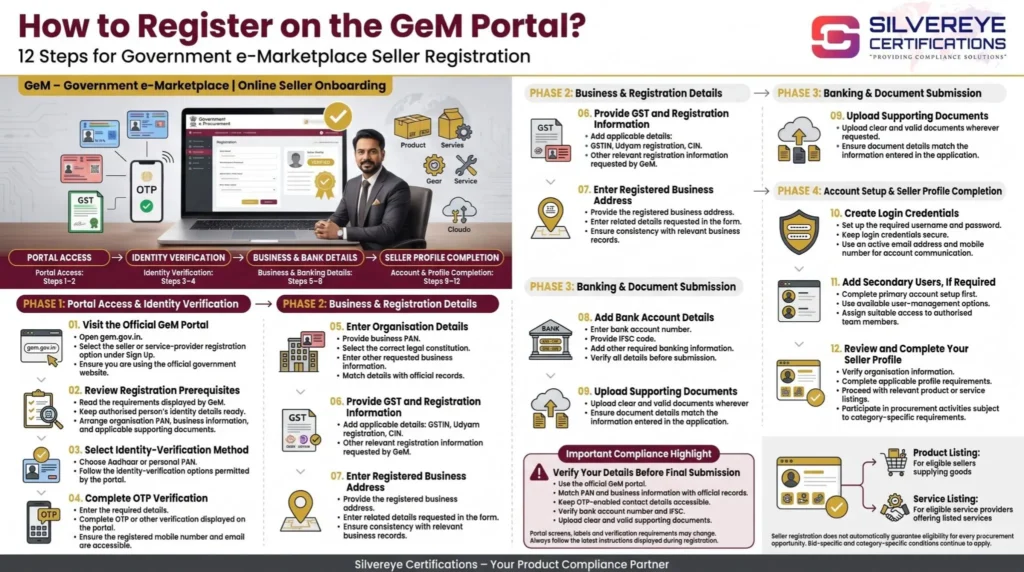
Important: GeM registration does not automatically make every product or service eligible for every government bid. Before listing products or submitting a bid, check the relevant category requirements, technical specifications, authorisations, certifications and buyer conditions.
How Long Does GeM Registration Take, and Why Do Applications Get Stuck?
GeM does not specify one guaranteed processing time for every seller-registration application. The time required depends on identity verification, business-data validation, document readiness and any additional approvals needed for your product or service category.
A straightforward application may move through the initial registration steps quickly. However, OEM vendor assessment, assessment-exemption verification, brand approval and catalogue approval are separate activities that can extend the overall onboarding process.
The following table gives a practical overview. These are indicative stages, not guaranteed GeM service-level timelines.
| Stage | Indicative timeline or process |
|---|---|
| Account creation and identity verification | OTP and available database checks take place during registration |
| Business and profile completion | Depends on document readiness and successful validation |
| OEM vendor assessment | RITES guidance describes a multi-stage process; allow around 15 working days as an indicative estimate, subject to the current policy and application completeness |
| Vendor-assessment exemption | The published GeM guidance describes a two-working-day validation process for exemption applications; actual processing may vary |
| Brand and catalogue approval | Separate review processes apply; additional documents or corrections can extend the timeline |
RITES, the vendor-assessment agency, advises applicants to respond to non-compliance observations within two working days. Delayed responses or incorrect information can lead to further delays or rejection.
Common Reasons for GeM Registration Delays or Rejection
- Mismatch in business information: Differences between the PAN, GST, bank records, registration documents and GeM application can trigger verification issues.
- Aadhaar OTP problems: An inactive mobile number linked to Aadhaar can prevent the authorised person from completing identity verification.
- Incorrect authorised person: The primary user should be eligible and authorised to represent the business. Using someone without the required authority can create verification problems.
- Unclear or incomplete documents: Blurred scans, missing pages, expired certificates or incorrect uploads may lead to clarification requests or rejection.
- Incorrect bank details: An incorrect account number, IFSC or account-holder name can create problems during bank verification and later payment processing.
- Incomplete OEM assessment application: Missing information about the business, manufacturing facilities, financial capacity or product categories can delay vendor assessment.
- Unanswered non-compliance observations: If RITES raises a clarification or non-compliance request, the applicant must respond within the specified time. Failure to do so can result in rejection or cancellation of the assessment application.
GeM Registration Mistakes to Avoid
- Paying an unofficial registration fee: Basic seller registration on GeM is free. If you hire a consultant, clarify that the payment is for professional assistance, not a government registration charge.
- Sharing OTPs or login credentials: Do not share your account access with unauthorised agents. Keep control of the primary seller account.
- Assuming Udyam registration automatically grants OEM assessment exemption: MSME status alone should not be treated as a universal exemption. Check the current Vendor Validation Policy and your specific eligibility.
- Selecting the wrong seller category: Identify whether you are registering as an OEM, deemed OEM or reseller, as the applicable verification and listing requirements can differ.
- Ignoring portal notifications: Regularly check your GeM account and registered email for verification requests, non-compliance observations and other important updates.
What to Do After Your GeM Registration Is Approved
Creating a GeM seller account is only the first step. To start participating in government procurement, you must complete your profile, prepare product or service listings and meet the requirements applicable to your seller category.
Follow these steps after registration:
- Complete your seller profile: Review the organisation's details, registered address, bank information, contact details and other profile fields. Keep the information accurate and updated.
- Choose relevant product or service categories: Identify the categories that match your actual products or services. Read the specifications and eligibility conditions before creating a listing.
- Create your catalogue: Add product details such as brand, model, technical specifications, images, pricing and other information requested by the relevant category. Service providers should prepare accurate service descriptions and comply with the applicable service-category requirements.
- Complete brand approval, where required: OEMs seeking to list their own brands may need to submit brand ownership or supporting documents for verification. Follow the current GeM brand and product approval policy rather than assuming that the same documents apply to every category.
- Complete vendor assessment or exemption, if applicable: OEMs in categories covered by the Vendor Validation Policy may need to complete vendor assessment through the designated agency, unless they qualify for an exemption. Check the current policy before applying.
- Meet reseller authorisation requirements: Resellers should check the relevant category and OEM requirements before listing or pairing products. Where authorisation or OEM pairing is required, complete that process using the applicable portal workflow.
- Monitor bids and purchase opportunities: Check relevant bids, reverse auctions and purchase opportunities regularly. Review technical specifications, eligibility conditions, delivery requirements and payment terms before submitting a quotation or bid.
- Maintain delivery and order records: Fulfil accepted orders according to the contract, meet delivery commitments and retain invoices and other supporting records. Address buyer complaints or incident-related notices through the prescribed GeM process.
- Monitor applicable GeM charges: Keep track of transaction charges and the annual milestone charge, where applicable. Pay charges within the prescribed timelines and review the latest revenue policy for any changes.
Use GeM's Seller Support and Training Resources
New sellers can use the official GeM helpdesk, training material and portal guidance to understand catalogue creation, bidding, vendor assessment and order management. RITES also provides a dedicated helpdesk for vendor-assessment queries.
Using these resources before submitting an application or bid can help sellers understand the requirements and avoid preventable errors.
Why Choose Silvereye Certifications for GeM Portal Registration?
Registering on GeM involves more than creating a seller account. Businesses must provide accurate information, complete the applicable verification steps and follow category-specific requirements before listing products or services. Silvereye Certifications provides professional guidance to help businesses navigate these steps.
Here is how we can support your GeM registration:
- Registration guidance: Assistance with understanding the seller-registration process and selecting the appropriate account type.
- Document review: Help checking business details, PAN, GST, Udyam and other supporting information before submission.
- Profile setup support: Guidance on completing seller-profile details and understanding the portal's requirements.
- OEM and reseller guidance: Assistance in understanding applicable brand approval, vendor assessment, exemption and reseller requirements.
- Application assistance: Support with identifying information gaps and addressing portal-related queries during the registration process.
- Ongoing compliance guidance: Help understanding applicable GeM charges, profile updates and vendor-assessment requirements.
Silvereye Certifications is a compliance consultancy that provides documentation and application support. GeM registration, verification and approvals are handled by the Government e-Marketplace authorities. Our role is to help businesses understand the requirements and prepare their applications correctly. Registration or approval cannot be guaranteed.
Conclusion
GeM seller registration gives eligible businesses an opportunity to offer products and services to government buyers through India's online public procurement platform. Although creating an account is free, sellers must provide accurate business information, complete the required verification and meet the conditions applicable to their product or service categories.
Before applying, keep your identity details, organisation PAN, bank information and other applicable documents ready. After registration, focus on completing your seller profile, creating accurate catalogue listings, meeting OEM or reseller requirements and monitoring relevant procurement opportunities.
A properly prepared application and an up-to-date seller profile can help reduce avoidable verification issues and make it easier to manage your GeM account. If you need assistance understanding the registration process or preparing your documents, Silvereye Certifications can guide you through the applicable requirements and application steps.
Frequently Asked Questions
Is GeM portal registration free?
Yes. GeM charges no fee to create a seller or service-provider account. Costs, if any, arise later through transaction charges, the Annual Milestone Charge or vendor assessment.
Is caution money still required in 2026?
No. GeM announced the elimination of caution money for sellers in August 2025. Ignore older pages that still list ₹5,000 to ₹25,000 slabs.
Who can register on GeM as a seller?
Proprietors, partnership firms, LLPs, companies, MSMEs, startups, trusts, societies and cooperatives, through an authorized person such as a director, key person or authorized signatory.
Which documents are needed for GeM registration?
Aadhaar or personal PAN of the authorized person, a linked mobile number, email ID, organization PAN, constitution proof, bank details, and GST or Udyam details where applicable.
Is GST mandatory for GeM registration?
GeM has historically required GSTIN above ₹20 lakh turnover, and most sellers register with GST anyway for invoicing. The live form shows what applies to you.
How long does GeM registration take?
GeM publishes no fixed timeline. Third-party guides quote one to seven working days, and matching documents are the biggest factor.
Does GeM registration need to be renewed every year?
We found no annual renewal fee or expiry date for the basic seller account. Vendor assessment, however, is valid for 3 years, so renew that on time.
Do I need vendor assessment to sell on GeM?
Not every seller does. It mainly applies to OEMs in certain product categories, and exemptions exist. Resellers generally rely on OEM authorization.
What are GeM transaction charges?
Nil up to ₹10 lakh per order, 0.30% on orders above ₹10 lakh and up to ₹10 crore, and a flat ₹3 lakh above ₹10 crore, per the revenue policy effective 9 August 2024.
Can a service provider use the same account?
Yes. GeM does not require separate registrations for a seller and a service provider.
Can an individual or small shop register without a company?
Yes, using a personal PAN or Aadhaar of the proprietor, subject to GeM's verification checks.
Do I need Udyam registration for GeM?
Udyam is relevant for MSMEs and is validated when you register as one. We did not find it listed as a requirement for every seller.
Why was my GeM registration rejected or stuck?
Usual causes are name mismatches, an Aadhaar not linked to a working mobile, unclear uploads, wrong bank details or the wrong person acting as primary user.