


- ICEGATE registration is completed online through the official ICEGATE portal. The registration process is paperless, so applicants do not normally need to visit a Customs office or submit physical documents.
- Prepare your system and documents: Keep your laptop or desktop, valid Digital Signature Certificate (DSC), DSC token (where applicable) and scanned supporting documents ready to avoid interruptions during registration.
- Verify your registered mobile number and email address: Your contact details should match the information available with GSTN and DGFT (for importers/exporters). Update any incorrect details before starting the application.
- Use the official ICEGATE website: Apply only through www.icegate.gov.in to avoid fraudulent websites and unauthorised intermediaries.
- Keep OTPs and DSC credentials secure: Never disclose your OTP, DSC token PIN or private signing credentials to agents or unknown individuals. Complete verification yourself.
- Check document accuracy: Ensure that your PAN, IEC, GSTIN, business name and authorised person's details match the supporting documents uploaded with your application.
Introduction
ICEGATE registration online is the process of creating an account on the official Indian Customs portal, ICEGATE (Indian Customs Electronic Gateway), to access electronic customs services and conduct import-export-related activities.
The registration process is completed online. Applicants generally need to verify their IEC and GSTIN details, validate their registered mobile number and email address through OTPs, select the appropriate user category, complete the registration form and provide the required supporting documents.

Where applicable, the authorized person's Digital Signature Certificate (DSC) is used to digitally sign the application. After submission, the Customs authorities review the application, and registration-related updates are communicated through the registered email address or portal.
ICEGATE registration does not require a separate government registration fee according to the portal's published registration guidance. However, applicants may incur expenses for obtaining a DSC or using optional professional assistance.
What Is ICEGATE Registration Online?
ICEGATE (Indian Customs Electronic Gateway) is the customs e-filing portal managed by the Central Board of Indirect Taxes and Customs (CBIC). ICEGATE registration online is the process of creating a user account on this portal to access electronic customs services.
The registration process is completed online. Applicants do not normally need to submit physical forms or visit a Customs office for standard registration. Identity verification, document uploads, application submission and registration updates are handled through the official website and registered communication channels.
Once approved, the ICEGATE ID allows registered users to access services such as:
- Filing Bills of Entry and Shipping Bills.
- Making customs duty payments.
- Uploading supporting documents electronically.
- Tracking consignments and checking document status.
Importers, exporters, customs brokers, shipping lines and other trade partners can register under the appropriate user category based on their business activities.
Is ICEGATE Registration Online Mandatory?
Businesses and individuals who need to access electronic customs filing services must obtain the appropriate ICEGATE registration. The registration category determines which services and functions are available to the user.
| Who you are | Do you need ICEGATE registration online? | Why |
|---|---|---|
| Importer or exporter with an IEC | Yes | To file Bills of Entry and Shipping Bills and track customs clearance |
| Employee or representative of an IEC holder | Yes, as a child user or authorized person | To operate the IEC holder's account with appropriate authorisation |
| Customs broker and staff | Yes | To file customs documents on behalf of clients |
| Shipping line, agent, freight forwarder or custodian | Yes, under the applicable role | To exchange cargo and manifest information with Customs |
| Trader who only wants basic status or reports | Depends on the service | Check the portal's available access options for non-filing users |
Note: The registration requirements and available services may differ depending on the applicant's role and the type of customs activity.
Benefits of ICEGATE Registration Online
ICEGATE registration online makes customs-related activities more accessible by allowing registered users to complete several processes electronically.
- No Physical Visits: Complete the registration process online without routinely visiting a Customs office.
- Paperless Documentation: Submit applications and supporting documents electronically and maintain a digital record of communications.
- Convenient Customs Filing: Access electronic filing facilities for Bills of Entry and Shipping Bills.
- Online Duty Payment: Pay applicable customs duties through the available electronic payment facilities.
- Consignment Tracking: Monitor the status of Bills of Entry, Shipping Bills and relevant customs documents.
- Team Management: Parent users can manage authorised child users and control their access based on business requirements.
- Data Verification: ICEGATE uses relevant IEC, PAN and GSTIN information for identity verification and validation.
Eligibility for ICEGATE Registration Online
Before applying for ICEGATE registration, applicants should check whether they meet the requirements for their selected registration category.
- Valid Importer Exporter Code (IEC): An active IEC issued by the Directorate General of Foreign Trade (DGFT) is required for importer and exporter registration.
- GSTIN Details: Keep the applicable GSTIN and PAN information ready for entity verification and linking.
- Registered Mobile Number and Email: Ensure that your contact details are accessible for OTP verification and registration communication.
- Authorized Person: The business must identify an authorized person to operate the ICEGATE account. Companies and other entities may need supporting authorization documents.
- Digital Signature Certificate (DSC): Keep the authorized person's valid DSC ready wherever the selected registration process requires digital signing.
- Role-Specific Approval: Customs brokers, shipping lines, custodians and other trade partners may need additional licences, F or G cards or relevant Customs approvals.
Important: DGFT requires IEC holders to complete their annual IEC confirmation or update between April and June, even if there are no changes in their business details. Keep your IEC information updated to avoid verification-related issues during ICEGATE registration.
What You Need Before You Start ICEGATE Registration Online
Although the registration process is online, proper preparation can help prevent technical issues, verification failures and application delays.
Use the following checklist before starting your ICEGATE registration online.
| Requirement | Why it matters | Quick check |
|---|---|---|
| Laptop or desktop with stable internet | The registration form and DSC-related utilities are easier to manage on a computer | Avoid unstable internet connections and public Wi-Fi |
| DSC token and signer utility | Required for digital signing wherever the portal prompts for it | Connect the token and check whether it is detected |
| Registered mobile number and email | Used for OTP verification and registration communication | Ensure you can access both |
| Scanned documents in PDF or JPEG format | Supporting documents may be required during registration | Check that every document is clear and readable |
| Application reference ID | Helps identify and track your registration application | Save the reference details securely |
| Sufficient time | Registration involves multiple verification and documentation steps | Keep enough uninterrupted time to complete the process |
The ICEGATE portal provides DSC installation instructions and technical support resources in its download section. Refer to these resources if your digital signature token is not detected or the signing utility encounters an error.
Documents Required for ICEGATE Registration Online
The documents required for ICEGATE registration online depend on the applicant's user category and business structure. Keep the following documents and details ready before submitting your application.
| Document or detail | Needed for |
|---|---|
| Importer Exporter Code (IEC) | Importer and exporter registration, including applicable child-user registration |
| GSTIN and PAN | Business identity verification and linking with IEC details |
| Authorisation Letter | Companies, partnership firms and representatives applying on behalf of another person or entity |
| Digital Signature Certificate (DSC) | Digital signing wherever required under the selected registration process |
| Business Registration Proof | Certificate of Incorporation, LLP Agreement or Partnership Deed, as applicable |
| Trade-Specific Licence or Approval | Customs brokers, shipping lines, custodians and other regulated trade partners |
Important: Do not assume that every applicant needs to upload all the documents listed above. The exact documentation requirements depend on the selected ICEGATE registration role.
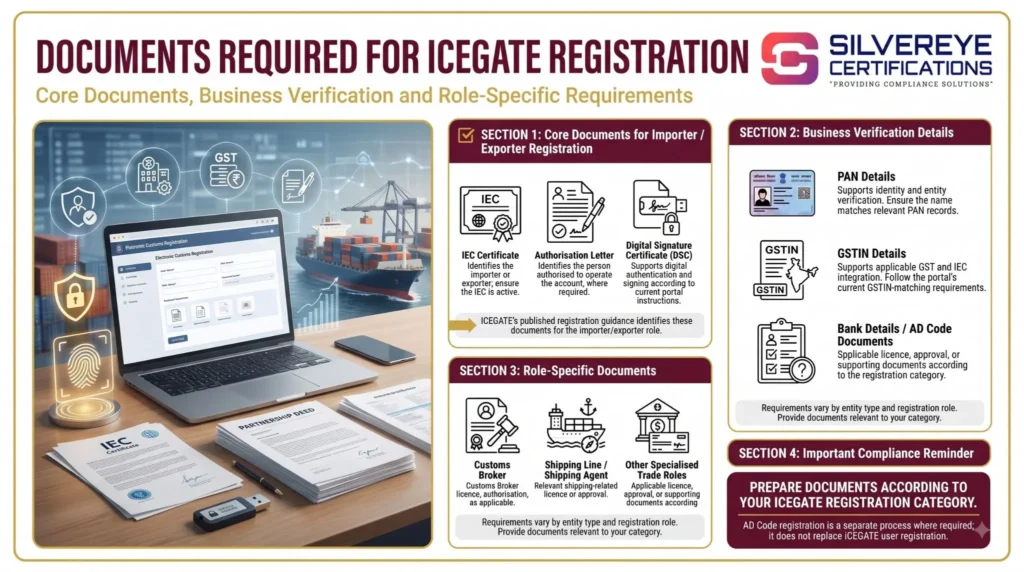
For a complete role-wise document checklist, required formats and common document mismatches, read our Documents Required for ICEGATE Registration guide.
How ICEGATE Registration Online Works: The Process in Six Stages
The ICEGATE registration process involves role selection, identity verification, OTP authentication, document submission and approval by the Customs authorities.
The following table explains the six main stages of registration. For detailed screenshots and instructions, refer to our ICEGATE Registration Process guide.
| Stage | What happens on the portal | What you need to do |
|---|---|---|
| 1. Start Registration | Registration option on the official ICEGATE website | Select Fresh Registration and choose your applicable user role |
| 2. Identity Verification | IEC and GSTIN verification fields | Enter your business details and verify the applicable GSTIN |
| 3. Contact Selection | Contact details fetched from GSTN/DGFT records | Select an accessible registered mobile number and email address |
| 4. OTP Verification | Separate OTPs sent to your mobile and email | Enter both six-digit OTPs within the validity period |
| 5. Role Registration Form | Organisation and authorised user details | Complete the form, upload supporting documents, save a draft if needed and submit |
| 6. Application Approval | Application forwarded to the ICEGATE approving authority | Monitor your registered email for approval or rejection information |
After successful OTP verification, ICEGATE generates a Reference ID valid for 15 days. You can use it to continue your registration later instead of repeating the initial verification process.
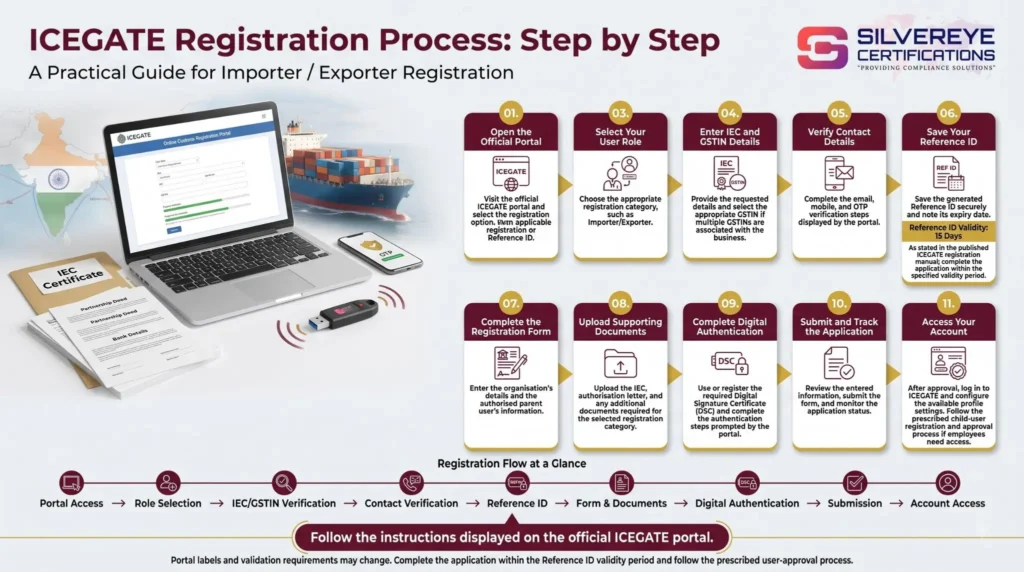
If you do not complete the registration within these 15 days, you will need to generate a fresh Reference ID.
Staying Safe During ICEGATE Registration Online
The ICEGATE portal handles sensitive business information, identity details and digital signatures. Therefore, applicants should follow basic security practices throughout the registration process.
- Use the official website: Type www.icegate.gov.in directly into your browser or access it through the official CBIC website. Avoid look-alike domains and suspicious sponsored advertisements.
- Verify payment requests: Do not pay anyone claiming to collect an unofficial ICEGATE registration fee. Verify any applicable charge through official portal instructions.
- Protect OTPs and passwords: Never share your OTP, ICEGATE password or DSC token PIN with unknown individuals or unauthorised agents.
- Control account access: If you appoint a consultant or service provider, keep your registered email, mobile number and account credentials under your company's control.
- Secure your DSC: Never leave your digital signature token connected to an unattended or shared computer.
- Choose service providers carefully: Request a written quotation explaining the consultancy scope, government charges (if applicable) and professional fees before making payment.
Security tip: Always review the information displayed before digitally signing or submitting your ICEGATE registration application.
Common ICEGATE Registration Online Errors and Their Solutions
Applicants may encounter technical and verification-related problems while completing ICEGATE registration. Understanding the possible causes can help resolve these issues without repeatedly submitting applications.
| Problem | Possible reason | Suggested solution |
|---|---|---|
| OTP not received | Incorrect or outdated mobile number or email in the source records | Verify and update contact details with the relevant authority before restarting |
| OTP expired | OTP was not entered within the permitted time | Generate a fresh OTP and complete verification promptly |
| IEC and GSTIN mismatch | Incorrect GSTIN selection or incomplete IEC-GSTIN mapping | Check the details and use the official GSTN integration and IEC-GSTIN mapping facilities |
| DSC not detected | Missing driver, incompatible signer utility or token configuration issue | Install the required utility and follow the ICEGATE DSC setup instructions |
| Application interrupted | Session timeout or incomplete registration | Continue using your valid Reference ID and complete the saved draft |
| Document upload failure | Unsupported format, unclear scan or file-size issue | Rescan the document and follow the file requirements displayed on the portal |
| Email already registered | An existing ICEGATE account is associated with the email address | Recover or verify the existing account instead of creating a duplicate registration |
How Long Does ICEGATE Registration Online Take?
The time required for ICEGATE registration online depends on document readiness, successful verification and the time taken by the approving authority to review the application.
The official ICEGATE FAQ mentions an indicative processing period of 3–4 working days after successful application submission. However, additional verification or document-related queries may extend the timeline.
The following table separates applicant preparation time from the official processing estimate.
| Phase | Estimated time | Factors affecting the timeline |
|---|---|---|
| Document preparation | Same day to a few days | DSC procurement, missing documents and incorrect business details |
| OTP and identity verification | Around 10–20 minutes | OTP delivery and contact verification |
| Role form and document uploads | Around 30–60 minutes | Number of fields and supporting documents |
| Customs application review | Official FAQ indicates 3–4 working days | Additional verification, document quality and application queries |
| First login | After registration approval | Receipt of credentials and successful login verification |
Please note: The preparation and form-completion estimates above are practical planning estimates, not official CBIC service-level commitments. The 3–4 working-day period is also indicative, not a guaranteed approval deadline.
ICEGATE Registration Online Fees
One of the common questions applicants ask is whether they need to pay a government fee for creating an ICEGATE account.
The registration process should be distinguished from the other expenses associated with import-export operations, such as obtaining a DSC or hiring a consultant.
| Cost item | Who provides the service | Cost information |
|---|---|---|
| ICEGATE registration | CBIC / ICEGATE | No separate registration fee indicated in the published registration guidance |
| Class 3 DSC and USB token | Licensed Certifying Authority | Varies by provider and validity |
| IEC, if not already obtained | DGFT | As per the applicable DGFT fee |
| Professional registration assistance (optional) | Consultant or agency | Depends on the scope of services |
Important: A DSC is a separate digital-signature expense, not an ICEGATE registration fee. Always verify the latest applicable charges before making payment.
ICEGATE Registration Online Validity and Renewal
Unlike licenses that require periodic renewal, ICEGATE registration does not have a clearly specified routine renewal cycle in the published registration guidance.
However, certain credentials and business registrations associated with your ICEGATE account must remain valid and updated.
| Element | Validity or status | What you should do |
|---|---|---|
| ICEGATE ID | No routine renewal period specified in the registration guidance | Keep account and business details updated |
| Class 3 DSC | As per the validity period issued by the Certifying Authority | Renew before expiry and update the DSC on ICEGATE where required |
| IEC | Requires annual confirmation or update as per DGFT rules | Complete the annual IEC update between April and June |
| GSTIN | Depends on the status of the GST registration | Monitor its active status and update relevant details |
| Child users | Access managed by the parent user | Disable access when an employee leaves the organisation |
ICEGATE Account Maintenance: Important Updates
Even when the ICEGATE account itself does not require routine renewal, the following updates may be necessary:
| Update or maintenance task | When required | Action to take |
|---|---|---|
| DSC renewal | Before DSC expiry | Renew through the Certifying Authority and update it on ICEGATE |
| Authorised signatory change | When the authorised person changes | Update the authorised user details and submit supporting authorisation documents |
| Contact detail update | When registered mobile or email changes | Update the relevant source records and ICEGATE profile |
| Password reset | When credentials are forgotten or compromised | Use the official password recovery facility |
| Child user management | When staff join or leave | Add, review or disable child-user access through the parent account |
Compliance tip: Do not confuse ICEGATE account maintenance with IEC annual updation. These are separate requirements managed through different government systems.
How to Check ICEGATE Registration Online Status and Log In
After submitting your ICEGATE registration application, monitor the registered email address for the application outcome.
According to the ICEGATE registration FAQ, successful applicants receive their ICEGATE User ID and password through registered email, while rejected applications are communicated with the reason for rejection.
Follow these steps after submitting your application:
- Check your registered email: Look for the registration approval or rejection communication from ICEGATE.
- Log in to the official portal: Visit ICEGATE and select the appropriate user login option.
- Use your ICEGATE credentials: Enter your approved ICEGATE ID and password.
- Complete two-factor authentication: Follow the current login verification process. ICEGATE's January 2026 guidance provides for OTP-based 2FA, with mobile OTP as the default method.
- Review your profile: Check that your IEC, GSTIN, organisation and authorised-user information are correct.
- Register or update your DSC: Complete the relevant DSC registration steps wherever required.
- Manage child users: If your organisation uses multiple employees, manage their access through the parent-user account.
- Check portal functionality: Familiarise yourself with the relevant electronic filing and document submission services before your first shipment.
What If Your ICEGATE Registration Application Is Rejected?
If Customs rejects your application, read the rejection communication carefully before submitting another application.
Common reasons include:
- Incorrect IEC or GSTIN details.
- Mismatch between PAN and applicant information.
- Unclear or incomplete supporting documents.
- Missing or incorrectly formatted authorisation letters.
- Incorrect applicant category or role selection.
- Missing required digital signature or declaration.
Correct the stated issue, prepare the necessary supporting documents and follow the applicable fresh-registration or resubmission instructions.
Remember: Your Reference ID is valid for only 15 days. If it expires before you complete the registration, you will need to restart the initial registration process.
Common Mistakes to Avoid During ICEGATE Registration Online
Although ICEGATE registration online is a paperless process, applicants can face delays or rejection due to incorrect information, incomplete documentation or technical issues. Avoiding these common mistakes can make the registration process smoother.
- Entering Incorrect IEC or GSTIN Details: Providing an incorrect IEC, PAN or GSTIN can cause identity verification failures. Always cross-check your business details before submitting the application.
- Using Outdated Contact Information: ICEGATE uses registered contact details for OTP verification and communication. Ensure your mobile number and email address are updated with the relevant authorities.
- Selecting the Wrong Registration Category: Choosing an incorrect user role, such as importer/exporter instead of customs broker or another trade-partner category, can affect your access to portal services.
- Uploading Incomplete Documents: Missing authorisation letters, unclear scans or incorrect document formats may lead to application queries or rejection. Review the document checklist before uploading.
- Ignoring DSC Compatibility: An incorrectly configured DSC token, expired certificate or missing signer utility can interrupt the digital-signing process. Test your DSC before starting registration.
- Not Saving the Reference ID: The Reference ID helps applicants resume an incomplete registration. Remember that it is valid for 15 days, so complete the application within the permitted period.
- Creating Duplicate ICEGATE Accounts: If your email address or business details are already associated with an existing account, check the account recovery options before attempting fresh registration.
- Ignoring Registration Updates: Failing to monitor your registered email or ICEGATE account can result in missed approval notifications, rejection reasons or other important communication.
- Sharing Sensitive Login Credentials: Sharing OTPs, passwords or DSC PINs with unauthorised agents can compromise your business account. Keep your credentials secure.
Practical advice: Review your IEC, GSTIN, PAN, authorised-person details and supporting documents before submitting the application. Accurate information can help minimise avoidable registration issues.
Why Choose Silvereye Certifications for ICEGATE Registration?
Completing ICEGATE registration involves understanding the appropriate user category, verifying business details, preparing supporting documents and following the portal's digital registration procedure. Professional assistance can help businesses navigate these requirements more efficiently.
Silvereye Certifications provides guidance and documentation assistance to importers, exporters and businesses seeking support with ICEGATE registration.
Here is why businesses can choose Silvereye Certifications:
- Expert Registration Guidance: Get assistance in understanding ICEGATE registration requirements and selecting the appropriate user category according to your business activities.
- Document Preparation Support: Receive guidance on arranging IEC, GSTIN, PAN, authorisation letters and other supporting documents required for your application.
- Application Assistance: Get support with the online registration procedure, form completion, document uploads and application submission.
- DSC-Related Guidance: Understand the digital signature requirements and technical preparations needed for your selected registration category.
- Error Resolution Support: Get assistance in identifying common registration issues, including IEC-GSTIN mismatches, document errors and application-related queries.
- Transparent Consultancy: Understand the scope of professional assistance and applicable charges before proceeding with the service.
- Post-Registration Guidance: Receive assistance in understanding ICEGATE login procedures, account management and relevant portal services.
With Silvereye Certifications, businesses can get structured guidance throughout the ICEGATE registration process and better understand their customs portal requirements.
Conclusion: Complete Your ICEGATE Registration Online with Proper Guidance
ICEGATE registration online is an important step for importers, exporters, customs brokers and other trade partners who need to access India's electronic customs services. It provides a digital platform for customs documentation, electronic filing, duty payments and shipment-related activities.
Before applying, ensure that your IEC, GSTIN, PAN, registered contact details and supporting documents are accurate. Select the correct registration category, complete OTP verification and fulfil the applicable DSC requirements to avoid unnecessary delays.
Remember that obtaining an ICEGATE account is only the beginning. Businesses should also maintain updated credentials, manage authorised users and follow applicable customs compliance requirements.
Need help with ICEGATE registration in India? Contact Silvereye Certifications for professional guidance with application documentation, registration procedures and customs portal compliance.
Get in touch with Silvereye Certifications today to make your ICEGATE registration process easier and more organised.
Frequently Asked Questions
Can I do ICEGATE registration online?
Yes. The process is fully online at icegate.gov.in, from identity checks to document upload and approval email.
Is ICEGATE registration online free?
The portal charges no registration fee. You pay for a DSC and, if you choose, a service provider.
How do I register on ICEGATE online?
Start ICEGATE registration: open icegate.gov.in, choose fresh registration and your role, verify IEC and GSTIN, confirm OTPs, then complete the role form with documents and DSC.
Do I need a DSC for ICEGATE registration online?
The standard ICEGATE registration route asks for the authorized person's DSC. A limited simplified route without DSC has been described, but not for filing customs documents. Confirm on the portal.
Can I register on ICEGATE from my mobile phone?
The early steps may work on a phone, but a computer is far more reliable for the long form and DSC signing.
How long does ICEGATE registration online take?
The online steps take a couple of hours at most. Customs approval is commonly 1 to 3 working days, with no official guarantee.
What if I do not receive the OTP during ICEGATE registration?
Your mobile or email at DGFT or GSTN is probably outdated. Update it there, then start again.
Can I save my ICEGATE registration and finish later?
Yes. Use save as draft and your Reference ID to resume ICEGATE registration.
Is it safe to use an agent for ICEGATE registration online?
It can be, if you keep the ICEGATE ID, password and email under your control and get a written scope. Never share OTPs or your DSC PIN.
How do I check my ICEGATE registration online status?
Watch your registered email for approval or rejection, or use your Reference ID and login to review the registration section.
Can an employee complete ICEGATE registration online under my IEC?
Yes, as a child user or authorized person with an IEC copy and authorization letter. The parent user approves
Why was my ICEGATE registration online rejected?
Common causes are an inactive IEC, name or PAN mismatch, unclear uploads, missing authorization or an invalid DSC. The reason is emailed to you.
Does ICEGATE registration online expire?
No fixed expiry is stated for the ID, but your DSC, IEC annual update and GSTIN must stay valid for filing to work.
What should I do right after ICEGATE registration online is approved?
Log in, change the password, check profile data, set up the DSC, add child users and run a test upload.