


- Online Registration: The process is completed through the ICEGATE login under Bank Account Management.
- Cross-Port Applicability: AD Code registration is generally reported to be valid across customs ports. However, exporters should verify the current portal procedure and port-specific requirements.
- Incentive Account: The registration and approval of the exporter's incentive account and IFSC details may follow a separate or linked process. Confirm the applicable approval status for each relevant customs location.
- Government Portal Fee: ICEGATE does not charge a separate fee for AD Code registration.
- Other Expenses: Possible costs include bank charges, DSC procurement or renewal and optional professional consultancy fees.
Introduction
ICEGATE AD Code Registration in Mumbai is the process of linking an exporter's authorised dealer (AD) bank account with their Importer Exporter Code (IEC) through the ICEGATE customs portal. It enables exporters to complete the applicable customs formalities and create Shipping Bills for export shipments.
To register an AD Code, exporters must first obtain an AD Code letter from their authorised dealer bank in the format prescribed under Customs Public Notice No. 93/2020. The letter must then be uploaded through the e-Sanchit facility to generate a reference number.

After obtaining the reference number, the exporter can log in to ICEGATE and access the Bank Account Management section to add the bank details and select the relevant customs location. The application must be digitally signed using the authorized signatory's Digital Signature Certificate (DSC) and submitted for verification.
Once the application is reviewed and approved by the customs officer, the AD Code registration becomes available for the applicable export-related customs activities.
What is ICEGATE AD Code Registration in Mumbai?
ICEGATE AD Code Registration in Mumbai is completed online through the ICEGATE portal using the Bank Account Management facility. Exporters can register their bank details and AD Code after their ICEGATE account has been successfully approved.
An Authorized Dealer (AD) Code is a unique code issued by an authorized dealer bank for foreign exchange transactions. It is required for completing applicable export-related customs formalities and linking the exporter's bank account with customs records.
To complete the registration, exporters generally need the following:
- AD Code Letter: Obtain an AD Code letter from the bank in the format prescribed under Customs Public Notice No. 93/2020, where applicable.
- IEC Certificate: Keep a valid Importer Exporter Code issued by DGFT.
- Digital Signature Certificate (DSC): Arrange the required DSC of the authorised signatory.
- e-Sanchit Reference: Upload the bank's AD Code letter through e-Sanchit and keep the generated reference number for the registration process.
- Bank Account Details: Keep the relevant account number, IFSC and other required banking information ready.
What Is ICEGATE AD Code Registration, and Why Do Mumbai Exporters Need It?
An AD Code (Authorized Dealer Code) is a unique code issued by an authorized dealer bank for the current account used by an exporter to receive foreign payments. ICEGATE AD Code Registration in Mumbai involves registering this code and the associated bank account against the exporter's Importer Exporter Code (IEC) on the ICEGATE customs portal.
AD Code registration is important because exporters need to complete the applicable bank account and AD Code formalities before filing Shipping Bills for their export consignments. Without the required registration, exporters may face difficulties while creating Shipping Bills and completing customs clearance.
Mumbai exporters may ship goods through different customs locations, including Mumbai port facilities, Nhava Sheva and the Air Cargo Complex at Sahar. Therefore, selecting the correct customs location and submitting accurate bank details are important steps in the registration process.
Remember: ICEGATE registration and AD Code registration are two separate processes. ICEGATE registration provides access to the customs portal, whereas AD Code registration links the exporter's authorized dealer bank details with the relevant customs records.
Mumbai's Three Customs Zones: Where Does Your AD Code Registration Fit?
Mumbai's customs operations are organised across three customs zones, covering different port, airport and cargo facilities. During AD Code registration, exporters must select the relevant customs location based on where their export shipments are processed.
Understanding the customs zones helps exporters identify the appropriate location while registering their bank details on ICEGATE.
| Customs Zone | Where It Operates | Relevant If You |
|---|---|---|
| Mumbai Customs Zone I | New Custom House, Ballard Estate, covering General, Import, Export, Audit, Appeals and related customs functions | Export goods through Mumbai port-side facilities |
| Mumbai Customs Zone II | Jawaharlal Nehru Custom House (JNCH), Nhava Sheva, with six commissionerates covering JNPT and the Raigad district | Export container cargo through Nhava Sheva |
| Mumbai Customs Zone III | Chhatrapati Shivaji Maharaj International Airport and Air Cargo Complex at Sahar, Andheri East, covering airport cargo and related customs functions | Export goods by air from Mumbai |
AD Code, IFSC Account and ICEGATE ID: What Is the Difference?
Exporters often confuse the ICEGATE ID, AD Code, IEC and incentive bank account. Although these details are connected with export-related customs activities, each serves a different purpose.
The following table explains the differences:
| Term | What It Means | Where It Matters |
|---|---|---|
| ICEGATE ID | Your login credentials after completing the applicable portal registration | Accessing customs services and filing documents |
| AD Code (Foreign Remittance Account) | A bank-issued code associated with the account used for export remittances | Applicable export bank and Shipping Bill formalities |
| Incentive Account with IFSC | Bank account details registered for receiving eligible export incentives and refunds | Drawback, RoDTEP and IGST refund-related transactions, as applicable |
| IEC | Importer Exporter Code issued by DGFT | Identifying the importer or exporter in customs transactions |
Inside ICEGATE, bank-related registrations are managed through the Bank Account Management facility. However, the AD Code and incentive account are separate registrations or account details, depending on the applicable portal procedure.
Important: Completing AD Code registration does not automatically mean that all incentive or refund-related bank account requirements have been completed. Exporters should check the approval status of each applicable account.
Who Needs ICEGATE AD Code Registration in Mumbai?
Businesses involved in exporting goods through Mumbai customs locations generally need to complete the applicable AD Code registration before filing their Shipping Bills.
The following table explains which exporters should consider this requirement:
| Mumbai User | Need AD Code Registration? | Why? |
|---|---|---|
| Exporters shipping goods through Mumbai or Nhava Sheva seaports | Yes | Required for applicable Shipping Bill and bank account formalities |
| Exporters sending goods by air through Sahar | Yes | Applicable to export customs procedures for air cargo |
| First-time exporters | Yes, before the first shipment | Helps avoid registration-related delays during the first export |
| Exporters who have changed their bank or account | Update required, as applicable | Customs records should reflect the current authorised dealer bank details |
| Merchant exporters using a customs broker | Yes | The broker may file documents, but the exporter's applicable bank registration requirements still need to be fulfilled |
| Businesses exporting only services | Generally not required for goods Shipping Bills | Service exports normally do not involve goods Shipping Bills |
Note: The exact registration requirements depend on the export activity, customs location and applicable ICEGATE instructions. Exporters should verify their requirements before dispatching goods.
Before You Start ICEGATE AD Code Registration in Mumbai
Before starting the registration process, exporters should ensure that their ICEGATE account is approved and that all necessary bank and business documents are available.
The following checklist can help you prepare:
| Requirement | Why It Matters |
|---|---|
| Approved ICEGATE Account | AD Code registration is completed through the registered ICEGATE login |
| Current Account with an Authorised Dealer Bank | The authorised dealer bank issues the AD Code letter |
| AD Code Letter in the Prescribed Format | The bank letter should follow the applicable requirements under Customs Public Notice No. 93/2020 |
| Class 3 DSC | Required for digitally signing the registration request, as applicable |
| Registered Mobile Number and Email | Needed for OTP verification and portal communication |
| Valid IEC | Identifies the exporter and links the bank details with the export business |
| Matching Business and Bank Details | The entity name, IEC, PAN and bank account information should be consistent across the relevant records |
| e-Sanchit Reference Number | Generated after uploading the required bank letter through e-Sanchit and used during the applicable registration process |
Preparation Tip: Check your bank letter carefully before uploading it. Differences in the business name, account details, AD Code or other required information may result in queries or rejection.
If you have not completed your ICEGATE account registration yet, first read our ICEGATE Registration in Mumbai guide. Once your account is approved, you can proceed with the AD Code registration process.
Documents Required for ICEGATE AD Code Registration in Mumbai
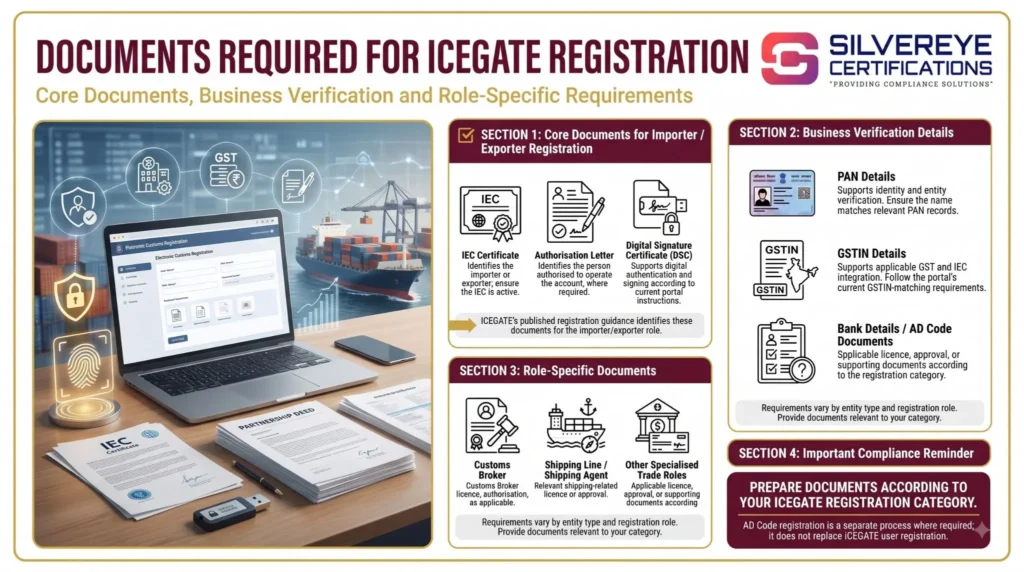
Before applying for ICEGATE AD Code Registration in Mumbai, exporters should arrange the required bank, business and authentication details. Proper documentation helps avoid errors, application queries and delays during customs verification.
The following table explains the commonly required documents and details:
| Document or Detail | What It Should Contain | Important Tip |
|---|---|---|
| Bank Authorisation Letter (AD Code Letter) | Exporter's name and address, IEC, PAN, account number, AD Code, IFSC, branch details and authorised bank signatory's signature | Request the letter in the format prescribed under Customs Public Notice No. 93/2020 |
| IEC and GSTIN Details | Valid Importer Exporter Code and applicable GSTIN information | Ensure details match the relevant business records |
| PAN Confirmation | PAN details linked to the exporter and bank account | Check for name or PAN mismatches before submission |
| e-Sanchit Reference (DRN/IRN) | Reference number generated after uploading the bank letter | Keep the reference number ready for the registration request |
| Digital Signature Certificate (DSC) | Valid DSC of the authorised signatory | Test the DSC before starting the application |
| OTP Authentication | Access to the registered mobile number and email, wherever required | Keep both contact channels active during submission |
Important: AD Codes are commonly referred to as 14-digit codes. However, exporters should use the code exactly as issued by their authorized dealer bank rather than relying on a manually assumed digit count.
ICEGATE AD Code Registration in Mumbai: Step-by-Step Process
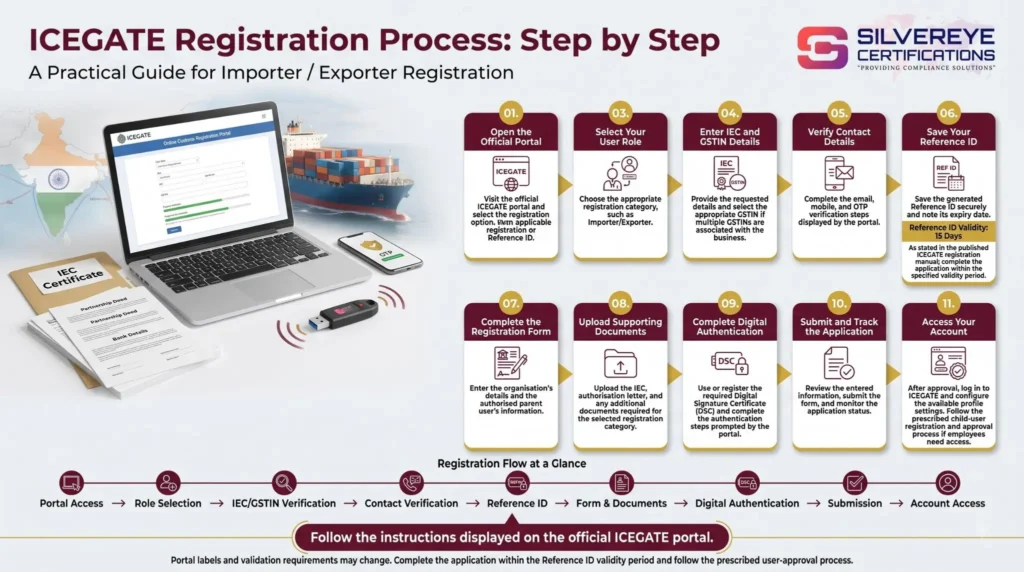
The AD Code registration process is completed online through the ICEGATE portal. Exporters must first obtain the bank authorization letter and upload it through e-Sanchit before submitting the bank account details for customs approval.
Follow these steps:
| Step | What You Need to Do | Where |
|---|---|---|
| 1. Obtain the Bank Letter | Request an AD Code authorisation letter from your authorised dealer bank in the prescribed format | Your Bank |
| 2. Upload Through e-Sanchit | Upload the bank letter and note the generated DRN or IRN reference number | ICEGATE e-Sanchit |
| 3. Open Bank Account Management | Log in to ICEGATE and navigate to Bank Account Management, then select the applicable Foreign Remittance Account (AD Code) option | ICEGATE Portal |
| 4. Add Bank Details | Enter the bank name, branch, AD Code, account number and IFSC | Registration Form |
| 5. Select Customs Location | Choose the relevant customs location, such as NCH Mumbai, JNCH Nhava Sheva or Air Cargo Complex Sahar | Registration Form |
| 6. Enter the e-Sanchit Reference | Provide the DRN or IRN generated after uploading the bank letter and verify the details | Registration Form |
| 7. Digitally Sign and Submit | Sign the application using the authorised signatory's DSC and complete OTP verification, wherever required | Registration Form |
| 8. Track Application Status | Monitor the application through Bank Account Management until it is approved or any query is raised | ICEGATE Portal |
Note: ICEGATE screen names and application fields may change with portal updates. Follow the latest instructions displayed during the registration process.
One AD Code Registration for Multiple Mumbai Customs Locations
Many exporters in Mumbai use more than one customs location. For example, a business may export container cargo through Nhava Sheva and air cargo through Sahar Airport.
Understanding the difference between AD Code registration and incentive account registration is important because their approval procedures may differ.
| Item | Applicable Position | What Exporters Should Do |
|---|---|---|
| AD Code (Foreign Remittance Account) | CBIC instructions have provided for a single AD Code registration across customs locations under the same IEC | Complete registration and verify its status at the relevant customs locations |
| Incentive Account with IFSC | Circular No. 24/2025-Customs, dated 7 October 2025, provides for auto-approval at other locations after the same account and IFSC combination is approved at one location | Register the incentive account and check its approval status at other relevant locations |
| Bank Account Validation | Bank details are subject to the applicable government payment-system validation | Ensure that the account holder's name, account number and IFSC are accurate |
Important: AD Code and incentive account procedures have undergone changes through CBIC instructions and circulars. Exporters should check the latest notifications on the CBIC official website and verify their account status on ICEGATE before filing Shipping Bills.
Incentive Account and IFSC Registration for Mumbai Exporters
Apart from AD Code registration, exporters claiming eligible export benefits should also complete the applicable incentive account registration with IFSC details on ICEGATE.
This account is used for receiving eligible export-related benefits, such as:
- Duty Drawback: Eligible refunds of customs duties under the applicable scheme.
- RoDTEP Benefits: Refund of embedded taxes and duties under the Remission of Duties and Taxes on Exported Products scheme.
- IGST Refunds: Applicable IGST refunds on eligible export transactions.
To avoid payment delays, exporters should follow these points:
- Enter the exact account holder name, account number and IFSC as recorded by the bank.
- Ensure that the incentive account details are correctly linked to the IEC.
- Check the account registration and bank validation status after submission.
- Update the registered details whenever the bank account or relevant banking information changes.
Note: AD Code registration and incentive account registration are separate requirements. Completing one does not automatically establish that the other has been approved.
Changing Your AD Code or Bank Account on ICEGATE
If an exporter changes their authorized dealer bank or current account, the existing bank details may need to be modified or replaced in ICEGATE. It is important to update the customs records before using the new account for export transactions.
The general steps include:
- Obtain a New AD Code Letter: Request an updated authorisation letter from the new authorised dealer bank in the prescribed format.
- Check the Existing Registration: Review the currently registered AD Code and bank account details on ICEGATE.
- Confirm NOC Requirements: Check whether a No Objection Certificate (NOC) from the previously registered bank is required under the applicable customs procedure.
- Upload the New Letter: Submit the bank letter through e-Sanchit and obtain the reference number.
- Submit the Modification Request: Use the relevant option under Bank Account Management to update the bank information.
- Complete Authentication: Digitally sign the request using the required DSC and complete any additional verification.
- Check Approval: Monitor the application until the new bank details are approved.
Tip: Avoid using the new bank details for export transactions until the applicable registration or modification request has been approved.
How Long Does ICEGATE AD Code Registration in Mumbai Take?
The time required for ICEGATE AD Code Registration in Mumbai depends on the bank's document issuance process, e-Sanchit upload, application accuracy and customs approval.
A CBIC instruction issued in 2023 prescribed time-bound disposal of AD Code and bank account registration applications. Applications received before 2 PM were to be disposed of on the same day, while applications received later were to be disposed of by 2 PM on the next working day, subject to the applicable instructions.
The following table provides an indicative timeline for planning:
| Phase | Typical Time | Possible Reasons for Delay |
|---|---|---|
| Bank Letter Preparation | Same day to a few working days | Bank processing or incorrect letter format |
| e-Sanchit Upload and Application | Approximately 30–60 minutes | Incorrect details, upload errors or DSC issues |
| Customs Approval | Same day to a few working days | Document verification or application queries |
| Incentive Account Validation | Varies | Bank account name, number or IFSC mismatch |
Note: These are indicative planning estimates, not guaranteed processing times. Actual approval depends on the applicable customs instructions and verification process.
ICEGATE AD Code Registration in Mumbai: Fees
There is no government application fee for ICEGATE AD Code Registration in Mumbai. However, exporters may incur additional expenses for obtaining bank documents, DSC and professional assistance.
The following table explains the possible costs:
| Cost Item | Who Charges It? | Applicable Cost |
|---|---|---|
| ICEGATE AD Code Registration | CBIC / ICEGATE | Nil |
| AD Code Letter | Authorized Dealer Bank | Bank charges, if any |
| Class 3 DSC and USB Token | Licensed Certifying Authority | Varies by provider and validity |
| Consultant Assistance (Optional) | Compliance Service Provider | Depends on the scope of services |
Note: Actual expenses may vary depending on the bank, DSC provider and consultant. Always request a written quotation before purchasing any additional service.
Validity and Renewal of ICEGATE AD Code Registration
Once approved, ICEGATE AD Code Registration in Mumbai does not have a fixed expiry date or a separate annual renewal fee specified for the registration itself. However, exporters must ensure that their registered bank details, IEC and other related information remain accurate and updated.
The following table explains the validity of different registrations and documents:
| Element | Validity | What to Watch |
|---|---|---|
| AD Code Registration | No fixed expiry is specified for the registration itself | Update the registration if the bank or account details change |
| Incentive Account and IFSC | Remains applicable while the registered account details are valid | Update changes in account holder name, account number or IFSC |
| Class 3 DSC | As per the purchased validity, commonly 1, 2 or 3 years | Renew before expiry to sign future applications or modifications |
| IEC | Requires annual confirmation or updation, where applicable, during April–June | Keep IEC details updated on the DGFT portal to avoid filing-related issues |
Important Renewal and Update Requirements
Exporters should periodically review their ICEGATE account and complete the following updates whenever required:
| Renewal or Update Task | When Required | How to Complete It |
|---|---|---|
| Update AD Code or Bank Details | When the bank or account changes | Obtain a fresh bank letter, upload it through e-Sanchit and submit the applicable modification request |
| Renew DSC | Before the DSC expires | Renew through the Certifying Authority and update the relevant DSC details on ICEGATE |
| Update IEC Details | During the prescribed annual update period or whenever business details change | Update the IEC through the DGFT portal |
| Review Registration Status | Before major export shipments | Check the status through Bank Account Management on ICEGATE |
Tip: Review your AD Code and incentive account details before important export shipments. Keeping the records updated can help prevent avoidable issues during Shipping Bill filing and export-related payment processing.
Why Does ICEGATE AD Code Registration Get Rejected? Common Reasons and Fixes
Exporters may face rejection or queries during ICEGATE AD Code Registration in Mumbai due to incorrect bank information, missing documents or technical issues. Checking the application carefully before submission can help reduce these problems.
The following table highlights common reasons for rejection and their solutions:
| Reason for Rejection | How to Fix It |
|---|---|
| Incorrect Bank Letter Format: The bank issues a generic letter instead of the prescribed AD Code format | Request a revised letter following the applicable requirements under Customs Public Notice No. 93/2020 |
| Business Name Mismatch: The entity name differs across the IEC, GST, PAN and bank records | Verify the details and correct the discrepancies in the relevant source records |
| Incorrect IFSC or Account Number: Bank details are entered incorrectly | Recheck the details against the bank-issued authorisation letter |
| Unauthorised Bank Signatory: The letter is not signed by an authorised bank representative | Request a properly signed and reissued bank letter |
| Incorrect e-Sanchit Reference: The DRN or IRN is missing or incorrectly entered | Upload the correct document again and use the corresponding reference number |
| ICEGATE Registration Pending: The applicant's ICEGATE account has not yet been approved | Complete the applicable ICEGATE registration process before applying for AD Code registration |
| DSC Not Detected: The portal cannot recognise the Digital Signature Certificate | Check the DSC token, signer utility and required configuration before resubmitting |
Practical Advice: Before submitting your application, cross-check your IEC, PAN, bank account number, IFSC and AD Code. Even small differences in official records can lead to additional verification or application queries.
Why Choose Silvereye Certifications for ICEGATE AD Code Registration in Mumbai?
Completing ICEGATE AD Code registration requires accurate bank documentation, correct e-Sanchit uploads and proper submission through the customs portal. Errors in bank details, IEC information or the authorization letter can lead to application queries and delays.
Silvereye Certifications provides professional compliance assistance to exporters who need support with ICEGATE registration and AD Code registration in Mumbai.
Our assistance includes:
- AD Code Documentation: Guidance on obtaining the bank authorisation letter in the prescribed format.
- ICEGATE Registration Support: Assistance with the applicable ICEGATE account registration requirements.
- e-Sanchit Upload Assistance: Guidance on uploading the bank letter and obtaining the required reference number.
- Bank Account Registration: Support with entering AD Code, account number, IFSC and other banking details.
- Customs Location Selection: Guidance on selecting the relevant customs location, including Mumbai, Nhava Sheva and Sahar Air Cargo.
- DSC Assistance: Guidance on obtaining and configuring the Digital Signature Certificate required for online submission.
- Application Query Support: Assistance in understanding and addressing registration-related queries.
- Post-Registration Guidance: Support with understanding bank detail updates and applicable incentive account requirements.
With a practical approach to documentation and regulatory procedures, Silvereye Certifications helps exporters navigate the registration process more efficiently.
Conclusion
ICEGATE AD Code Registration in Mumbai is an important requirement for exporters completing customs formalities and filing Shipping Bills through Mumbai's customs locations. Whether you export through Mumbai port facilities, Nhava Sheva or the Air Cargo Complex at Sahar, registering the correct AD Code and bank account details helps you manage export transactions smoothly.
Before applying, ensure that your ICEGATE account is approved, IEC details are valid, the AD Code letter follows the prescribed format, and the e-Sanchit reference is available. You should also verify your incentive account and IFSC registration separately wherever applicable. Keeping your bank and business records updated can help prevent registration errors and export-related delays.
If you need assistance with bank documentation, e-Sanchit uploads, DSC configuration or ICEGATE AD Code registration, Silvereye Certifications can guide you through the applicable process and help you manage your export compliance requirements.
Frequently Asked Questions
What is ICEGATE AD Code registration in Mumbai?
It is the AD Code registration of your bank's code and account against your IEC on the customs portal, so Shipping Bills can be created and incentives credited.
Is ICEGATE AD Code registration in Mumbai mandatory for exporters?
For goods exporters, yes. Customs does not process a Shipping Bill without AD Code registration.
Is there a fee for ICEGATE AD Code registration in Mumbai?
No portal fee. You may pay your bank for the letter and the DSC provider for the certificate.
What document do I need from my bank?
An AD Code letter on bank letterhead in the format of Customs Public Notice 93/2020, with your account, AD Code and IFSC details, signed by an authorized bank signatory.
Where do I do AD Code registration on ICEGATE in Mumbai?
Log in, open Bank Account Management, then Foreign Remittance Account (AD Code), and add the bank account.
Do I need ICEGATE registration before AD Code registration in Mumbai?
Yes. AD Code registration happens inside your approved ICEGATE account.
Do I need a DSC for ICEGATE AD Code registration in Mumbai?
The request is signed with the authorized person's DSC and confirmed with an OTP.
Which customs location do I select in Mumbai?
Pick the one you ship through, such as New Custom House for Mumbai port work, JNCH for Nhava Sheva or the Air Cargo Complex at Sahar.
Do I repeat ICEGATE AD Code registration in Mumbai for Nhava Sheva and Sahar?
The AD Code registration is described as a single registration valid across locations. Confirm status on the portal at each location you use.
What is the IFSC or incentive account registration?
It registers the account where drawback, RoDTEP and IGST refunds are credited. Circular 24/2025-Customs provides auto-approval at other locations once the same pair is approved at one.
How long does ICEGATE AD Code registration in Mumbai take?
A 2023 CBIC instruction aims at same-day or next-day disposal, and providers commonly quote two to three working days overall.
Can I change my bank account after ICEGATE AD Code registration in Mumbai?
Yes, through a modification request with a fresh bank letter. A no-objection certificate from the existing bank may be needed.
Does ICEGATE AD Code registration in Mumbai expire?
No fixed expiry is stated. It needs updating when your bank or account details change.
Should I use an ICEGATE AD Code registration consultant in Mumbai?
It helps when your bank is unfamiliar with the format or you need DSC, ICEGATE and AD Code together. Get a written scope and keep the login yourself.