

- Online Registration: ICEGATE registration in Nhava Sheva can be completed online through the official ICEGATE portal. Applicants do not need to visit the Jawaharlal Nehru Custom House (JNCH) solely to create an ICEGATE account.
- Registration Fees: ICEGATE does not charge any registration fee. However, applicants may incur expenses for obtaining a Class 3 Digital Signature Certificate (DSC), bank-related services for exporters and professional consultancy, if required.
- Documents and Verification: Keep your IEC, GSTIN, PAN, authorisation letter and authorised signatory's DSC ready before applying. Ensure that your registered mobile number and email address are updated with DGFT and GSTN to receive OTPs without delays.
- Post-Registration Formalities: After ICEGATE registration is approved, importers can file Bills of Entry, while exporters should complete the applicable AD Code and bank account registration formalities. The relevant JNCH customs commissionerates process import-export documents according to the applicable customs procedures.
Introduction
ICEGATE registration in Nhava Sheva follows the same centralized online registration process applicable across India. Importers, exporters, customs brokers and other authorized trade partners can create their accounts through the official ICEGATE portal without visiting the local customs office for registration.
The process involves verifying your Importer Exporter Code (IEC) and GSTIN, completing OTP verification, selecting the appropriate user role and submitting the registration form. Applicants must also provide the required authorization letter and use the authorized person's Digital Signature Certificate (DSC), wherever applicable. Once the application is processed, the registration result is communicated through email.

There is no registration fee charged by ICEGATE. However, applicants may incur additional expenses for obtaining a DSC or hiring a professional consultant.
The local customs authority becomes important after registration. Businesses operating through Nhava Sheva deal with the Jawaharlal Nehru Custom House (JNCH) and its respective commissionerates for customs clearance and processing of Bills of Entry and Shipping Bills. Understanding the responsibilities of these commissionerates helps importers and exporters identify the appropriate customs formation for their shipments and related formalities.
What Is ICEGATE Registration in Nhava Sheva?
ICEGATE Registration in Nhava Sheva refers to creating an online account on the Indian Customs Electronic Gateway (ICEGATE), the official electronic platform of the Central Board of Indirect Taxes and Customs (CBIC). It enables importers, exporters, customs brokers and other authorized trade partners operating in the Nhava Sheva port area to access online customs services and manage their import-export documentation.
Through ICEGATE, registered users can electronically file Bills of Entry and Shipping Bills, submit supporting documents, make customs duty payments, track shipment clearance and access other applicable customs-related services. The registration process is centralized, meaning businesses in Nhava Sheva follow the same online procedure as applicants in other parts of India.
However, the local customs authority plays an important role after registration. Shipments handled through the Jawaharlal Nehru Custom House (JNCH) are processed by the relevant customs commissionerates under Mumbai Customs Zone-II. Therefore, businesses must understand which commissionerate handles their cargo and related customs formalities.
ICEGATE registration is particularly important for businesses involved in containerized imports and exports through Nhava Sheva. It provides access to electronic customs services and helps businesses coordinate their documentation and clearance activities more efficiently.
Documents Required for ICEGATE Registration in Nhava Sheva
Before applying for ICEGATE registration in Nhava Sheva, applicants should arrange the necessary business, identity and authorization documents. The documents may vary depending on whether you are registering as an importer, exporter, customs broker or another authorized trade partner.
| Document or Detail | Purpose / Requirement |
|---|---|
| IEC Certificate | Required for importers and exporters, including child users registering under an IEC holder. |
| GSTIN and PAN | Used for business verification and linking the GSTIN with the IEC. |
| Authorisation Letter | Required for companies, firms and individuals operating on behalf of another person or organisation. For companies, the applicable ICEGATE advisory specifies the required directors' signatures. |
| DSC of the Authorised Person | Used for digital authentication and signing under the standard registration process. |
| Business Proof | Documents such as the Certificate of Incorporation, LLP Agreement or Partnership Deed may be required to establish the entity's identity. |
| Licence, F or G Card, or Approval Letter | Required for customs brokers, shipping lines and other authorised trade partners, depending on their registration category. |
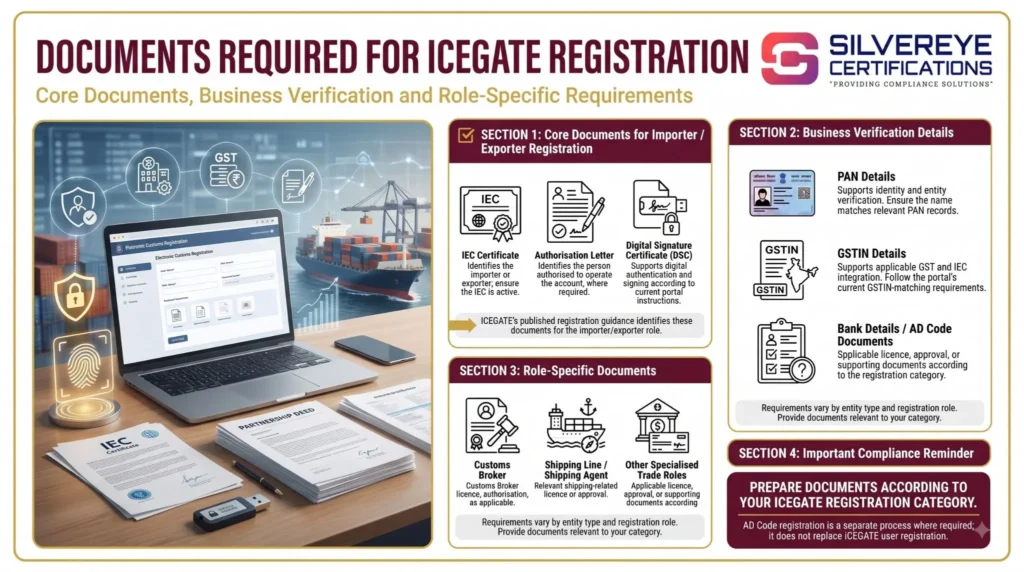
Note: Document requirements may differ according to the selected ICEGATE user role. For a detailed role-wise checklist and common documentation mismatches, read our Documents Required for ICEGATE Registration guide.
ICEGATE Registration in Nhava Sheva: Step-by-Step Process
ICEGATE registration in Nhava Sheva follows the same online procedure applicable across India. Applicants must verify their business details, complete OTP authentication, provide authorized user information and submit the required documents.
Follow these steps to complete the registration:
| Step | What You Need to Do | Nhava Sheva-Specific Tip |
|---|---|---|
| 1. Open the ICEGATE portal | Visit icegate.gov.in and select the fresh registration option. | Always use the official ICEGATE website. |
| 2. Select your user role | Choose Importer/Exporter, Customs Broker or the applicable trade partner category. | Customs brokers should select the appropriate broker registration role. |
| 3. Verify IEC and GSTIN | Enter your IEC and select the GSTIN linked to your business. | If your IEC has multiple GSTINs, select the appropriate GSTIN for your registration. |
| 4. Confirm contact details | Verify the mobile number and email address retrieved from DGFT or GSTN records. | Ensure the details are active and do not belong to a former employee or agent. |
| 5. Complete OTP verification | Enter the OTPs received on your registered mobile number and email address within the permitted time. | Keep your phone and email inbox accessible during verification. |
| 6. Save the Reference ID | Note the generated Reference ID to resume the application if required. | Store it safely with your DSC and application details. |
| 7. Complete the registration form | Enter organisation and authorised user details, upload documents and complete the applicable DSC authentication. | Review the information carefully before final submission. |
| 8. Wait for approval | ICEGATE processes the application and communicates the result through email. | If the application is rejected or queried, correct the issue and follow the portal's instructions. |
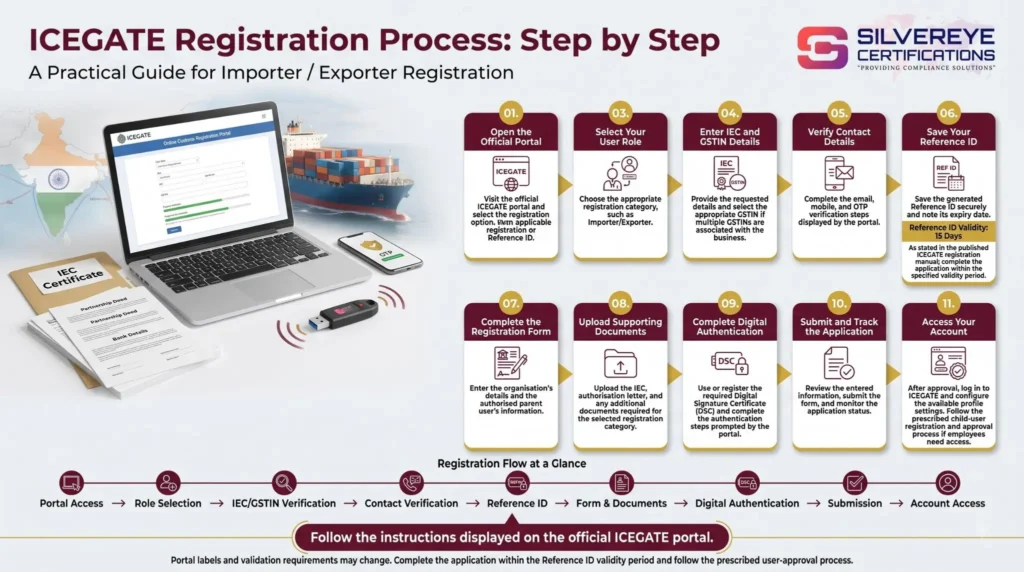
For a detailed explanation of the complete application procedure, read our ICEGATE Registration Process guide.
DSC for ICEGATE Registration in Nhava Sheva
A Digital Signature Certificate (DSC) is an important part of ICEGATE registration. It verifies the identity of the authorized person and enables secure digital authentication and signing of customs-related documents.
The standard ICEGATE registration process requires the DSC of the authorized signatory. Applicants generally use a Class 3 DSC with signing capability, issued by a licensed Certifying Authority after identity verification.
A limited simplified registration route without DSC has also been described for certain non-filing users. Applicants should check the latest ICEGATE instructions to confirm which registration method applies to their requirements.
Consider the following points before obtaining your DSC:
- Apply for the DSC early: Obtain your DSC before starting ICEGATE registration to avoid delays.
- Complete identity verification: Follow the verification procedure prescribed by your selected Certifying Authority.
- Choose the appropriate validity: DSCs are commonly available with one-, two- or three-year validity, depending on the provider.
- Test the DSC: Install the required signer utility and follow the ICEGATE technical setup instructions to ensure that the DSC is detected correctly.
AD Code and IFSC Registration for Nhava Sheva Exporters
Exporters operating through Nhava Sheva must complete the applicable Authorized Dealer (AD) Code and bank account registration formalities in addition to ICEGATE registration. These details are important for export documentation and the processing of applicable export incentives.
The AD Code identifies the authorized bank branch handling the exporter's foreign exchange transactions. Exporters should complete the applicable bank account details through the ICEGATE Bank Account Management facility.
Follow these important points:
- Obtain the AD Code letter: Request an AD Code letter from your authorized dealer bank in the format prescribed by the applicable customs requirements.
- Complete the registration procedure: JNCH issued a procedure in 2020 for AD Code and IFSC registration through ICEGATE, including steps involving the bank and JNCH's EDI office. Check the latest JNCH public notices for any changes.
- Verify bank account details: Ensure that the AD Code, account information and IFSC details are entered correctly.
- Check port-related requirements: Confirm whether your AD Code and incentive account details are correctly registered for the relevant customs location.
- Update changed bank details: Complete the applicable update procedure whenever your bank branch or account information changes.
Our ICEGATE AD Code Registration guide explains the registration process in greater detail. The general process also applies to exporters operating through Nhava Sheva, subject to applicable local customs procedures.
How Long Does ICEGATE Registration in Nhava Sheva Take?
The time required for ICEGATE registration in Nhava Sheva depends on document readiness, DSC verification, OTP authentication and customs application review.
ICEGATE does not provide a guaranteed approval timeline for every application. The following time ranges are indicative estimates based on common experience with complete applications.
| Registration Stage | Typical Time | Factors That May Cause Delays |
|---|---|---|
| Document preparation and DSC | Same day to a few days | DSC verification and document mismatches |
| Online verification and OTPs | 10–20 minutes | Expired OTPs or outdated contact details |
| Registration form and uploads | 30–60 minutes | Missing information or unclear documents |
| Customs review of ICEGATE registration | Commonly 1–3 working days | Additional queries, name or PAN mismatches |
| First login | Generally the same day as approval | Password issues or DSC detection problems |
Note: These are indicative timelines, not official service-level commitments. Actual processing time may vary depending on the application and verification requirements.
ICEGATE Registration in Nhava Sheva: Fees
There is no government registration fee for creating an ICEGATE account in Nhava Sheva. However, applicants may incur additional expenses for obtaining a Digital Signature Certificate, completing IEC registration or hiring professional assistance.
| Cost Item | Who Charges It? | Applicable Cost |
|---|---|---|
| ICEGATE registration | CBIC / ICEGATE | Nil |
| Class 3 DSC and USB token | Licensed Certifying Authority | Varies by provider and validity |
| IEC registration, if not already available | DGFT | As per the applicable DGFT fee |
| Bank AD Code letter for exporters | Bank | Depends on bank charges, if any |
| Consultant or customs broker assistance | Service provider | Varies according to the scope of services |
Applicants should confirm the latest applicable charges with the relevant authority, bank or service provider before making payments.
Validity and Renewal of ICEGATE Registration in Nhava Sheva
ICEGATE registration does not have a fixed printed expiry date or a separate annual renewal fee. However, businesses must keep their login credentials, DSC and linked business registrations active to continue accessing customs services.
| Registration Element | Validity | What You Need to Do |
|---|---|---|
| ICEGATE ID | No fixed expiry stated by the portal | Keep entity, authorised signatory and contact details updated. |
| Class 3 DSC | Depends on the purchased validity, commonly 1, 2 or 3 years | Renew before expiry and update the DSC details on ICEGATE, where required. |
| IEC | Requires annual updation during April–June | Complete the required update through the DGFT portal. |
| GSTIN | Remains valid while GST registration is active | Monitor its status and address any suspension or cancellation. |
| AD Code Registration | No fixed expiry stated in the information provided | Follow the applicable update procedure whenever bank or account details change. |
Businesses should also complete the following updates whenever required:
| Renewal or Update Task | When Is It Required? | How to Complete It |
|---|---|---|
| DSC renewal | Before the existing DSC expires | Renew through the Certifying Authority and update the details on ICEGATE. |
| Change of authorised signatory | When the authorised person changes | Submit a new authorisation letter and update the authorised user details. |
| Change of contact details | Whenever registered mobile or email details change | Update the relevant records with DGFT and GSTN, followed by the applicable ICEGATE update. |
| Child user management | When employees join or leave the organisation | The parent user should approve new users and deactivate access for former employees. |
Common Problems Avoid For ICEGATE Registration
Even after completing the registration form, applicants may face issues due to incorrect details, outdated records or technical problems. The following table highlights common ICEGATE registration problems and their possible solutions.
| Problem | Likely Cause | Fix |
|---|---|---|
| OTP not received | Outdated mobile number or email address registered with DGFT or GSTN | Update the contact details at the source and restart the registration process |
| IEC and GSTIN do not match | GSTIN is not integrated or correctly mapped | Use the portal's integration and mapping utilities to verify the details |
| DSC not detected | DSC signer utility or required Java setup is missing | Install the required utility and follow the official DSC setup instructions |
| Application rejected due to name or PAN mismatch | Business details differ across official records | Correct the source records and submit the application again |
| Authorisation letter queried | Letter is unsigned, not on company letterhead or has incorrect signatories | Issue a revised authorisation letter with the required signatures |
| Shipping Bill cannot be created | Exporter's AD Code or bank details are not registered | Complete the applicable AD Code and bank account registration process |
Tip: Before submitting your application, check that your IEC, GSTIN, PAN, business name and authorized signatory details are consistent across the relevant records. This can help prevent avoidable delays and rejection.
Do It Yourself or Use ICEGATE Registration Services in Nhava Sheva?
Since ICEGATE registration is an online, centralized process, applicants in Nhava Sheva, Navi Mumbai, Mumbai or any other location use the same official portal. The main factors affecting a smooth registration are accurate business records, a valid Digital Signature Certificate (DSC), correct document preparation and proper form submission.
You can complete the registration yourself if your documents and business details are ready. However, professional assistance may be useful when you face technical issues or have multiple registrations and users to manage.
| Situation | Better Route |
|---|---|
| Business records match, DSC is ready and there is one authorised signatory | Do it yourself |
| IEC and GSTIN mapping issues keep occurring | Take professional assistance |
| Business has multiple GSTINs or requires several child users | Take professional assistance |
| First-time importer or exporter needs support with DSC, IEC, AD Code and ICEGATE registration | Work with a compliance partner |
Before hiring a service provider, ask for a written scope of work and quotation. Also, ensure that the ICEGATE account, registered email address and login credentials remain under your company's control.
Why Choose Silvereye Certifications for ICEGATE Registration in Nhava Sheva?
Completing ICEGATE registration involves more than filling out an online form. Incorrect IEC or GSTIN details, DSC configuration issues, incomplete authorisation documents or missing AD Code information can delay the process. Silvereye Certifications provides professional compliance assistance to help businesses complete the required steps correctly.
With support from Silvereye Certifications, you can get assistance with:
- Registration Guidance: Understand the applicable ICEGATE registration category and requirements for your business.
- Document Preparation: Organise and review documents such as IEC, GSTIN, PAN, authorisation letters and other applicable records.
- DSC Assistance: Get guidance on obtaining, configuring and using the required Digital Signature Certificate.
- IEC and GSTIN Mapping: Identify common record mismatches and understand the steps needed to correct them.
- AD Code Guidance: Receive assistance with the applicable AD Code and bank account registration requirements for export activities.
- Application Support: Get guidance through form submission, document uploads and responses to registration-related queries.
- Post-Registration Assistance: Understand account access, user management and important details to maintain after registration.
Silvereye Certifications works as an independent compliance consultancy and is not a government authority or part of ICEGATE or CBIC. Final registration approval is subject to the applicable portal and customs authority requirements.
Conclusion
ICEGATE Registration in Nhava Sheva allows importers, exporters, customs brokers and other authorized trade participants to access India's electronic customs services for filing documents, paying duties and tracking cargo clearance. Although registration is completed online through the central ICEGATE portal, businesses operating through Jawaharlal Nehru Port (JNPA/JNCH) should also understand the applicable local customs procedures.
Before applying, keep your IEC, GSTIN, PAN, authorized signatory details and DSC ready. Exporters should also check the applicable AD Code and bank account registration requirements to avoid difficulties when filing Shipping Bills.
If you need help with document preparation, DSC configuration, IEC-GSTIN mapping or AD Code guidance, Silvereye Certifications can assist you throughout the registration process. Proper preparation can make ICEGATE registration smoother and help your business manage customs-related activities more efficiently.
Frequently Asked Questions
Can I do ICEGATE registration in Nhava Sheva online?
Yes. ICEGATE registration in Nhava Sheva is fully online at icegate.gov.in.
Do I need to visit JNCH for ICEGATE registration in Nhava Sheva?
No. Verification, uploads and approval for ICEGATE registration happen online and by email.
Is ICEGATE registration in Nhava Sheva free?
The portal charges no fee. You pay for the DSC and any optional service provider.
Which documents are needed for ICEGATE registration in Nhava Sheva?
IEC, GSTIN, PAN, an authorization letter, the authorized person's DSC and entity proof. Brokers add license details.
Which customs office handles Nhava Sheva cargo?
Jawaharlal Nehru Custom House, with six commissionerates under Mumbai Customs Zone-II. Check the latest jurisdiction notice for the current allocation.
Do I need separate ICEGATE registration for Nhava Sheva and Mumbai ports?
No separate ICEGATE registration per port is described. Exporters handle AD Code and bank details separately.
How long does ICEGATE registration in Nhava Sheva take?
No official timeline. Clean applications are commonly approved in 1 to 3 working days.
Do I need a DSC for ICEGATE registration in Nhava Sheva?
The standard route asks for the authorised person's DSC. A limited simplified route has been described, but it is not for filing customs documents.
What if I do not receive the OTP during ICEGATE registration?
The mobile or email at DGFT or GSTN is probably outdated. Update it there and start again.
Can my customs broker complete ICEGATE registration in Nhava Sheva for me?
Yes, with your authorisation. Keep your own ICEGATE ID and email under your control
Do exporters at Nhava Sheva need an AD Code?
Yes. Customs does not process a Shipping Bill without a registered AD Code
How do I renew ICEGATE registration in Nhava Sheva?
There is no renewal fee. Renew your DSC, update the IEC every April to June, and keep signatory and contact details current.
Why was my ICEGATE registration in Nhava Sheva rejected?
Common causes are an inactive IEC, name or PAN mismatches, unclear uploads, missing authorization or an invalid DSC. The reason is emailed.
Should I use an ICEGATE registration consultant in Nhava Sheva?
It helps when records do not match or you need DSC, IEC and AD Code together. Get a written scope and keep the login yourself.