

ICEGATE AD Code registration in Chennai is completed online through your approved ICEGATE account under the Bank Account Management section.
- Required Documents: Keep your bank-issued AD Code letter in the applicable Customs-prescribed format, IEC details, DSC (if required), and the e-Sanchit reference for the uploaded letter ready.
- When to Register: Complete the applicable AD Code and bank-detail registration process before filing your first Shipping Bill at the relevant Chennai Customs location.
- Registration Fees: ICEGATE generally does not charge a separate portal fee. However, bank charges, DSC costs and consultant fees may apply, depending on your requirements.
Introduction
ICEGATE registration in Chennai links your authorized dealer bank details with your IEC on the Customs portal to support Shipping Bill filing.
To complete the process, obtain an AD Code letter from your bank in the applicable Customs-prescribed format. Upload the letter through e-Sanchit and retain its reference number. Next, log in to your approved ICEGATE account, open Bank Account Management, add your bank details, select the relevant Customs location, sign the application using your DSC if required, and submit it for Customs processing.

An approved ICEGATE account is required before you begin. ICEGATE generally does not charge a separate portal fee for AD Code registration, although bank, DSC and consultant charges may apply.
What Is ICEGATE AD Code Registration, and Why Does It Matter?
An AD Code (Authorized Dealer Code) is issued by your authorized dealer bank for foreign exchange-related transactions. ICEGATE AD Code registration connects the relevant bank account and AD Code with your Importer Exporter Code (IEC) through the Customs system.
For exporters shipping goods through Chennai, registering the AD Code is an important step in preparing for Shipping Bill filing and export clearance. Customs processes the registration request and verifies the submitted documents before approval.
The AD Code account and the refund or incentive bank account serve different purposes. Registering one does not automatically mean the other is registered. Exporters should check the status of both, where applicable, through the ICEGATE portal.
ICEGATE registration gives you portal access, while AD Code registration records the relevant bank details for export-related Customs procedures.
AD Code, IFSC Account and ICEGATE ID: What Is the Difference?
| Term | What it means | Where it matters |
|---|---|---|
| ICEGATE ID | Your login for the ICEGATE portal | Accessing online Customs services |
| AD Code account | Bank account registered with the AD Code for foreign remittance purposes | Export-related Customs procedures, including applicable Shipping Bill processes |
| Refund or incentive bank account | Bank account registered for eligible refunds or export benefits | Receiving eligible payments, such as drawback or IGST refunds |
| IEC | Importer Exporter Code issued by DGFT | Identifying the exporter in export-related transactions |
Both AD Code and refund-bank-account registrations can be managed through Bank Account Management on ICEGATE, but they are separate registration categories. RoDTEP benefits are generally handled through the ICEGATE electronic scrip system rather than being directly credited to a bank account.
Who Needs ICEGATE AD Code Registration in Chennai?
| Exporter category | Is AD Code registration relevant? | Why it matters |
|---|---|---|
| Goods exporters shipping by sea or air from Chennai | Yes, where required for the applicable export process | Supports the relevant Customs filing process |
| First-time goods exporters | Yes, before undertaking the applicable export filing | Helps prevent avoidable registration delays |
| Exporters changing banks or AD Code details | An update may be required | Keeps registered details accurate |
| Merchant exporters using a Customs broker | Yes, where applicable to the export transaction | Using a broker does not remove the need for the relevant exporter and bank details |
| Service exporters with no goods shipments | Usually not for Shipping Bill filing | Their service-export procedures differ from goods-export procedures |
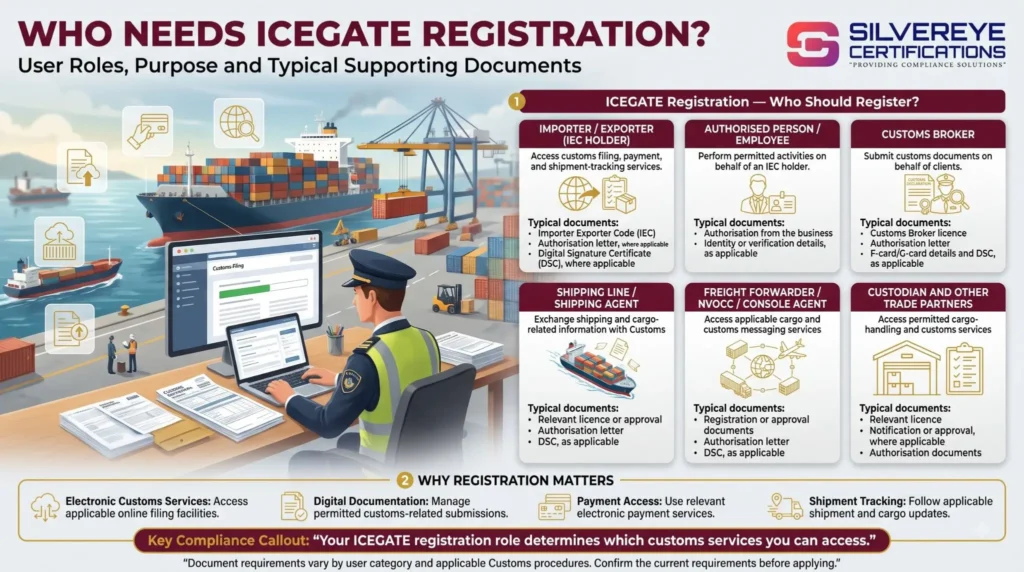
Confirm the requirements for your specific export activity and Customs location before filing.
Before You Start ICEGATE AD Code Registration in Chennai
| Requirement | Why it matters |
|---|---|
| Approved ICEGATE account | Allows you to access the relevant registration functionality |
| Current account with an authorised dealer bank | The bank provides the AD Code and supporting letter |
| Bank authorisation letter | Must meet the format and documentation requirements applicable to the registration |
| IEC and PAN details | Help establish the identity of the exporter |
| GST registration details, where applicable | May be required as part of the supporting documentation |
| Cancelled cheque or bank statement, as applicable | Helps support verification of bank details |
| Class 3 DSC | Required for the relevant digital-signing workflow |
| Active mobile number and email address | Helps with account verification and communication |
Important: Public Notice No. 93/2020 was issued by Jawaharlal Nehru Custom House at Nhava Sheva. Do not present its format as a Chennai-specific notice without checking the current instructions applicable to your registration.
If you have not yet registered on ICEGATE, complete that step first. Then consult the current ICEGATE registration advisories and AD Code and bank-account guidance before submitting your application.
Documents Required for ICEGATE AD Code Registration in Chennai
| Document or detail | What to prepare | Practical tip |
|---|---|---|
| Bank authorisation letter | Bank-issued letter containing the required exporter, account and AD Code details | Ask your bank for a letter that meets the applicable Customs format |
| IEC certificate or details | IEC linked to the exporting entity | Check that the information matches your ICEGATE profile |
| PAN details | PAN of the relevant business entity and authorised signatory, as applicable | Check names and entity details carefully |
| GST registration certificate | GST details where required | Ensure the business information is consistent |
| Cancelled cheque or bank statement | Supporting evidence for the account | Confirm that the account details are readable and accurate |
| e-Sanchit reference number | Reference generated after uploading the required supporting documents | Retain the reference for the online registration request |
| DSC and verification details | Digital signature and any required authentication | Test your DSC before submitting the application |
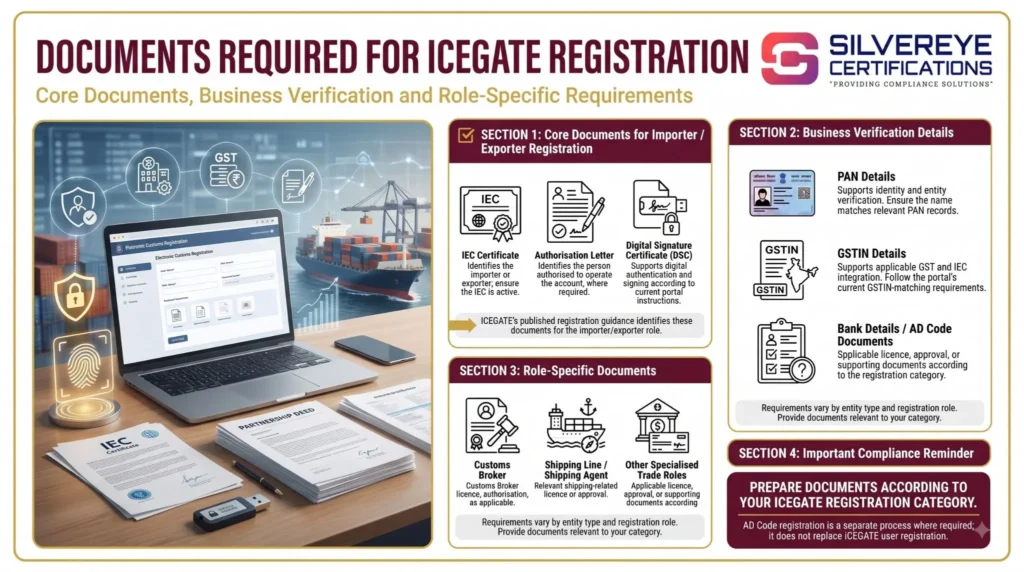
The exact documents may vary according to the registration category and current ICEGATE instructions. Use the latest portal guidance rather than relying solely on older checklists.
Note on AD Code digits: Do not assume that every AD Code has the same number of digits. Enter the code exactly as issued by your authorised dealer bank.
ICEGATE AD Code Registration in Chennai: Step-by-Step Process
You can register your AD Code on ICEGATE through the Bank Account Management dashboard. The exact steps and supporting documents may depend on your bank and the current portal workflow.
| Step | What you need to do | Where |
|---|---|---|
| 1. Obtain the bank letter | Request an AD Code authorisation letter from your authorised dealer bank, if required for your application | Your bank |
| 2. Prepare supporting documents | Keep your IEC, PAN, GST registration details, cancelled cheque or bank statement, and other required documents ready | Your business records |
| 3. Open Bank Account Management | Log in to ICEGATE and navigate to Financial Services → Bank Account Management | ICEGATE portal |
| 4. Select the account type | Choose Foreign Remittance Account (Authorised Dealer Code) | Bank Account Management |
| 5. Add the bank account | Enter the requested bank, branch, AD Code, account number and Customs location details | Registration form |
| 6. Upload documents, if required | Follow the portal instructions to upload supporting documents through e-Sanchit and provide the relevant reference details | ICEGATE/e-Sanchit |
| 7. Verify and submit | Verify the entered details and complete the required authentication, including DSC or OTP where prompted | Registration form |
| 8. Track the request | Check whether the application is pending, approved or rejected and address any issues shown | Bank Account Management |
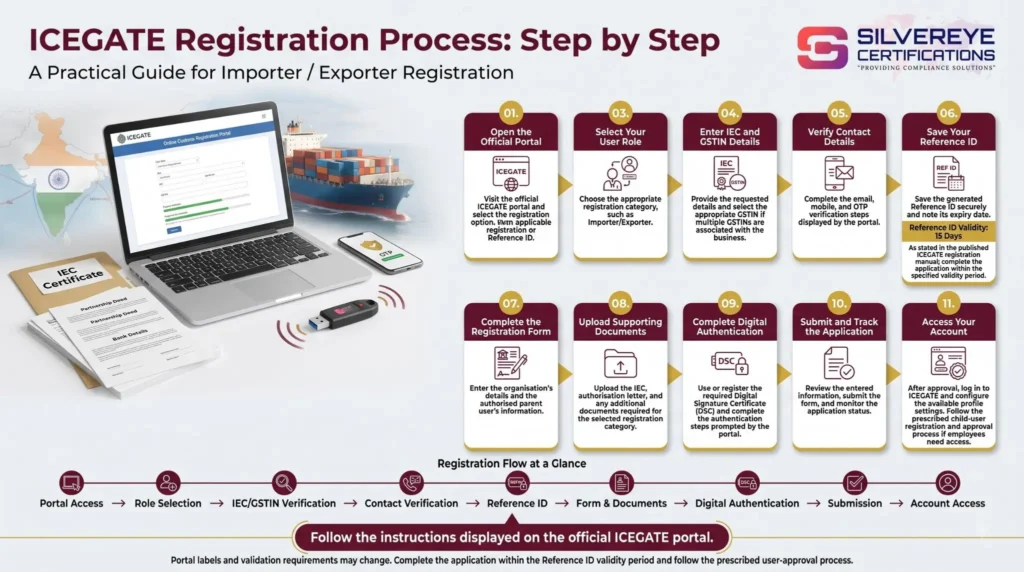
ICEGATE's published guidance describes the Foreign Remittance Account registration process and the online facility for managing bank details. Always follow the current portal prompts because the workflow may vary.
Choosing the Customs Location for Chennai Exporters
When submitting an AD Code request, check the Customs location required by the portal and the location assigned to your registration. The appropriate choice depends on your export route and the applicable Customs setup.
| Export route | What Chennai exporters should check |
|---|---|
| Sea cargo through Chennai Port | Confirm the relevant Chennai Sea Customs location |
| Air cargo through Chennai | Confirm the applicable Air Cargo Complex location at Meenambakkam |
| Exports through Kamarajar or Kattupalli | Confirm the relevant Customs location and procedure before submitting the request |
| Exports through multiple ports in India | Check the current cross-port registration rules and your account's registration status |
If you are unsure which location to select, verify it with your Customs broker or the relevant Customs office before submitting your application.
One AD Code Registration Across Multiple Ports: What Exporters Should Know
The registration process has changed. A Customs public notice issued by Mumbai's Air Cargo Complex in September 2025 states that, under its revised process, an AD Code with the associated bank account needs to be registered only once at a Customs port. Once approved, it becomes available across Customs locations. Amendments must be made at the port where the AD Code was originally registered.
| Item | What exporters should know | Recommended action |
|---|---|---|
| AD Code and foreign remittance account | The revised process provides for cross-location availability after approval | Check the registered status and port of registration in ICEGATE |
| Refund or incentive account | This is a separate bank-account registration from the AD Code account | Verify its registration and validation status separately |
| Change to registered bank details | Amendments may need to be submitted through the designated registration port | Follow the portal's current modification instructions |
| Bank change and NOC | Additional documentation may be required, depending on the change and applicable Customs instructions | Confirm the exact requirement with your bank and the relevant Customs office |
Important: The cited public notice is specific to Mumbai's Air Cargo Complex. Before applying its instructions to Chennai, confirm the current ICEGATE procedure and the rules applicable to your Customs location.
IFSC and Incentive Account Registration for Chennai Exporters
Exporters seeking eligible refunds or export benefits should also check whether their refund or incentive bank account needs to be registered separately from their AD Code account.
- Verify bank details: Ensure the account holder's name, account number and IFSC match the bank's records.
- Check registration status: Review the status of both the AD Code account and the refund or incentive account in ICEGATE.
- Resolve validation issues: Follow any instructions shown if the bank details are pending or rejected.
- Update changed details: Submit the relevant modification request if your registered bank account changes.
Keep in mind that different export benefits may follow different payment mechanisms. For example, RoDTEP benefits are handled through the applicable electronic scrip process rather than simply being credited as a direct bank refund.
How to Change Your AD Code or Bank Account on ICEGATE
If you change banks or need to update registered account information, use the modification facility available through Bank Account Management.
- Obtain updated bank documentation: Request the required authorisation letter from your new or existing bank, depending on the change.
- Check whether an NOC is required: The supporting-document requirements depend on the type of modification and applicable Customs instructions.
- Submit the modification request: Select the relevant registered account and follow the current portal workflow, including document upload where required.
- Track the request: Check for approval or rejection and resolve any issues before relying on the updated details for export filings.
Do not assume that every bank change requires the same documents or that a modification is effective immediately. Confirm approval and the applicable requirements for your Chennai export location before proceeding with your shipment.
How Long Does ICEGATE AD Code Registration in Chennai Take?
The time required for ICEGATE AD Code registration in Chennai depends on the completeness of your documents, successful submission and Customs verification.
Chennai Customs has issued a public notice stating that AD Code and IFSC registration or modification requests should be approved on the same day when the required documents are verified and the request is submitted before 2:00 PM. This is subject to document verification and should not be treated as a guarantee for every application.
| Stage | Indicative time or requirement | What can cause delays? |
|---|---|---|
| Obtain the bank letter | Depends on the bank | Incorrect format or incomplete bank details |
| Upload documents to e-Sanchit | Depends on document readiness | Upload errors or missing documents |
| Submit the ICEGATE request | After preparing the required information | Incorrect AD Code, account number or IFSC |
| Customs approval | Same-day approval may be possible under Chennai Customs' stated conditions | Document deficiencies or verification queries |
| Incentive account validation | Depends on the applicable bank-validation process | Bank-detail mismatches or validation issues |
Allow additional time for preparing documents and correcting errors. Two to three working days may be used as a planning estimate, not an official approval guarantee.
ICEGATE AD Code Registration in Chennai: Fees
There is generally no separate ICEGATE portal fee for AD Code registration. However, related services may involve additional costs.
| Cost item | Who may charge it? | Cost information |
|---|---|---|
| ICEGATE AD Code registration | ICEGATE/Customs | No separate portal registration fee generally applies |
| AD Code authorisation letter | Bank | Depends on the bank's charges, if any |
| Class 3 DSC and USB token | Certifying Authority or authorised vendor | Varies by provider and validity period |
| Consultant assistance | Consultancy or service provider | Depends on the scope of assistance |
Ask your bank or service provider for a cost breakdown before proceeding. You may not need every optional service listed above.
Validity and Renewal of ICEGATE AD Code Registration
ICEGATE AD Code registration is not generally described as a subscription that requires routine annual renewal. However, exporters should monitor their registration status and update relevant details when their bank account or other registered information changes.
| Element | What to know | What to check |
|---|---|---|
| AD Code registration | No routine annual renewal should be assumed without checking current instructions | Registration status and accuracy of bank details |
| Incentive bank account and IFSC | Maintained separately from the AD Code account where applicable | Account number, account name and IFSC |
| Class 3 DSC | Valid for the period issued by the Certifying Authority | Expiry date and signing functionality |
| IEC | Requires annual confirmation or updating as prescribed by DGFT | Complete the required annual update within the applicable period |
| ICEGATE account | Keep account access and registration details current | Login status, registered contact details and portal notices |
DGFT provides for IEC annual updating during the April–June period. Late updating may attract the applicable fee under the current rules. Check the official DGFT website for the latest requirements.
When Should You Update Your AD Code or Bank Details?
| Update task | When it may be needed | What to do |
|---|---|---|
| Change of bank or account | When the registered bank details change | Obtain the required bank documents and submit a modification request |
| DSC renewal | Before the certificate expires | Renew through the issuing Certifying Authority |
| IEC update | During the prescribed annual update period | Complete the update through the DGFT portal |
| Registration status review | Before important export consignments | Check Bank Account Management on ICEGATE |
Always follow the current portal instructions for amendments, supporting documents and approval requirements.
Why Does ICEGATE AD Code Registration Get Rejected?
An AD Code application may be delayed or rejected if the supporting documents are incomplete or the submitted information does not match the relevant records.
| Common reason | How to address it |
|---|---|
| Bank letter does not meet the applicable format | Ask the bank to issue a letter that satisfies the relevant Customs requirements |
| Business name differs across documents | Check the entity name against the IEC, PAN and bank records |
| Incorrect IFSC or account number | Verify the details against official bank documentation |
| Missing bank authorisation or signature | Obtain the required signed and authenticated documents from the bank |
| Incorrect or missing e-Sanchit reference | Verify the document reference and enter the correct details |
| ICEGATE registration is incomplete | Complete the applicable ICEGATE registration process first |
| DSC is not detected | Check certificate validity, signer software and browser or system configuration, then retry if appropriate |
Before resubmitting, read the rejection reason displayed on ICEGATE and correct the specific deficiency. If the issue persists, follow the official ICEGATE support or Customs escalation process.
Why Choose Silvereye Certifications for ICEGATE AD Code Registration in Chennai?
Silvereye Certifications helps exporters understand the ICEGATE AD Code registration process and prepare the documentation required for export-related Customs procedures.
- Registration Guidance: Understand the applicable steps for ICEGATE AD Code registration and bank-account details.
- Document Assistance: Get guidance on preparing IEC details, bank authorisation letters and other supporting documents.
- Bank Detail Support: Understand the difference between AD Code registration and refund or incentive account registration.
- Error Prevention: Identify common documentation issues, such as mismatched business names, incorrect bank details or incomplete applications.
- Export Compliance Guidance: Get assistance understanding related export documentation and applicable compliance requirements.
Whether you are a first-time exporter or an established business shipping through Chennai, Silvereye Certifications can help you understand the process and prepare for the relevant registration steps. Approval remains subject to the applicable requirements and the decision of the relevant authorities.
Conclusion
ICEGATE AD Code Registration in Chennai is an important step for exporters preparing to file Shipping Bills and complete Customs-related export procedures. Before applying, ensure that your ICEGATE account is active, your IEC and bank details are accurate, and the required supporting documents are ready.
Remember that AD Code registration and refund or incentive account registration are separate processes. If you export through multiple ports or change your bank details, check the latest ICEGATE instructions to confirm whether an additional registration or modification is required.
For assistance understanding the registration process and organising the required documentation, Silvereye Certifications can guide you through the relevant steps and help you prepare for your export compliance requirements.
Frequently Asked Questions
What is ICEGATE AD Code registration in Chennai?
It is the AD Code registration of your bank's code and account against your IEC on the customs portal, so Shipping Bills can be created and incentives credited.
Is ICEGATE AD Code registration in Chennai mandatory for exporters?
For goods exporters, yes. Customs does not process a Shipping Bill without AD Code registration.
Is there any fee for ICEGATE AD Code registration in Chennai?
No portal fee. You may pay your bank for the letter and the DSC provider for the certificate.
What document do I need from my bank?
An AD Code letter on bank letterhead, in the format of Customs Public Notice 93/2020, with your account, AD Code and IFSC details, signed by an authorised bank signatory.
Where do I register the AD Code on ICEGATE?
Log in and open Bank Account Management, then Foreign Remittance Account (AD Code), and add the bank account.
Do I need ICEGATE registration before AD Code registration in Chennai?
Yes. AD Code registration happens inside your approved ICEGATE account.
Do I need a DSC for ICEGATE AD Code registration in Chennai?
The request is signed with the authorized person's DSC and confirmed with an OTP.
Do I repeat ICEGATE AD Code registration for each Chennai port?
Practitioners report a single AD Code registration valid across ports. Confirm on the portal and check the status of your incentive account at each port.
What is the e-Sanchit reference used for?
It links your uploaded bank letter to the request. You attach the DRN or IRN when submitting.
How long does ICEGATE AD Code registration in Chennai take?
AD Code registration approval is aimed at the same working day in a customs circular, and providers commonly quote two to three working days overall.
Why do my refunds not arrive after AD Code registration?
The incentive account and IFSC are a separate registration, and bank name or IFSC mismatches can hold up credits.
Can I change my bank account later?
Yes, through a modification request with a fresh bank letter. A no-objection certificate from the existing bank may be needed.
Does ICEGATE AD Code registration in Chennai expire?
No fixed expiry is stated. It needs updating when your bank or account details change.
Should I use an ICEGATE AD Code registration consultant in Chennai?
It helps when your bank is unfamiliar with the format or you need DSC, ICEGATE and AD Code together. Get a written scope and keep the login yourself.