

Phytosanitary Certificate online registration in India is handled through the government's Plant Quarantine Information System (PQIS). The service is also listed on the National Single Window System (NSWS).
- Create an account: Register on the official portal and log in to access the relevant services.
- Submit a consignment-specific application: Complete a separate application for each consignment, providing accurate shipment and commodity details.
- Avoid common errors: Check that the information matches across your application and supporting documents, and upload clear, complete files.
- Use official portals safely: Access government websites directly and protect your login credentials. Be cautious of look-alike websites and agents requesting payments outside the authorised payment process.
Introduction
Phytosanitary Certificate online registration in India involves creating an exporter account on the Plant Quarantine Information System (PQIS) portal and using the registered login to submit an application for each consignment. The registration option is generally available through the portal's login window.
When applying, exporters must select the appropriate certificate type, either a Phytosanitary Certificate or a Re-export Phytosanitary Certificate, depending on the shipment. After the required checks and inspection, the certificate may be accessed through the portal according to the applicable procedure. As portal screens and application steps can change, exporters should follow the current on-screen instructions and confirm the latest requirements with their relevant Plant Quarantine Station.
What is Phytosanitary Certificate Online Registration?
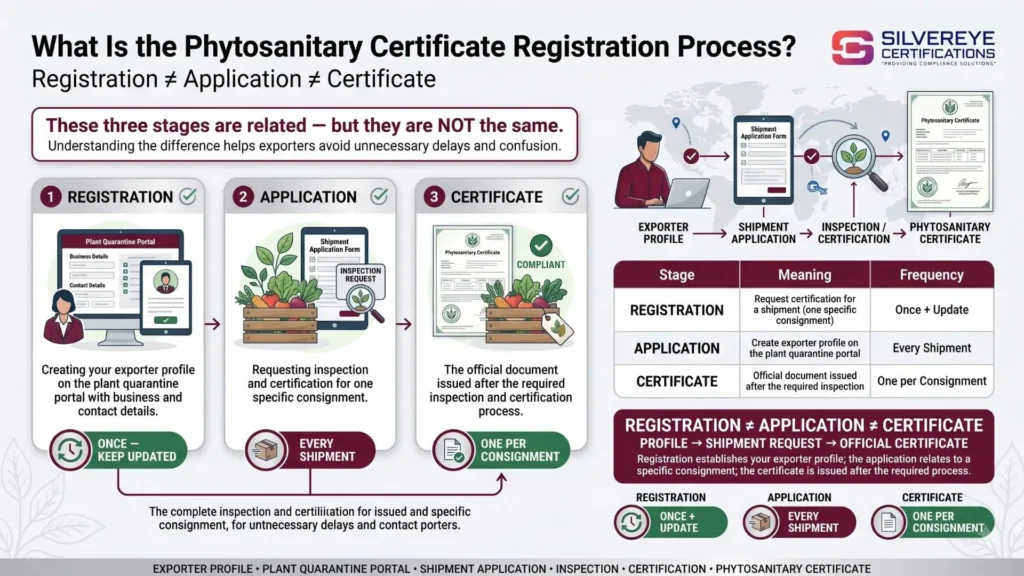
The term Phytosanitary Certificate online registration is commonly used in two ways: creating an exporter account on the government portal and submitting an application for a certificate for an individual consignment. Understanding the difference helps new exporters avoid confusion during the application process.
Portal registration involves creating an exporter login on the Plant Quarantine Information System (PQIS). You provide the required business details and a working email address and mobile number. The portal's registration process may send your user ID or other account information to your registered email address.
Certificate application takes place after registration. You log in to the portal and submit a separate application for each consignment that requires phytosanitary certification.
A Phytosanitary Certificate is an official document confirming that a consignment meets the applicable plant health requirements of the importing country. India issues these certificates under the framework of the International Plant Protection Convention (IPPC) through the plant quarantine system administered by the Directorate of Plant Protection, Quarantine and Storage (DPPQS), under the Ministry of Agriculture and Farmers Welfare.
So, can you apply for a Phytosanitary Certificate online? Yes, online application facilities are available. However, online submission does not eliminate physical inspection, sampling, treatment or other checks when these are required for the consignment.
Who Needs to Register? Eligibility for an Online Phytosanitary Certificate Application
Exporters shipping plants, plant products or other regulated articles may need to complete Phytosanitary Certificate online registration and apply for a certificate when the importing country's regulations require one. The exact requirements depend on the commodity, its processing level and the destination country's plant health rules.
Before booking a shipment, check the destination country's requirements and ask your buyer for the relevant import permit or written confirmation of the applicable phytosanitary conditions, where necessary.
| Exporter Type | Why a Certificate May Be Required |
|---|---|
| Fresh fruit and vegetable exporters | Shipments may require inspection to verify compliance with destination-country pest requirements. |
| Grain, pulse and stored-product exporters | Certain consignments may require pest-related checks or treatment, depending on the importing country's conditions. |
| Spice, tea and coffee exporters | Phytosanitary documentation may be required depending on the commodity, processing and destination. |
| Seed and planting material exporters | These products may be subject to import permits, specific declarations and additional plant health checks. |
| Cut flower and nursery exporters | Live plants and plant materials may face specific inspection and pest-control requirements. |
| Wood, cotton and other plant-material exporters | Requirements depend on the material, its processing and the importing country's regulations. |
| Re-exporters | Eligible consignments previously imported and subsequently exported may require a Re-export Phytosanitary Certificate, depending on the applicable rules. |
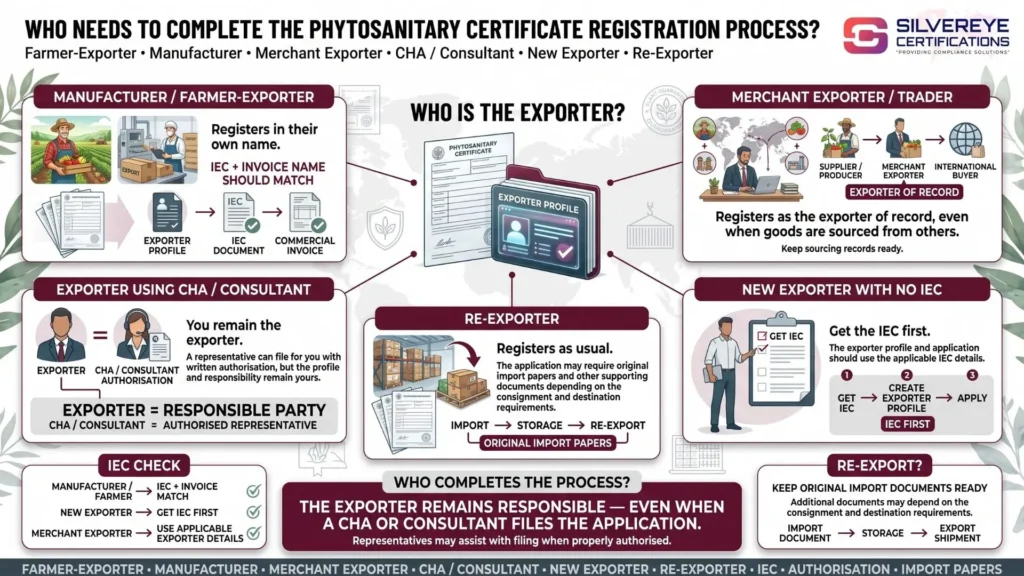
Not every plant-derived product requires a Phytosanitary Certificate. Heavily processed products, such as certain pickled, frozen or preserved foods, may fall outside phytosanitary requirements. However, this depends on the product and destination country. Other documents, including food safety or health certificates, may still be required.
Benefits of Completing Phytosanitary Certificate Online Registration
Completing your exporter registration and understanding the online application process can make shipment preparation easier. The available features depend on the current government portal and the services enabled for your account.
| Benefit | What It Means for You |
|---|---|
| Online application | Submit applications through the designated government platform without relying solely on paper-based filing. |
| Draft management | Save and resume an application if the portal provides this functionality. |
| Fee visibility | Review applicable charges through the authorised payment process before making a payment. |
| Application reference | Keep the application number or acknowledgement for future follow-ups. |
| Status tracking | Use the available application-status facility to check progress. |
| Email and SMS updates | Receive notifications where these services are supported and enabled. |
| Organised records | Keep application references, submitted documents and available certificate records organised under your account. |
For exporters managing multiple consignments, maintaining accurate account details and organised shipment records can simplify follow-ups and help prevent avoidable documentation errors.
Before You Start: Phytosanitary Certificate Online Registration Checklist
Most delays during Phytosanitary Certificate online registration can be avoided by preparing the required business details and shipment documents in advance. Before opening the registration page, check the following information.
| Check | Why It Matters |
|---|---|
| Destination country's plant health requirements | Some countries require additional declarations, treatments or import permits. |
| Botanical name of the product | Accurate commodity identification helps the authorities assess the applicable requirements. |
| Valid IEC and business details | Keep your Importer Exporter Code (IEC) and business information ready for registration and application. |
| Working email and mobile number | These details may be used for account verification and application communications. |
| Invoice and packing list | Product descriptions, quantities and consignee details should match the application and supporting documents. |
| Inspection location and schedule | The consignment must be available for inspection according to the instructions of the relevant Plant Quarantine Station. |
| Treatment arrangements, if required | Fumigation or another prescribed treatment may need to be completed before certification. |
Step-by-Step: How to Complete Phytosanitary Certificate Online Registration
India's current government platform is the Plant Quarantine Management System (PQMS), which provides exporter registration and online Phytosanitary Certificate application facilities. Exporters can also access the relevant application service through the National Single Window System (NSWS).
The general process is outlined below. Portal labels and procedures may change, so follow the instructions displayed on the official website.
- Open the official portal. Visit the PQMS registration page and confirm that you are using the government website.
- Enter your exporter details. Select the appropriate client and document types, enter your IEC and complete the requested business, address and contact information.
- Verify your registration details. Follow the portal's verification steps, including email OTP verification where prompted. Complete the required fields for login credentials and submit the registration form.
- Log in to your account. After registration is completed, use your credentials to access the available exporter services.
- Select the appropriate certificate application. Choose the Phytosanitary Certificate service for an eligible export consignment or the relevant re-export service where applicable.
- Complete the application form. Enter the requested exporter and consignee details, commodity name, botanical name where required, quantity, country of origin, destination and shipment information.
- Review the application and charges. Check the entered details carefully and review any applicable fees displayed through the authorised application process.
- Upload the supporting documents and submit. Attach the documents required for your commodity and destination. Save the application reference or acknowledgement for future follow-up.
- Track the application and follow inspection instructions. Check the available status facility and respond to any queries. Present the consignment for inspection or treatment when instructed by the relevant authority.
- Access the certificate after approval. If the application satisfies the applicable requirements, the issuing authority can proceed with certification according to the prescribed procedure.
The official PQMS website also provides exporter guidelines and user resources. For additional help, exporters can contact the PQMS help desk using the details published on the portal.
For more detailed information about eligibility, inspection and certificate issuance, refer to our dedicated Phytosanitary Certificate Registration Process guide.
Required Documents Phytosanitary Certificate Online Registration
The documents required for Phytosanitary Certificate online registration depend on the commodity, destination country and applicable plant quarantine conditions. The authorities may request additional documents for specific products or shipments.
| Document | Purpose |
|---|---|
| Completed online application | Provides the exporter, consignee, commodity and consignment details. |
| Commercial invoice and packing list | Supports verification of the goods, quantity and shipment information. |
| Purchase order or trade agreement | Provides supporting commercial information where required. |
| IEC and exporter registration details | Supports identification of the exporter during registration and application. |
| Destination-country import permit | May be required for seeds, planting material and other regulated commodities. |
| Fumigation or treatment certificate | Provides evidence of treatment when prescribed by the applicable requirements. |
| Shipping bill or airway bill | Links the application to shipment documentation where required. |
| Export licence or other regulatory clearance | Applies to commodities subject to additional export controls, including relevant CITES-listed species. |
| Laboratory reports or declarations | May be requested to demonstrate compliance with specific phytosanitary conditions. |
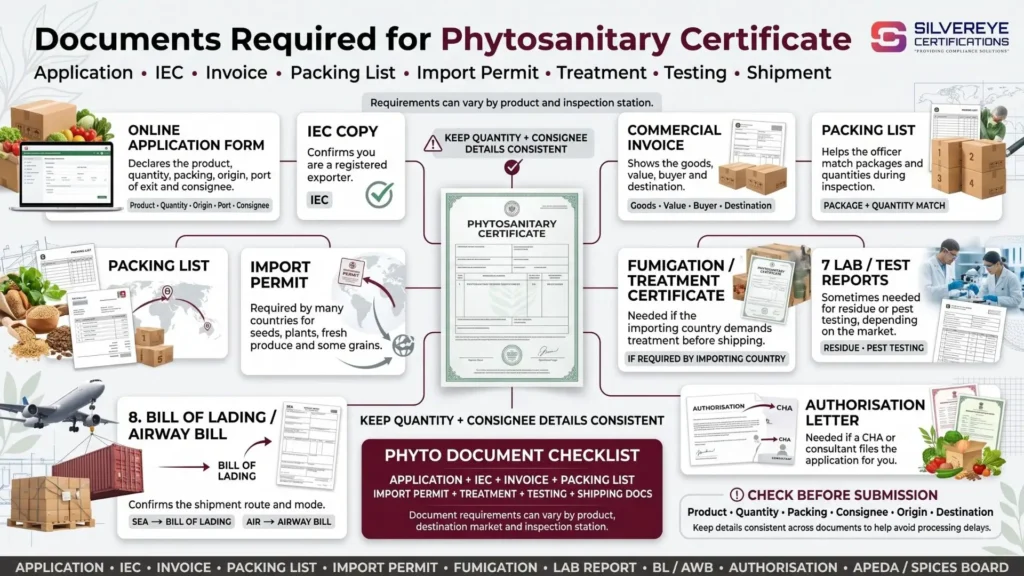
Before submitting the application, confirm the exact document list with the relevant Plant Quarantine Station and the destination country's requirements. Providing consistent information across the application, invoice, packing list and supporting certificates can help reduce avoidable queries.
Phytosanitary Certificate Online Registration Fees: What You Pay For
When completing Phytosanitary Certificate online registration, check the applicable charges through the official application process rather than relying on fixed amounts published on third-party websites. The total cost may include government assessment or inspection charges, treatment expenses and other services required for the consignment.
Additional inspection-related charges may apply when an inspection is conducted at an approved location outside the Plant Quarantine Station, subject to the applicable rules. Treatment costs, such as fumigation, are generally separate from government charges.
| Cost Item | What You Should Know |
|---|---|
| Assessment and inspection fee | Check the applicable amount through the official application process or with the issuing authority. |
| Outside inspection charges | Additional charges may apply when inspection takes place outside the station, depending on the applicable rules. |
| Treatment costs | Fumigation and other prescribed treatments may involve separate service-provider charges. |
| Rejected or cancelled application | Check the applicable refund policy before making payment, as refunds may be subject to specific conditions. |
| Professional support fee | Payable if you hire a consultant to assist with registration, documentation or application filing. |
The applicable charges may change, so confirm them before submitting your application. For a more detailed discussion of certification expenses, see our Phytosanitary Certificate Registration Fees guide.
How Long Does Phytosanitary Certificate Online Take?
The processing time for a Phytosanitary Certificate online application depends on the commodity, destination-country requirements, inspection availability and whether treatment or laboratory testing is necessary.
The following table provides broad planning estimates. These figures should not be treated as guaranteed government timelines; confirm the current processing requirements with the relevant Plant Quarantine Station.
| Type of Consignment | Indicative Planning Time |
|---|---|
| Bulbs, tubers, nursery stock and tissue-cultured material | May require around one day in straightforward cases |
| Fresh fruit, vegetables, cut flowers and similar perishable products | May require around one day, depending on inspection arrangements |
| Grains, pulses and stored products requiring fumigation | Allow additional time for treatment and inspection |
| Seeds | Processing may take several days or longer if treatment or testing is required |
| Bulk cargo linked to vessel loading | Allow sufficient time for inspection, documentation and coordination with loading schedules |
Actual processing times can vary significantly. Additional declarations, sampling, laboratory analysis, treatment and destination-specific conditions may extend the process.
Exporters should also account for document preparation, packing, treatment and transport. Applying just before the vessel cut-off is risky, particularly when the consignment requires inspection or treatment.
Phytosanitary Certificate Online Registration Validity
A Phytosanitary Certificate is issued for a particular consignment and must satisfy the importing country's applicable requirements. The period during which a certificate remains acceptable can depend on the destination country, commodity, shipment circumstances and applicable plant quarantine procedures.
Some guidance refers to short validity windows, including seven days for perishable consignments and 30 days for non-perishable consignments. However, exporters should verify these periods against the current official procedure and the importing country's requirements before relying on them.
| Consignment Type | What to Confirm |
|---|---|
| Perishable consignments | Check any time limit linked to inspection, certificate issuance and shipment. |
| Non-perishable consignments | Confirm the applicable certificate and destination-country requirements before dispatch. |
A certificate's issuance date alone does not guarantee that it will be accepted by the importing country. If a shipment is delayed, contact the issuing Plant Quarantine Station and confirm whether the existing certificate remains acceptable or further action is required.
Renewal, Amendment and Re-Issue For Phytosanitary Certificate Online Registration
Exporter account registration is generally a one-time process, subject to the portal's account requirements. A Phytosanitary Certificate, however, relates to a specific consignment and is not renewed like a long-term business licence.
| Situation | What to Do |
|---|---|
| Exporting another shipment of the same product | Submit a fresh application for the new consignment. |
| Certificate no longer acceptable for the planned shipment | Contact the issuing authority to confirm whether a new application or other action is required. |
| Error in the issued certificate | Ask the issuing authority about the applicable correction or amendment procedure. |
| Shipment quantity or details change after issuance | Contact the issuing station to determine whether an amendment or a new certificate is needed. |
| Exporter account details change | Update the registered details through the available portal procedure to maintain account access. |
Do not reuse a certificate issued for an earlier shipment without confirming that it is valid and acceptable for the current consignment.
Common Phytosanitary Certificate Online Registration Mistakes That Cause Delays
Errors in the application, inconsistent documents and incomplete preparation can lead to queries or delays. Review the following points before submitting your application.
| Common Mistake | How to Avoid It |
|---|---|
| Application details do not match the invoice or shipping documents | Cross-check names, quantities, dates and consignee details before submission. |
| Incorrect certificate type | Choose the export or re-export application according to the shipment's circumstances. |
| Missing destination-country requirements | Confirm import permits, additional declarations and treatment conditions before applying. |
| Treatment is delayed or undocumented | Arrange required treatment in advance and retain the relevant records. |
| Goods are not ready for inspection | Pack and organise the consignment so it can be inspected as instructed. |
| Commodity is restricted or outside the applicable requirements | Confirm export eligibility and phytosanitary requirements before shipment planning. |
| Application timing is poorly planned | Allow sufficient time for inspection, treatment, queries and vessel scheduling. |
A final review of the application and supporting documents can help reduce avoidable errors and shipment delays.
Why Choose Silvereye Certifications For Phytosanitary Certificate Online Registration?
Phytosanitary Certificate registration involves more than submitting an online application. Exporters must prepare accurate shipment details, check destination-country requirements and coordinate any necessary inspection or treatment. Silvereye Certifications helps simplify the process with practical compliance and documentation support.
- Registration Assistance: Get guidance on exporter account registration and navigating the official plant quarantine portal.
- Destination Requirement Checks: Understand the applicable phytosanitary requirements for your product and destination country.
- Document Preparation: Organise application details and supporting documents to help reduce errors and avoidable queries.
- Application Support: Get assistance with completing and reviewing your application before submission.
- Inspection Coordination: Understand the applicable inspection, sampling and treatment requirements for your consignment.
- Shipment-Focused Guidance: Plan the documentation process around your expected shipping date to help minimise avoidable delays.
Whether you are a first-time exporter or regularly ship agricultural products, Silvereye Certifications can help you navigate Phytosanitary Certificate online registration with greater clarity and confidence.
Get Phytosanitary Certificate Online Registration Support from Silvereye Certifications
Need help with Phytosanitary Certificate online registration? Silvereye Certifications assists exporters with account registration, destination-country requirement checks, application preparation and supporting documentation. Our team helps you understand the applicable process, organise the required paperwork and prepare for inspection requirements to minimise avoidable delays.
Share your product details, destination country and expected shipping date with Silvereye Certifications to discuss your requirements and plan the next steps for your Phytosanitary Certificate application.