

For most importers and exporters, the documents required for ICEGATE registration include an IEC, GSTIN details, PAN, an authorization letter, and a Digital Signature Certificate (DSC), depending on the registration type.
- Customs brokers, shipping lines, custodians, and other trade partners must provide additional role-specific documents as applicable to their registration category.
- Ensure that the name and PAN details match the relevant records, including PAN, IEC, GSTIN, DSC, and the authorization letter, wherever applicable. Mismatches can delay the ICEGATE registration process.
- ICEGATE registration is free of charge. However, you may incur costs for obtaining a Digital Signature Certificate (DSC) if you do not already have one.
Introduction
The documents required for ICEGATE registration depend on your role. Importers and exporters generally need an active Importer Exporter Code (IEC), the relevant GSTIN details, the entity's PAN, an authorization letter naming the person who will operate the account, and that person's Digital Signature Certificate (DSC). Companies and firms should also keep the applicable business and authorization documents ready, while customs brokers must provide their license and relevant F-card/G-card details, as applicable.

Upload clear, self-attested colour scans in PDF or JPEG format and ensure that the names and details match across the relevant records to help avoid rejection. ICEGATE registration is free of charge, so your main potential expense is obtaining a DSC if you do not already have one. This guide explains each document requirement, who must sign the authorization letter, and how to avoid common registration errors.
Documents Required for ICEGATE Registration
This table lists the documents required for ICEGATE registration, who may need each document, and the common mistakes to avoid. Your exact document set depends on your registration role and category, which the next section explains.
| Document | What it proves | Who needs it | What to check |
|---|---|---|---|
| IEC (Importer Exporter Code) certificate | Authorisation to import or export | Importers and exporters; certain authorised users under an IEC | The IEC must be valid and up to date |
| GSTIN details | GST registration and tax identity | Applicants whose registration route requires GSTIN verification | Ensure the GSTIN is correctly linked to the IEC, where applicable |
| PAN of the entity | Identity and verification of the business | Business entities, as applicable to their registration category | Ensure the entity name matches the relevant PAN records |
| Authorisation letter | Authorises a person to operate the account on behalf of the organisation | Applicants registering through an authorised representative or child-user process | Use the appropriate format, letterhead and authorised signatures |
| DSC of the authorised person | Digital authentication and signing | Users required to register a DSC for their registration category | The DSC must belong to the relevant user and be valid |
| Business registration proof | Establishes the legal identity of the entity | Companies, LLPs and partnerships, where required | Keep the applicable incorporation certificate, LLP agreement or partnership deed ready |
| Customs broker licence and F-card/G-card details | Establishes the broker's or employee's relevant status | Customs brokers and their eligible employees | Ensure the licence and card details are valid and current |
| Entity approval or licence | Establishes eligibility for the relevant trade-partner category | Shipping lines, shipping agents, custodians and similar users, as applicable | Keep the relevant licence, approval letter or notification ready |
| Mobile number and email address | Supports OTP verification and account communication | All applicants | Use the contact details registered with GSTN and, for importers/exporters, DGFT, as applicable |
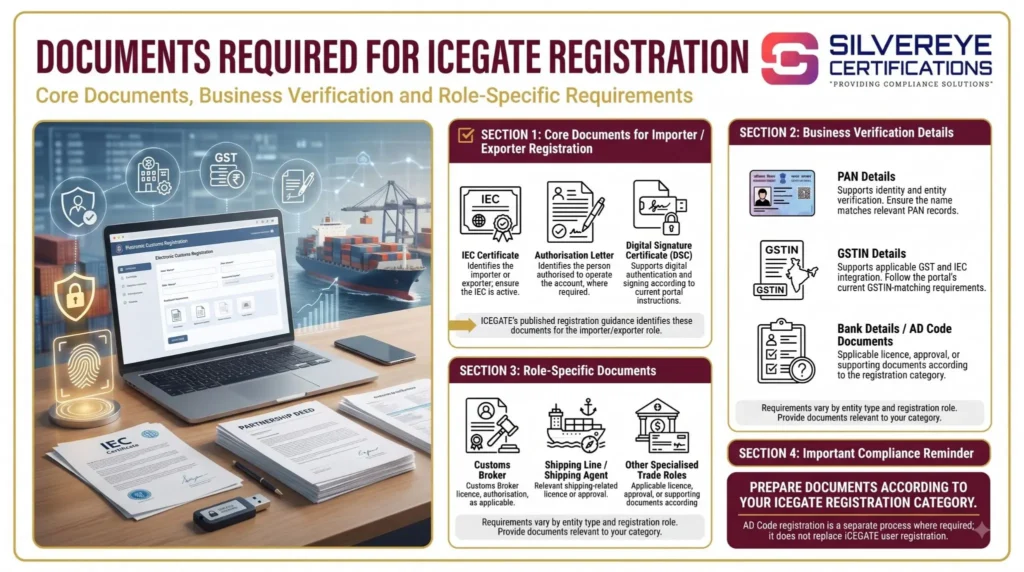
Not every item in the documents required for ICEGATE registration is uploaded as a document. For example, your mobile number and email address are verified during registration. Make sure the relevant contact details are up to date with GSTN and DGFT, as applicable, before you apply.
Role-Wise Documents Required for ICEGATE Registration
ICEGATE publishes registration guidance for different user categories. The table below summarizes the key documents and details to prepare. Requirements can vary by role and registration route, so check the latest official ICEGATE checklist before submitting your application.
| Role | Entity-level document or details | Authorised-user documents or details |
|---|---|---|
| Importer / Exporter (IEC holder) | IEC certificate and applicable GSTIN details | PAN, Aadhaar, DSC and authorisation documents, as required by the registration route |
| IEC authorised person (child user) | IEC details of the parent user | Authorisation letter and identity/DSC requirements applicable to the child-user process |
| Customs Broker (F-card holder) | Customs broker licence details | F-card details, DSC and applicable authorisation documents |
| Customs Broker employee (G-card holder) | Customs broker firm's details and parent-user approval | G-card details, DSC and applicable authorisation documents |
| Shipping line | Shipping line licence or other applicable commercial credentials | PAN, DSC and authorisation documents, as required |
| Shipping agent | Applicable agency licence or credentials | PAN, DSC and authorisation documents, as required |
| Custodian | Relevant customs approval, notification or licence | PAN, DSC and authorisation documents, as required |
| Other trade partners (console agents, freight forwarders, NVOCCs and similar users) | Applicable registration certificate, licence or approval | Documents required for the specific user category |
| Participating Government Agency (PGA) user | Applicable government-agency credentials | Identity and DSC requirements specified for the relevant registration route |
For ICEGATE registration, identify the correct parent user and authorised signatory before preparing the authorisation letter. Parent users may create and manage child-user registrations where the relevant ICEGATE process permits it. Customs broker employees, including G-card holders, must follow the applicable parent-user approval process.
Documents Required for ICEGATE Registration by Business Type
Your business type determines which documents you need for ICEGATE registration. Use this table to identify the documents to keep ready for your applicant category. Exact requirements may vary by registration route.
| Applicant type | Documents to keep ready |
|---|---|
| Proprietor registering personally | IEC, applicable GSTIN details, PAN and the proprietor's DSC. An authorization letter must be provided in the prescribed format and signed by the proprietor where required. |
| Partnership firm | IEC, applicable GSTIN details, PAN, partnership deed where applicable, authorisation letter signed by all partners, and the authorised person's DSC. |
| LLP | IEC, applicable GSTIN details, PAN, LLP agreement or incorporation proof where required, authorisation letter signed by all designated partners or as specified in the official instructions, and the authorised person's DSC. |
| Private or public limited company | IEC, applicable GSTIN details, PAN, certificate of incorporation, authorisation letter on company letterhead, and the authorised person's DSC. The letter must be signed by the required directors or accompanied by the prescribed Board Resolution where applicable. |
| Employee acting for an IEC holder | IEC details, authorisation letter from the IEC holder, the employee's applicable identity and DSC requirements, and parent-user approval for child-user registration. |
Document-by-Document Guide
Here is how to prepare the key documents required for ICEGATE registration, in the order most applicants collect them.
1. IEC Certificate
The Importer Exporter Code (IEC) issued by DGFT is a key document for ICEGATE registration by importers and exporters.
Before starting your application:
- Confirm that your IEC is active and the entity details are up to date.
- Check the legal name and PAN against the relevant records.
- Review your registered business details and correct any errors through DGFT before proceeding.
DGFT requires IEC holders to complete the prescribed annual online IEC confirmation or update process during the applicable period. Check the latest DGFT instructions for the current year's deadline.
2. GSTIN
GSTIN details are used for tax identity and verification where applicable to your registration category.
- Check that your GSTIN is active and the relevant business details are correct.
- Verify the IEC–GSTIN mapping, where required.
- If the portal cannot match your records, consult the official GSTN integration and IEC–GSTIN mapping instructions before submitting the application.
You can find the relevant guidance on the official ICEGATE Registration page.
3. PAN
The PAN details entered during ICEGATE registration must correspond to the relevant entity and registration records.
Before applying, check that:
- The PAN belongs to the correct entity or applicant.
- The legal name matches the relevant PAN and IEC records.
- You have not entered a trading name where the form requires the legal name.
Even small discrepancies can lead to verification problems or delays.
4. Authorization Letter
An authorisation letter identifies the person authorised to operate the ICEGATE account on behalf of the entity. This is an important document to prepare correctly.
For the signature requirements, follow the official ICEGATE instructions for your business type. The registration manual specifies the following arrangements:
- Proprietorship: Signed by the proprietor.
- Partnership firm: Signed by all partners.
- Company or LLP: Signed by a majority of the directors or designated partners, as applicable, or by a company secretary referring to and enclosing the relevant Board Resolution.
Use this practical checklist when preparing the letter:
| Element | What to include |
|---|---|
| Letterhead | Company or firm letterhead, where applicable, with the registered address |
| Entity details | Legal name, IEC number, PAN and GSTIN, where applicable |
| Authorised person | Full name, designation and the identity or contact details requested in the prescribed format |
| Purpose | Authority to register and operate the ICEGATE account and perform the permitted customs-related activities |
| Signatures | Signatures required under the applicable ICEGATE instructions, with names and designations |
| Date | Date of signing and any other details required by the prescribed format |
| Supporting resolution | Board Resolution, where required for the applicable signing arrangement |
5. Digital Signature Certificate (DSC)
A Digital Signature Certificate (DSC) is used for digital authentication and signing. ICEGATE's registration instructions specify DSC requirements for the relevant user categories.
Before starting the registration process:
- Check the required DSC type and class in the latest official instructions.
- Ensure the DSC belongs to the person who will use it and is valid.
- Install the required token drivers and signer utility, where applicable.
- Test the DSC before submitting your registration form.
ICEGATE has also published guidance on simplified registration and the transition to DSC-based registration.
6. Business Registration Proof
Non-individual entities should keep their applicable business registration documents ready.
Depending on the entity type, these may include:
- Certificate of Incorporation for a company.
- LLP agreement or incorporation details for an LLP.
- Partnership deed for a partnership firm, where applicable.
- Other business or entity documents specifically requested by ICEGATE.
Upload the complete, readable document whenever it is required, including the relevant pages, signatures and stamps.
7. Customs Broker and Other Role-Specific Documents
Some ICEGATE users must provide additional documents based on their professional role.
- Customs brokers: Customs broker licence details, F-card details and the applicable DSC and authorisation documents.
- Customs broker employees: G-card details and the parent user's approval for child-user registration.
- Shipping lines and shipping agents: Relevant licence or customs approval documents.
- Custodians and other trade partners: Applicable customs approval letters, notifications, licences or registration certificates.
- Participating Government Agency (PGA) users: Documents specified for the relevant government-agency category.
8. Bank Details and AD Code Letter
Bank details and an Authorised Dealer (AD) Code letter should be considered separately from the core ICEGATE user-registration checklist.
Exporters may need to complete AD Code registration at the relevant customs location or port for applicable export procedures, including shipping-bill processing. The precise documents depend on the procedure and port requirements.
Keep the bank-issued AD Code letter and any supporting bank documents requested for that process ready. Confirm the latest requirements before submitting an AD Code registration request.
Name and Detail Consistency: Where Records Must Match
Before uploading the documents required for ICEGATE registration, review the relevant details for consistency. Incorrect or outdated information can delay verification.
| Detail | Where it appears | What to check |
|---|---|---|
| Entity legal name | IEC, GST records, PAN and business registration documents | Ensure the legal name is consistent across the relevant records |
| PAN | IEC, PAN records and ICEGATE application | Confirm that the correct entity's PAN is used |
| Authorised signatory's name | Authorisation letter, DSC and identity details | Ensure the details identify the same authorised person |
| Mobile number and email | Relevant DGFT, GSTN and ICEGATE records | Confirm that the contact details required for verification are current |
| Business address | IEC, GST records and business registration proof | Check for outdated addresses or changes that need to be updated |
How to Prepare and Upload Your Documents
Follow these steps to prepare the documents required for ICEGATE registration:
- Scan every required document clearly, capturing the complete pages, signatures and stamps.
- Use the accepted file format, such as PDF or JPG, and follow the file-size limit displayed in the applicable ICEGATE instructions.
- Name your files clearly, such as
IEC-Certificate,Authorisation-LetterandIncorporation-Certificate, to make them easier to identify. - Keep separate files where appropriate, unless the portal specifically requests a combined document.
- Review every scan to ensure it is readable, correctly oriented and not cropped.
- Self-attest documents where required by the official checklist.
- Use the Save as Draft option if available and keep your Reference ID safe. Check its validity period and complete the application before it expires.
For the step-by-step application process, see our ICEGATE Registration Process guide.
Cost, Validity and Renewal of the Documents
ICEGATE registration does not carry a registration fee. However, you may incur costs for obtaining a Digital Signature Certificate (DSC), applying for an IEC, or using optional professional assistance. The following table summarises the potential costs.
| Item | Who charges | Cost |
|---|---|---|
| ICEGATE registration and document upload | ICEGATE | Nil for registration |
| DSC and USB token | Licensed Certifying Authority or provider | Varies by provider and validity period |
| IEC application, if you do not have one | DGFT | As per the current DGFT fee schedule |
| Authorisation letter | Your business | No government fee; prepared on your letterhead where applicable |
| Optional documentation assistance | Service provider | Varies by scope; request a written quotation |
Validity of Documents Required for ICEGATE Registration
Not all documents have the same validity period. Some require periodic updates, while others remain usable until they expire or the underlying details change.
| Document | Validity or update requirement | What to remember |
|---|---|---|
| IEC | No fixed expiry date, but annual confirmation or updating is required | Failure to complete the prescribed annual update can result in deactivation |
| GSTIN | Valid while the GST registration remains active | Cancellation or suspension may affect related verification |
| DSC | As specified in the certificate, commonly one, two or three years | Renew before expiry to continue digitally signing new documents |
| Authorisation letter | Depends on the applicable requirements and whether the details remain current | Issue a fresh letter when the authorised person or relevant entity details change |
| Customs broker, shipping or custodian approvals | As specified in the relevant licence or approval | Monitor expiry dates and maintain current documents |
Keep a dated record of document validity and renewal deadlines so your ICEGATE account and subsequent customs filings are not disrupted unexpectedly.
What to Renew or Update and When
| Document or detail | When to update | How |
|---|---|---|
| DSC | Before the certificate expires | Renew through a licensed Certifying Authority and register or update the DSC on ICEGATE, as applicable |
| IEC details | During the prescribed annual update period, generally April to June | Complete the annual update through the DGFT portal |
| Authorisation letter | When the authorised person or relevant entity details change | Issue a fresh letter with the required signatures and update the relevant ICEGATE details |
| Mobile number and email | When the registered contact details change | Update the relevant records through the applicable DGFT, GSTN and ICEGATE procedures |
How Long Does It Take to Collect These Documents?
Plan your timeline around the document that takes the longest to obtain. The following estimates are indicative planning estimates, not official ICEGATE processing timelines.
| Document | Typical preparation time | Dependency |
|---|---|---|
| IEC, if already held | Same day, if the details are current | Downloading or checking the existing IEC and correcting outdated details, if needed |
| GSTIN and PAN details | Same day, if records are available and correct | Existing registration and tax records |
| Authorisation letter | Same day to two working days | Preparing the letter and obtaining the required signatures |
| DSC | A few working days may be needed | Identity verification, issuance and delivery by the provider |
| Customs approvals or licences | Depends on the applicable process | Existing approval or the relevant customs authority's processing time |
Start by checking your IEC and GSTIN details, then arrange the authorisation letter and DSC as required for your registration category. Submit your ICEGATE registration only after the required documents are ready.
The actual timeline depends on your circumstances. A DSC may take longer than preparing existing business records, while new licences or approvals can require additional processing.
Mistakes That Get ICEGATE Registration Documents Rejected
Even when you have all the required documents, incorrect details or incomplete uploads can delay your ICEGATE registration.
| Common mistake | Possible result | How to fix it |
|---|---|---|
| IEC is inactive or not updated | Verification failure or delay | Complete the required update or contact DGFT if the IEC is deactivated |
| PAN or legal-name mismatch | Application query or rejection | Correct the source record before applying again |
| Incomplete or incorrectly signed authorisation letter | Application query or rejection | Follow the applicable signing requirements and upload the correctly signed letter |
| Authorisation letter signed by the wrong persons | Application query or rejection | Check the official requirements for your business type |
| DSC is expired or does not belong to the authorised person | Digital authentication failure | Use a valid DSC that meets the applicable registration requirements |
| Scans are blurred, cropped or incomplete | Document verification delay | Upload clear, complete and readable scans |
| Outdated mobile number or email address | OTP or verification problems | Update the relevant registered contact details |
| Incorrect registration role selected | Wrong document requirements or processing delays | Select the role that matches your business activity |
If your ICEGATE registration is rejected, check the registered email address for the rejection reason and follow the instructions provided. Correct the issue in the relevant source record or document before submitting a fresh or corrected application, as directed by ICEGATE.
Why Choose Silvereye Certifications for ICEGATE Registration?
Preparing the documents required for ICEGATE registration can be challenging when you are unsure about role-specific requirements, authorization letters or DSC setup. Silvereye Certifications helps businesses understand the applicable documentation requirements and prepare for the registration process.
- Document Checklist Assistance: Identify the documents relevant to your business type and registration category.
- Authorisation Letter Guidance: Understand the information and signatures required for your authorisation letter.
- Document Verification Support: Review names, PAN details and other relevant records to help identify inconsistencies before submission.
- DSC Guidance: Understand the applicable Digital Signature Certificate requirements and registration steps.
- Registration Process Assistance: Get guidance on the application process, document uploads and addressing common registration issues.
With practical documentation support, Silvereye Certifications helps importers, exporters and other eligible trade partners prepare for ICEGATE registration with greater confidence. Requirements depend on your registration category, and final approval remains subject to ICEGATE's verification.
Conclusion
Preparing the documents required for ICEGATE registration in advance can help reduce errors, avoid unnecessary delays and make the application process smoother. Start by checking your IEC, PAN and applicable GSTIN details, then prepare the required authorization letter, DSC and any business-specific licenses or approvals.
Before submitting your application, ensure that your documents are current, readable and consistent with the relevant records. Also, distinguish between documents needed for ICEGATE registration and additional requirements, such as AD Code registration, that may apply to subsequent export procedures.
If you need help understanding the documentation requirements for your business type, Silvereye Certifications can guide you through the preparation process so you can approach your ICEGATE registration with greater clarity and confidence.
Frequently Asked Questions
What documents are required for ICEGATE registration?
For ICEGATE registration, importers and exporters need: IEC, GSTIN details, PAN, an authorization letter and the authorized person's DSC. Other roles add their license, F or G card, or customs approval.
Is an authorization letter among the documents required for ICEGATE registration?
It is needed when someone other than the individual IEC holder will operate the account, and companies and firms generally need it. Use the portal's checklist for your role.
Who should sign the authorization letter for ICEGATE registration?
For companies, the official advisory says all directors or a majority of directors should sign. Firms use partners, and proprietors sign personally.
Do I need a DSC for ICEGATE registration?
The ICEGATE registration checklist lists a DSC for the authorised person. A limited simplified route without DSC has been described, but it is not for filing customs documents.
Which DSC class should I buy for ICEGATE registration?
Practitioners advise a Class 3 DSC with signing capability from a licensed Certifying Authority, in the signatory's name.
Is GST registration required for ICEGATE registration?
GSTIN is a mandatory field in role registration and must be linked to your IEC.
What file format should I use for the documents required for ICEGATE registration?
PDF or JPEG, as the portal prompts. Check the size limit shown on the upload screen.
Can an employee complete ICEGATE registration using my IEC?
Yes. Register as a child user or authorized person with a copy of the IEC and an authorization letter from the IEC holder. The parent user approves.
What are the documents required for ICEGATE registration for customs brokers?
The customs broker license or F card details, authorization letter and DSC. Employees use G card details.
Do shipping lines and custodians need different documents for ICEGATE registration?
Yes. They upload a licence or customs approval letter along with an authorisation letter and DSC.
Why was my ICEGATE registration rejected?
Common causes are an inactive IEC, name or PAN mismatches, unsigned letters, unclear scans or an invalid DSC. The reason is emailed to you.
How much do the documents required for ICEGATE registration cost?
The portal charges nothing for ICEGATE registration. You pay for the DSC, and for an IEC if you do not already have one.
Do the documents required for ICEGATE registration expire?
The IEC needs an annual update from April to June, the DSC expires as purchased, and GSTIN stays valid while active. Replace the authorisation letter when details change.
Where do I find the official list of documents required for ICEGATE registration?
In the registration section of icegate.gov.in, which publishes role-wise ICEGATE registration requirements. Check it on the day you apply.