

- Free ICEGATE Registration: Registration through the official ICEGATE portal does not have a government registration fee. However, you may incur costs for a Class 3 Digital Signature Certificate (DSC), where required, and professional assistance if you hire a consultant.
- Required Details and Documents: Keep your valid IEC, applicable GSTIN details, PAN, registered mobile number and email address, authorised signatory details, DSC, and authorisation letter ready. Exact document requirements depend on your registration type.
- Approval and Verification: Processing may be quicker when your IEC, GSTIN, PAN, business name and contact details match across the relevant records. Approval is subject to ICEGATE verification, so processing time is not guaranteed.
- Purpose of ICEGATE Registration: Your approved ICEGATE ID allows you to access relevant customs services, including electronic filing of Shipping Bills and Bills of Entry, tracking submitted documents and paying customs duties online. The services available depend on your registered user role.
Introduction
ICEGATE registration is the process of creating an account on the official Indian Customs portal, ICEGATE, operated by the Central Board of Indirect Taxes and Customs (CBIC). The portal enables registered users to access customs services, including electronic filing of Bills of Entry and Shipping Bills, online customs duty payments and shipment clearance tracking.
To register, importers and exporters generally need a valid Import Export Code (IEC), applicable GSTIN and business details, and the required authorization and Digital Signature Certificate (DSC), depending on their user category and registration type. The portal does not charge a registration fee, although obtaining a DSC or hiring a consultant may involve additional costs.

Registration processing depends on document verification and the consistency of details across ICEGATE, DGFT and GST records. Below, we explain ICEGATE registration eligibility, required documents, the online application process, fees, validity and renewal requirements for 2026.
What Is ICEGATE Registration?
ICEGATE (Indian Customs Electronic Gateway) is the online customs portal operated by the Central Board of Indirect Taxes and Customs (CBIC). It connects importers, exporters, customs brokers, shipping lines and other trade partners with Indian Customs.
ICEGATE registration means creating a user account on the portal and registering the appropriate business role. This allows users to access customs services according to their registration permissions.
Once registration is approved, the user receives an ICEGATE ID, which can be used to access applicable online services, file customs documents, make electronic payments and track document status.
Who Needs ICEGATE Registration?
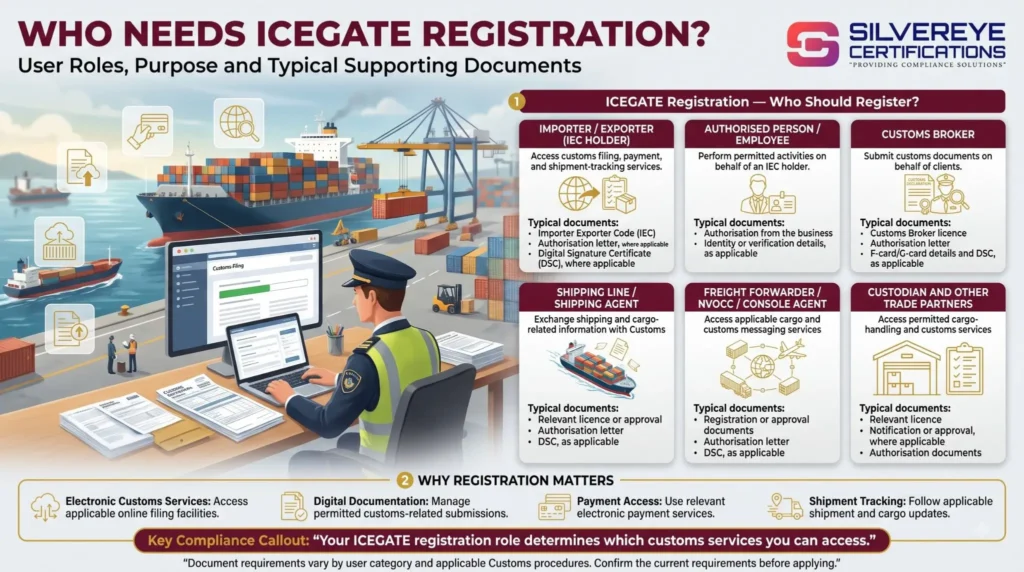
ICEGATE registration is relevant to businesses and authorized intermediaries that need to access Indian Customs' electronic services. The registration role determines which services are available to each user.
| User Role | Why They Register | Typical Supporting Documents |
|---|---|---|
| Importer / Exporter (IEC holder) | Access customs filing, payment and shipment-tracking services | IEC, authorisation letter and DSC |
| Authorised person / employee | Perform permitted activities on behalf of an IEC holder | Authorisation and identity or verification details, as applicable |
| Customs Broker | Submit customs documents on behalf of clients | Customs Broker licence, authorisation letter, F-card/G-card details and DSC, as applicable |
| Shipping Line / Shipping Agent | Exchange shipping and cargo-related information with Customs | Relevant licence or approval, authorisation letter and DSC |
| Freight Forwarder / NVOCC / Console Agent | Access applicable cargo and customs messaging services | Registration or approval documents, authorisation letter and DSC, as applicable |
| Custodian and other trade partners | Access permitted cargo-handling and customs services | Relevant licence, notification, approval or authorisation documents |
Benefits of ICEGATE Registration
Registering on ICEGATE provides access to several electronic customs services.
- Electronic customs filing: Submit applicable Bills of Entry, Shipping Bills and other customs documents online.
- Online customs duty payment: Pay customs duties and other applicable charges through supported payment facilities.
- Shipment and document tracking: Check the status of submitted documents and access available acknowledgements.
- e-Sanchit document submission: Upload supporting documents electronically where the service is applicable.
- Customs-related verification: Access supported verification and information services.
- Reduced paperwork: Complete many customs-related activities online rather than relying entirely on physical submissions.
- Access to customs-linked services: Use services available to your registered role, subject to the relevant permissions and requirements.
These services can help businesses manage customs formalities more efficiently, although registration alone does not guarantee faster clearance or approval of a customs declaration.
Eligibility for ICEGATE Registration
Eligibility depends on your user category and the customs services you intend to access. For a typical importer or exporter, check the following requirements before applying:
- Valid IEC: Importers and exporters generally need an active Importer Exporter Code issued by DGFT for IEC-holder registration.
- Correct business details: The name entered in the registration form should match the relevant PAN records.
- Registered contact details: Ensure that your email address and mobile number meet ICEGATE's verification requirements and are correctly recorded with the relevant authorities.
- Digital Signature Certificate: The current ICEGATE registration guidance requires a DSC for registration validation.
- Authorised signatory: Identify the person authorised to operate the account on behalf of the business.
- Authorisation letter: Companies, LLPs, partnerships and other non-individual entities may need an authorisation letter executed according to ICEGATE's prescribed requirements.
- GSTIN details: Keep your GSTIN and IEC details consistent wherever GSTIN integration or matching is required for your role.
Keep your IEC updated. Under DGFT's Foreign Trade Policy, IEC holders must update their IEC details electronically each year during the April–June period, even when no changes are required. Failure to complete the prescribed update can result in deactivation.
Documents Required for ICEGATE Registration
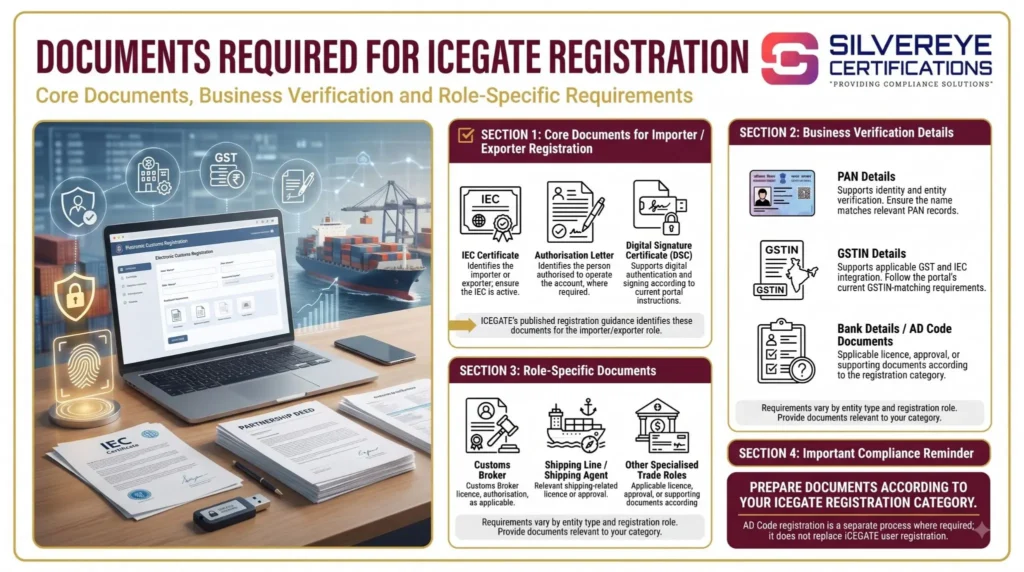
Prepare the documents relevant to your registration category before starting the application. ICEGATE's published registration guidance identifies an IEC license, authorization letter and DSC for the importer/exporter role. Other requirements vary by entity type and role.
| Document / Detail | Purpose | Important Notes |
|---|---|---|
| IEC certificate | Identifies the importer or exporter | Required for IEC-holder registration; ensure the IEC is active |
| PAN details | Supports identity and entity verification | The name should match the relevant PAN records |
| GSTIN details | Supports applicable GST and IEC integration | Follow the portal's requirements for GSTIN matching |
| Authorisation letter | Identifies the person authorised to operate the account | Must meet ICEGATE's requirements for the entity type |
| Digital Signature Certificate (DSC) | Supports digital authentication and signing | Follow current portal instructions for the accepted DSC and authorised person |
| Business constitution documents | Establishes the legal structure of the entity | Provide the relevant incorporation certificate, partnership deed or other document if required |
| Role-specific licence or approval | Establishes eligibility for specialised roles | For example, a Customs Broker licence or shipping-related approval |
| Bank details / AD Code documents | Supports applicable export-related customs procedures | AD Code registration is a separate process where required; it is not a substitute for ICEGATE user registration |
Important Note on DSC and Document Uploads
ICEGATE's published registration FAQ states that registration is paperless and requires a DSC and Aadhaar-based validation. Applicants should check the current portal instructions for the accepted DSC type, validation method and authorized-person requirements before purchasing a certificate.
The documents required can vary by registration role. Avoid uploading unnecessary documents or assuming that every importer, exporter and intermediary must submit the same checklist. Use the latest ICEGATE registration instructions as your final reference.
Before You Start: Link Your GSTIN and IEC
A common reason for ICEGATE registration errors is a mismatch between the IEC and GSTIN records or a GSTIN that has not yet been integrated with Customs.
ICEGATE provides separate utilities for these tasks:
- GSTIN Integration: Registers your GSTIN with the Customs system.
- IEC–GSTIN Mapping: Links your IEC with the relevant GSTIN in the Customs system.
If validation fails, check whether GSTIN integration and IEC–GSTIN mapping have been completed. Where necessary, complete GSTIN integration first and then map the IEC. Allow time for the updated details to reflect in the system.
Also verify that your organisation's name, PAN details, email address and mobile number match the relevant records. ICEGATE's registration guidance states that contact details should match those registered with GSTN and, for importers and exporters, DGFT.
ICEGATE Registration Process: Step by Step
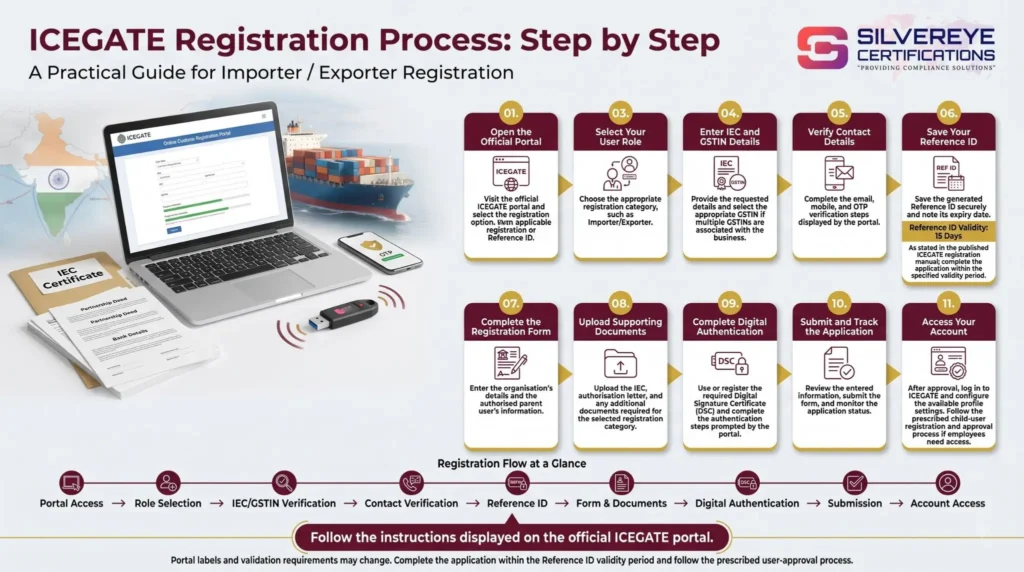
The following steps provide a general guide for importer/exporter registration. Screen labels and validation requirements may change, so follow the instructions displayed on the official ICEGATE portal.
- Open the official portal: Visit icegate portal and select the registration option.
- Start a new registration: Choose the fresh-registration option if you do not already have an applicable registration or Reference ID.
- Select your user role: Choose the appropriate category, such as Importer/Exporter.
- Enter your IEC and GSTIN details: Provide the requested information and complete the available verification steps. If multiple GSTINs are associated with your business, select the appropriate one.
- Verify your contact details: Follow the portal's instructions for email, mobile and OTP verification.
- Save your Reference ID: If the portal generates a Reference ID, save it securely and note its expiry date. The published ICEGATE registration manual states that a Reference ID is valid for 15 days, so complete the application within the specified period.
- Complete the registration form: Enter the organisation's details and the authorised parent user's information.
- Upload supporting documents: Submit the IEC, authorisation letter and any additional documents required for your registration category.
- Complete digital authentication: Register or use the required Digital Signature Certificate (DSC) and complete the authentication steps prompted by the portal.
- Submit and track your application: Review the details, submit the form and monitor the application status.
- Access your account: After registration is approved, log in to ICEGATE and configure the available profile settings. If employees need access, follow the prescribed child-user registration and approval process.
Managing employee access: The parent user should grant access only to authorized employees and promptly disable or remove access when an employee no longer needs it.
How Long Does ICEGATE Registration Take?
ICEGATE's published registration materials do not establish a universal approval timeline for every registration category. Processing depends on the application, verification requirements and whether additional information is needed.
| Stage | What Happens | Time Consideration |
|---|---|---|
| Document preparation | Collect IEC, GSTIN, PAN details, authorisation and DSC, where required | Depends on document readiness |
| Online application | Enter details, complete verification and upload documents | Depends on the application and validation steps |
| Customs verification | The application undergoes the applicable checks | No universal approval time should be assumed |
| Account activation | Registration is approved and the user can access permitted services | Follows successful approval |
Applications may encounter delays due to incorrect business names, unintegrated GSTINs, IEC–GSTIN mapping issues, invalid contact details, incomplete documents or DSC problems.
To reduce avoidable delays, check the records before applying and respond promptly to any request for correction or additional information.
ICEGATE Registration Fees
ICEGATE does not charge a registration fee for creating a user account. However, businesses may incur costs for supporting requirements or optional professional assistance.
| Cost Item | Who Charges It | Cost Consideration |
|---|---|---|
| ICEGATE registration | ICEGATE / CBIC | No registration fee |
| IEC, if not already obtained | DGFT | Separate fee under the applicable DGFT schedule |
| Digital Signature Certificate | Licensed Certifying Authority | Varies by provider, certificate type and validity |
| USB token, if required | DSC provider or reseller | Depends on the product and provider |
| Professional assistance | Consultant or service provider | Optional; depends on the scope of work |
Before purchasing a DSC, confirm the current ICEGATE requirements for your user role. Use an authorised provider and check the total price, validity period and any token charges.
Be cautious of anyone describing a consultant's service charge as a mandatory government fee for ICEGATE registration.
ICEGATE Registration Validity
ICEGATE account registration, your IEC, GST registration and your DSC are separate. Each has its own status and maintenance requirements.
| Element | Validity or Maintenance | What to Watch |
|---|---|---|
| ICEGATE ID / user registration | Follow the current portal rules for account status and maintenance | Keep business, user and contact details updated |
| Digital Signature Certificate | As specified by the issuing Certifying Authority | Renew before expiry and update the certificate on ICEGATE where required |
| IEC | Must be updated electronically every year during the prescribed April–June period | Failure to update may result in deactivation |
| GSTIN | Depends on the status of the GST registration | Keep the registration active where required and update changed details |
| Authorised user details | Update when the authorised person or their details change | Ensure the person remains authorised to access the account |
DGFT requires IEC holders to complete the prescribed annual update, including confirming details when no changes have occurred. An IEC that is not updated within the required period may be deactivated until the required update is completed.
ICEGATE Registration Renewal and Updates
There is no general annual renewal fee specified for ICEGATE user registration in the published registration guidance. However, this does not mean that every linked credential remains valid indefinitely. Check the current portal instructions for any role-specific maintenance requirements.
| What Needs Attention | When to Act | What to Do |
|---|---|---|
| Digital Signature Certificate | Before expiry | Renew through the issuing Certifying Authority and register or update the DSC on ICEGATE as required |
| IEC details | Every year during the prescribed April–June period | Complete the annual update through DGFT |
| Authorised signatory | When the authorised person changes | Update the account and submit supporting authorisation documents as required |
| Email and mobile number | When contact details change | Update the relevant records and ICEGATE profile using the prescribed process |
| Child users | When staff join, change roles or leave | Add, modify or disable access through the available user-management functions |
| Password or login access | When credentials are forgotten or compromised | Use the official recovery process and follow the security instructions |
For additional guidance, refer to the official ICEGATE registration resources, which include instructions for registration, GSTIN integration, IEC–GSTIN mapping, DSC registration and DSC updates.
Practical tip: Keep a reminder before your DSC expires and review your IEC, GSTIN and authorised-user details periodically. This helps reduce the risk of avoidable account-access or digital-signing problems when a shipment is ready for customs filing.
Common Mistakes That Delay ICEGATE Registration
Avoid these common errors to make the registration process smoother:
- Name or PAN mismatch: Differences between the IEC, GST records and uploaded documents can trigger verification issues.
- Outdated contact details: Incorrect mobile numbers or email addresses can prevent OTP verification.
- GSTIN integration or mapping issues: An unintegrated GSTIN or incomplete IEC–GSTIN mapping may cause validation errors.
- Incorrect or invalid DSC: The DSC may not meet the current requirements or may not be registered to the authorised signatory.
- DSC technical issues: Missing drivers, an incorrectly configured signing utility or browser compatibility problems can prevent digital authentication.
- Poor-quality documents: Blurred scans, cropped pages or unsigned authorisation letters can lead to requests for correction.
- Incorrect user setup: Attempting to create duplicate parent-user registrations when the portal restricts them can cause difficulties. Follow the current ICEGATE instructions for your entity and user role.
Should You Register on ICEGATE Yourself or Hire a Consultant?
If your IEC and GST details match, your documents are ready and your DSC works correctly, self-service ICEGATE registration may be manageable. Professional assistance can be useful when you encounter repeated validation errors or need help coordinating multiple compliance requirements.
| Situation | Suggested Approach |
|---|---|
| Records match, DSC is ready and there is one authorised signatory | Apply yourself |
| IEC–GSTIN mapping problems or repeated registration rejections | Consider professional assistance |
| Multiple GSTINs, branches or child users need to be configured | Consider professional assistance |
| You need support with IEC, DSC, AD Code and ICEGATE procedures | Consider a compliance service provider |
Before hiring a consultant, clarify the scope of work, professional fees, DSC costs and whether AD Code registration assistance is included. Also confirm who will control the account after registration.
Important: Keep ownership and control of your business's ICEGATE account. Share access only with authorised individuals and never disclose passwords or sensitive authentication credentials unnecessarily.
What to Do After Your ICEGATE Registration Is Approved
Once your registration is approved, complete these checks before your first customs filing:
- Verify your account: Log in and confirm that your IEC, GSTIN and registered user role are correct.
- Complete AD Code formalities: If you export, check whether AD Code registration is required for your port and complete the applicable process before filing the relevant Shipping Bill.
- Set up authorised users: Add employees or other permitted users through the prescribed process and review their access regularly.
- Check your DSC: Confirm that your Digital Signature Certificate is valid, recognised by the portal and working correctly.
- Prepare e-Sanchit documents: Ensure supporting documents are available in the required format for electronic submission, where applicable.
- Secure your registration details: Store your Reference ID, ICEGATE ID and authorisation documents securely, with access limited to the relevant personnel.
Completing these steps helps you prepare for electronic customs filing and reduces the likelihood of avoidable delays when processing import or export shipments.
Why Choose Silvereye Certifications for ICEGATE Registration?
Navigating ICEGATE registration can be challenging when IEC details, GSTIN mapping, digital signatures or supporting documents are not in order. Silvereye Certifications helps businesses understand the registration requirements and manage the process more efficiently.
Our support can include:
- Eligibility Guidance: Understand the applicable ICEGATE registration requirements for your business and user role.
- Document Preparation: Get guidance on preparing the required documents and authorisation letters.
- IEC–GSTIN Mapping Support: Identify potential mismatches and understand the steps needed to resolve mapping or integration issues.
- DSC Assistance: Get guidance on Digital Signature Certificate requirements and registration-related technical issues.
- Registration Support: Receive assistance with the online application, submission process and application-status follow-up.
- Related Export Compliance: Get guidance on associated procedures, such as AD Code registration, where applicable.
Whether you're a first-time exporter or an established business managing regular shipments, Silvereye Certifications can help you navigate the ICEGATE registration process with greater clarity. Our goal is to simplify the documentation process and help you understand the compliance steps relevant to your business.
Conclusion: Complete Your ICEGATE Registration with Confidence
ICEGATE registration is an important step for importers, exporters and other eligible trade partners who need access to India's electronic customs services. Preparing the correct documents, checking IEC and GSTIN details, configuring your DSC and selecting the appropriate user role can help reduce common registration issues.
After approval, keep your business details updated, manage authorised-user access carefully and complete any additional formalities required for your shipments, including AD Code registration where applicable.
If you need help with documentation, registration or related export compliance procedures, Silvereye Certifications can guide you through the process. Start by reviewing your business details and registration requirements so you can prepare for customs filing with greater confidence.
Frequently Asked Questions
What is ICEGATE registration?
It is the process of creating a verified user account on the CBIC's ICEGATE portal so you can file customs documents, pay duty and track clearances online.
Is ICEGATE registration mandatory?
Yes. ICEGATE registration is required for anyone who needs to file customs documents electronically, which includes importers, exporters, customs brokers and other trade partners.
Is there any fee for ICEGATE registration?
No. The portal does not charge a registration fee. You pay only for your DSC and, if you choose, a consultant.
Which documents are needed for ICEGATE registration?
For importers and exporters: IEC, GSTIN details, PAN, an authorization letter and the authorized person's Class 3 DSC. Other roles have their own checklist on the portal.
Can I complete ICEGATE registration without a DSC?
The official role checklist lists a DSC for the authorized person, and the older DSC-free route is reported as withdrawn. Check the registration page on the day you apply.
Is GSTIN necessary for ICEGATE registration?
Yes. GSTIN is a mandatory field in ICEGATE role registration, and it must be linked to your IEC.
How long does ICEGATE registration take?
There is no published fixed timeline. Clean applications are often approved in a few working days, while mismatched data can take longer.
What is a Reference ID in ICEGATE registration?
It is a number issued after you verify IEC, GSTIN and contact details. You use it to continue the role registration form later.
How long is ICEGATE registration valid?
ICEGATE registration has no printed expiry, but your DSC, IEC (annual update) and GSTIN must stay valid for filing to work.
How do I renew ICEGATE registration?
There is no separate renewal fee. Renew your DSC before it expires, update it on your profile, and keep IEC and signatory details current.
What if my DSC is not detected during ICEGATE registration?
Check the signer utility and browser setup, make sure the token is plugged in, and confirm the DSC is valid and Class 3. The portal publishes a Java/DSC setup guide.
Can an employee complete ICEGATE registration on my behalf?
An employee can be registered as a child user under your parent ID, with your approval, or as an IEC authorised person with a valid authorisation letter.
How do I check my ICEGATE registration status?
Use the Reference ID or log in to the portal and check the registration section. You will also receive notifications on the registered email and mobile.
Is ICEGATE registration the same as IEC registration?
No. IEC comes from DGFT and authorises you to import or export. ICEGATE registration gives you access to customs e-filing. You need an IEC first.