

- Two registration paths exist: Regular SIMS (per-consignment registration) and SARAL SIMS (a single annual registration for small and export-linked importers, launched November 20, 2025).
- The process got simpler in 2025–26: Regular SIMS filing now needs only 20 fields, down from 56, and Non-QCO steel grades no longer need a separate Ministry of Steel clarification or NOC before registering.
- Instant ARN, short validity: Once submitted and digitally signed, the portal issues your Automatic Registration Number (ARN) immediately — but it's valid for only 75 days, so timing your filing matters.
- Strict advance-filing window: As per the Ministry of Steel notice effective February 20, 2026, you must register 60 days before to 2–3 days before your shipment's expected arrival.
Introduction
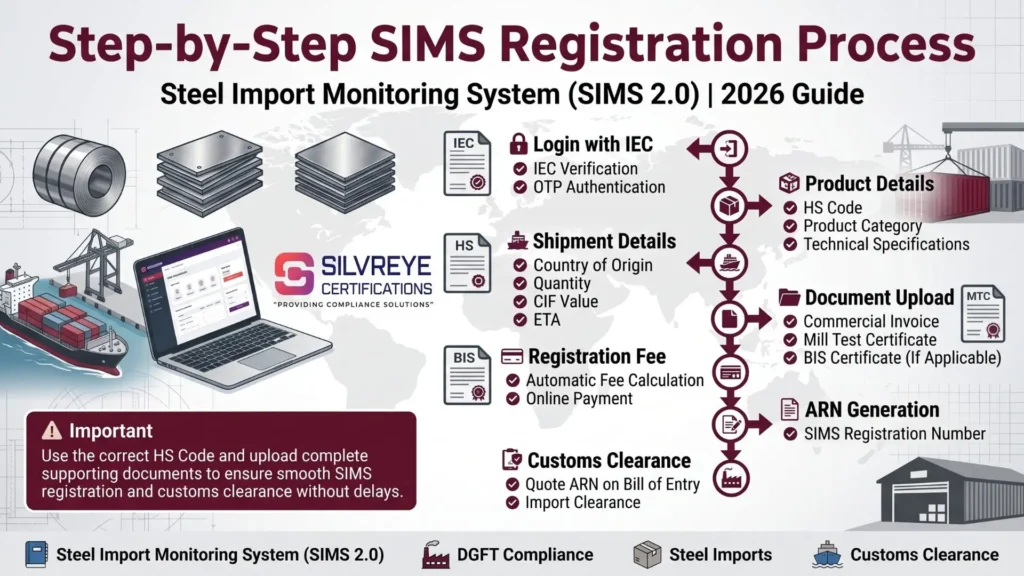
The SIMS registration process involves logging into the DGFT portal with your IEC, navigating to Services → Import Management System → Steel Import Monitoring System (SIMS), and filing a Fresh Application with your product, HS code, and shipment details.
After digitally signing the application and paying a fee starting at ₹500, the portal instantly issues an Automatic Registration Number (ARN) valid for 75 days. Since November 2025, the process has been simplified from 56 fields to just 20, and small or export-linked importers can use SARAL SIMS for a single annual registration instead of filing separately for every shipment.
What Is the SIMS Registration Process?
The SIMS registration process is the sequence of steps an importer follows on the DGFT portal to obtain an Automatic Registration Number (ARN) before bringing steel products into India. It was introduced on November 1, 2019, through DGFT Notification No. 17/2015-2020, and since July 25, 2024, the entire workflow runs on the SIMS 2.0 platform integrated with the main DGFT portal.

At its core, the process asks for three things: who you are (your IEC and business details), what you're importing (HS code, grade, quantity, value), and where it's coming from and when it's arriving (country of origin, port, and expected arrival date). Once this information is submitted, digitally signed, and the fee is paid, the system generates your registration number — this ARN is what you'll later quote on your Bill of Entry.
The two biggest process changes to know about heading into 2026 are the field simplification (56 fields down to 20) and the introduction of SARAL SIMS, a simplified annual-registration path for small and export-linked importers. Both are covered in detail below.
Before You Begin: Prerequisites for SIMS Registration
- Valid IEC (Importer Exporter Code): Your 10-digit DGFT-issued IEC is both your business identifier and your login credential for the SIMS portal.
- Digital Signature Certificate (DSC) or Aadhaar-based OTP: SIMS 2.0 requires digital authentication to sign and submit your application — keep your DSC token or Aadhaar-linked mobile/email ready.
- Active DGFT portal login: If you haven't already registered on the main DGFT website, you'll need to do that first and ensure your profile details (including designation, where applicable) are complete.
- GSTIN matching your IEC: Since IGST applies to steel imports at customs clearance, your GST details should be consistent with your IEC registration to avoid mismatches later.
- AD (Authorized Dealer) Code: Issued by your bank, this is typically needed alongside SIMS registration for the broader import and customs clearance process.
Two Ways to Register: Regular SIMS vs. SARAL SIMS
Not every importer needs to file a fresh SIMS registration for each shipment. Since November 20, 2025, the Ministry of Steel offers a second, simplified registration path — SARAL SIMS — specifically for small importers and export-linked imports.
| Aspect | Regular SIMS | SARAL SIMS |
| Who it's for | All importers, any shipment size | MSMEs/small importers and export-linked imports (Advance Authorization, SEZ, EOU) |
| Registration frequency | Per consignment | Single registration for the entire financial year |
| Quantity limit | No limit | Up to 10 MT per consignment, annual cap of 1,000 MT (temporarily 500 MT for FY 2025-26, until April 2026); no limit for export-linked imports |
| What you declare | Full shipment-level detail (20 fields) | Total intended import quantity for the year |
| Portal | Main SIMS portal via DGFT | sims.steel.gov.in/SARAL |
| Annual reporting | Not applicable | Importers must file actual import details by April 30 of the following financial year |
If your imports exceed the SARAL SIMS threshold during the year, regular SIMS registration becomes mandatory for the remainder of that financial year, and you cannot switch back to SARAL SIMS until the next financial year begins.
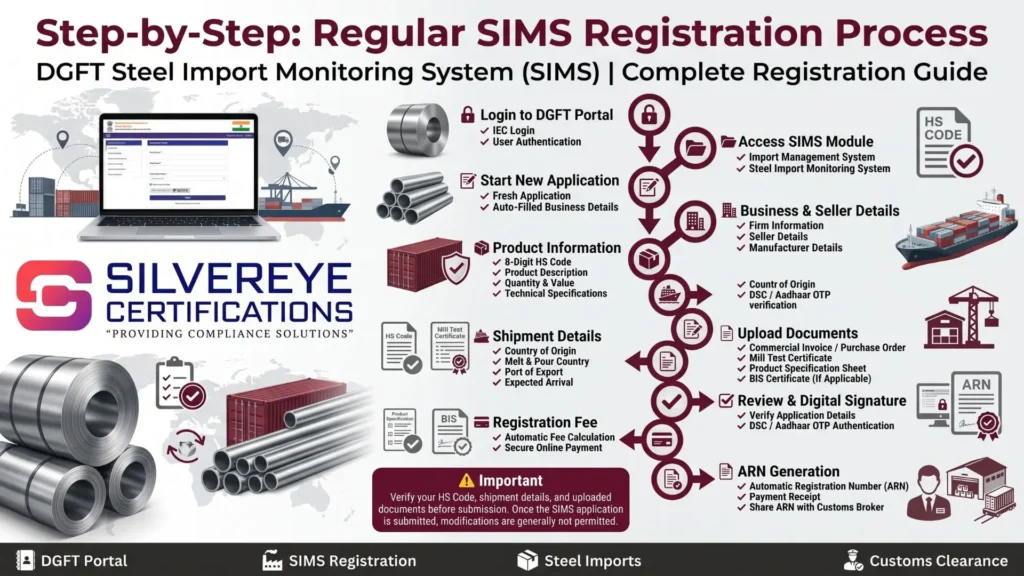
Step-by-Step: Regular SIMS Registration Process on the DGFT Portal
- Log in to the DGFT portal: Visit the DGFT website and sign in using your registered credentials linked to your IEC.
- Navigate to the SIMS module: Go to Services → Import Management System → Steel Import Monitoring System (SIMS).
- Start a fresh application: Click "Start Fresh Application." Fields like application type, trade type, and applicable public notice are typically auto-populated based on your IEC profile.
- Fill in firm details: Confirm or update your business details, then save and proceed to the next section.
- Add seller and manufacturer details: SIMS allows only one seller and one manufacturer per application, so make sure your invoice matches this structure before you start.
- Enter product and HS code details: Provide the 8-digit HS code, product description, technical specification, quantity, and declared value — the simplified SIMS 2.0 form now asks for around 20 fields instead of the earlier 56.
- Add shipment logistics: Enter country of origin, country of melt and pour, port of export, and expected date of arrival.
- Upload supporting documents: Attach your invoice or purchase order, Mill Test Certificate, product specification sheet, and BIS certificate if applicable to your product.
- Review the application summary: Check every field carefully — HS code, quantity, value, and dates — since the application cannot be edited after submission.
- Digitally sign the application: Click "Sign" and authenticate using your Digital Signature Certificate (DSC) or Aadhaar-based OTP.
- Pay the registration fee: Complete payment through the portal's payment gateway; the fee is calculated automatically based on your shipment's CIF value.
- Download your ARN and receipt: Once payment is confirmed, you'll be redirected to a confirmation page with your Automatic Registration Number (ARN). A receipt and acknowledgement email with the registration number follow automatically — save both for your records and share the ARN with your customs broker.
Step-by-Step: SARAL SIMS Registration Process
- Confirm eligibility: Check that your annual import volume fits within the SARAL SIMS thresholds, or that your imports qualify as export-linked (Advance Authorization, SEZ, or EOU route).
- Access the SARAL SIMS portal: Go to sims.steel.gov.in/SARAL and log in using your IEC credentials.
- Declare your intended annual quantity: Unlike regular SIMS, you only need to declare the total quantity of steel you plan to import for the financial year — not shipment-by-shipment detail.
- Submit and receive your SARAL SIMS number: Once submitted, the portal issues a single SARAL SIMS registration number valid for use across multiple consignments during the financial year.
- Use the same number for each shipment: Quote your SARAL SIMS number on the Bill of Entry for every qualifying consignment throughout the year — no need to re-register for each one.
- File your annual return: Submit details of your actual imports by April 30 of the following financial year, as required under the SARAL SIMS framework.
If your cumulative imports cross the SARAL SIMS quantity cap partway through the year, you'll need to switch to regular, per-consignment SIMS registration for any further shipments in that same financial year.
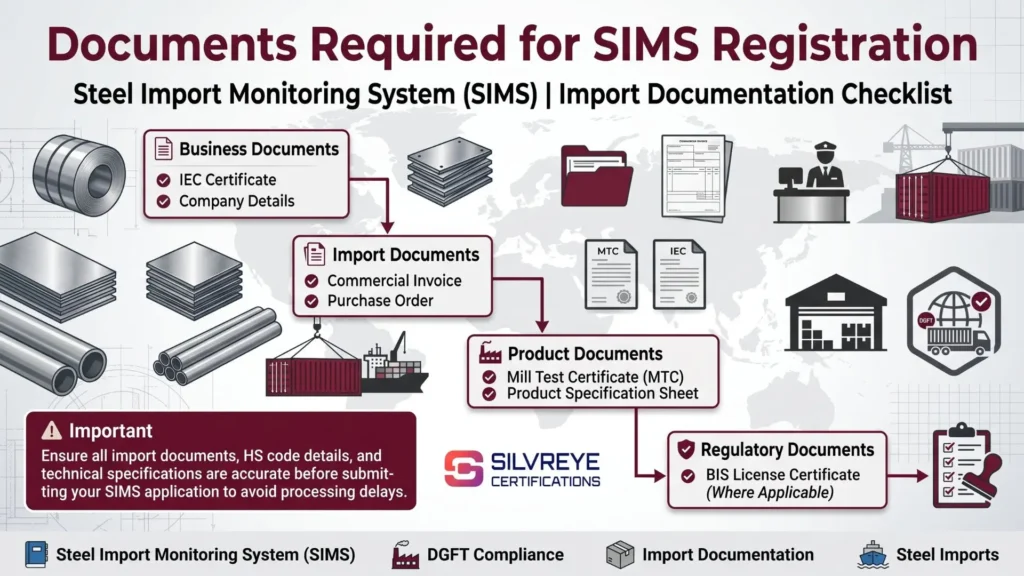
Documents Required for the SIMS Registration Process
- IEC Certificate: Your active Import Export Code — this is also your login credential.
- Digital Signature Certificate (DSC): Needed to digitally sign and submit your application (Aadhaar-based OTP authentication is also accepted under SIMS 2.0).
- Commercial Invoice or Purchase Order: Should match the seller and manufacturer details you enter — remember, only one of each is allowed per application.
- Mill Test Certificate (MTC): Confirms the technical and chemical specifications of the steel product.
- Proof of Business: Company registration document or GST certificate, where requested.
- BIS Certificate (where applicable): Required if your specific product currently falls under an active BIS Quality Control Order.
SIMS Registration Fees
| Fee Component | Detail |
| Rate | Re. 1 per ₹1,000 of the covered steel portion's CIF value |
| Minimum Fee | ₹500 per registration |
| Maximum Fee | ₹1,00,000 per registration |
| Refund Policy | Non-refundable, even if the shipment is delayed or cancelled |
| SARAL SIMS Fee | Charged on the annual registration rather than per shipment — confirm the current applicable amount on the SARAL SIMS portal at the time of filing |
Validity and Renewal Timeline
- Regular SIMS validity: The Automatic Registration Number (ARN) is valid for 75 days from the date of registration.
- SARAL SIMS validity: Valid for the full financial year in which it's issued, covering multiple consignments up to the declared quantity cap.
- No formal renewal for regular SIMS: If your ARN lapses before the shipment arrives, or if shipment details change, you need to file a fresh registration — there's no edit or extension option.
- Bill of Entry linkage: Whether you use regular SIMS or SARAL SIMS, the relevant registration number must be quoted on the Bill of Entry for customs clearance.
Advance Registration Timeline (2026 Update)
The Ministry of Steel revised the advance registration window through Notice No. S-21022/9/2025-TRADE-TAX, dated February 19, 2026, effective from February 20, 2026.
| Import Category | Registration Window |
| Imports from Nepal, Bhutan, and Sri Lanka | Not earlier than 60 days and not later than 2 days before expected arrival |
| Imports from all other countries | Not earlier than 60 days and not later than 3 days before expected arrival |
| Imports from SEZ/EOU into the domestic tariff area (OTA) | Not earlier than 60 days and not later than 2 days before expected arrival |
What's Changed in the SIMS Registration Process Recently
If you registered under SIMS a couple of years ago and are coming back to it now, a few process-level changes are worth knowing before you file:
- Fewer fields to fill: SIMS 2.0 cut the regular registration form from 56 fields down to about 20, making the application noticeably faster to complete.
- No more NOC for Non-QCO grades: Importers no longer need a separate clarification or No Objection Certificate from the Ministry of Steel for steel grades not covered by a Quality Control Order — the SIMS number can be generated directly from the portal.
- SARAL SIMS for repeat small importers: Launched on November 20, 2025, this lets qualifying MSMEs and export-linked importers register once a year instead of once per shipment.
- Unified DGFT interface: As of the Ministry of Steel's March 2026 notifications, importers are directed to use the unified DGFT portal interface for SIMS applications rather than any standalone legacy system.
Common Mistakes to Avoid During the SIMS Registration Process
- Adding more than one seller or manufacturer: The portal only accepts one of each per application — split multi-seller shipments into separate applications.
- Submitting before verifying HS code and quantity: Since applications can't be edited after submission, a small error means starting over with a fresh filing.
- Missing DSC or OTP setup: Not having your Digital Signature Certificate or Aadhaar-linked OTP access ready causes last-minute delays at the signing step.
- Registering too early or too late: Filing outside the 60-day to 2–3-day advance window (per the February 2026 notice) means your application won't be accepted or your ARN won't align with your shipment's actual arrival.
- Assuming SARAL SIMS applies without checking the cap: Exceeding the annual quantity threshold mid-year forces a switch to regular, per-consignment SIMS registration.
What Happens If You Skip or Get the Process Wrong
- Shipment hold at the port until a valid ARN or SARAL SIMS number is produced.
- Demurrage and container storage charges accumulating during the delay.
- Possible re-export or rejection of the consignment for non-compliance.
- Financial penalties for importers who bypass registration entirely or submit inaccurate shipment details.
Conclusion
The SIMS registration process has genuinely gotten easier over the past year — fewer fields, no more NOC requirement for Non-QCO grades, and a dedicated SARAL SIMS path for importers who don't want to file a fresh application for every small or export-linked shipment. That said, the fundamentals haven't changed: get your IEC, DSC, and shipment documents in order before you start, double-check every field since nothing can be edited after submission, and file within the current 60-day to 2–3-day advance window. Whether you use regular SIMS or SARAL SIMS, the goal is the same — a valid registration number in hand well before your steel shipment reaches Indian customs.
Frequently Asked Questions
How long does the SIMS registration process take?
Once you submit a correctly filled application and complete payment, the Automatic Registration Number (ARN) is generated immediately on the portal. The time-consuming part is usually gathering documents and verifying HS code details beforehand, not the submission itself.
What is the difference between SIMS and SARAL SIMS?
Regular SIMS requires a fresh registration for every consignment. SARAL SIMS, launched November 20, 2025, allows eligible small and export-linked importers to register once for the entire financial year, covering multiple shipments under one number.
Who is eligible for SARAL SIMS?
Importers bringing in small consignments (up to 10 MT per shipment, within an annual cap of 1,000 MT, temporarily 500 MT for FY 2025-26 until April 2026) and importers using the Advance Authorization, SEZ, or EOU export-linked routes, which have no quantity limit.
How many fields do I need to fill for SIMS registration now?
Regular SIMS 2.0 registration requires about 20 fields, down from the original 56 fields under the earlier version of the system.
Do I need a Digital Signature Certificate for SIMS registration?
Yes, in most cases. SIMS 2.0 requires digital authentication to sign and submit your application, either through a Digital Signature Certificate (DSC) or Aadhaar-based OTP verification linked to your IEC.
Can I add multiple sellers or manufacturers in one SIMS application?
No. The SIMS portal allows only one seller and one manufacturer per application. If your shipment involves more than one of either, you'll need separate applications.
How early should I start the SIMS registration process?
As per the Ministry of Steel notice effective February 20, 2026, registration can be filed up to 60 days before your shipment's expected arrival and must be completed at least 2–3 days before arrival, depending on the country of origin.
Can I edit a SIMS application after submitting it?
No. Once submitted, a SIMS application cannot be modified. If any detail changes, you need to submit a completely fresh registration.
Do I still need a No Objection Certificate from the Ministry of Steel to register?
Not for Non-QCO covered steel grades. That clarification/NOC requirement has been revoked, and importers can generate SIMS numbers for such grades directly from the portal.
What happens if my SARAL SIMS imports exceed the annual cap?
Once your cumulative imports cross the SARAL SIMS threshold, regular per-consignment SIMS registration becomes mandatory for the rest of that financial year, and you cannot switch back to SARAL SIMS until the next year.
Where do I get my SIMS registration number after applying?
The Automatic Registration Number (ARN) appears immediately on the portal after successful submission and payment, and a confirmation receipt plus an acknowledgement email with the registration number are sent to your registered contact details.
What should I do if I don't receive my SIMS OTP?
Check that your registered email address and mobile number in your DGFT profile are current and correctly linked to your IEC, since the OTP is sent only to these registered contacts.